When Should You Move From VPS to Cloud Hosting?

When Should You Move From VPS to Cloud Hosting?

A VPS can be an excellent step up from shared hosting. It gives a business more dedicated resources, greater control and room to run a growing website. But as traffic, applications and operational demands increase, a VPS may eventually become difficult to manage or unable to provide the flexibility your business needs.

That does not mean every business should move to cloud hosting immediately. Cloud hosting can offer useful advantages, but it may also introduce more configuration, monitoring and cost-management decisions. The right time to move depends on your website’s workload, reliability requirements, growth plans and technical support needs.

For Nigerian businesses, entrepreneurs and organisations, the decision should be practical rather than driven by technology trends. The goal is not to choose the most advanced hosting option. It is to choose an environment that keeps your website available, secure, manageable and suitable for the way your business operates.

First, understand what is changing

A VPS is a virtual server with allocated resources such as processing power, memory and storage. It is usually suitable for websites that need more control or capacity than shared hosting provides, including busy WordPress websites, online stores, business applications and websites with custom software requirements.

Cloud hosting generally runs workloads across a cloud infrastructure rather than depending on one virtual server alone. Depending on the service, resources may be adjusted more easily, and workloads may be distributed across multiple systems. However, “cloud” does not automatically mean unlimited resources, perfect availability or zero maintenance. Providers offer different architectures and management levels, so the details matter.

Signs that your VPS may no longer be enough

Your traffic has become difficult to predict

A VPS may handle a steady level of traffic well. Problems can arise when demand changes sharply—for example, during a product launch, seasonal campaign, viral social media post or important registration period.

If the server regularly approaches its CPU, memory or bandwidth limits during traffic increases, you may need a hosting setup that can scale more easily. Review server monitoring data rather than relying only on occasional slowdowns. A single busy day does not necessarily justify a migration, but repeated capacity problems deserve attention.

Brief traffic increases cause outages or severe slowness

Visitors may leave when pages take too long to load or become unavailable. For a business website, this can affect enquiries, online sales and customer confidence. A mobile-first audience may notice performance problems particularly quickly, especially when using variable mobile connections.

Before moving, check whether the problem is actually the VPS. Slow WordPress plugins, unoptimised images, poor database queries, weak caching, an overloaded email service or an insecure script can all create performance problems. Improving the website may solve the issue without changing hosting.

You need high availability for an important service

A basic company website and a customer-facing application do not always have the same availability requirements. If your website supports bookings, transactions, customer accounts or a business process that must remain available, depending on one server may create an unwanted single point of failure.

A suitable cloud design can reduce reliance on one virtual machine, but only when the application, database, storage, backups and network arrangements are designed properly. Moving a website to a cloud server without planning does not automatically create resilience.

Scaling has become slow or disruptive

On a traditional VPS, increasing capacity may involve selecting a larger plan, restarting services, adjusting configurations or migrating to another server. If this happens often, or if growth requires repeated manual intervention, a more flexible platform may be worth considering.

Cloud hosting can make it easier to increase resources or distribute workloads, depending on the provider and hosting model. The important question is whether your business actually needs that flexibility. A website with predictable traffic may gain little from complex scaling options.

Your application needs more than one server

A single VPS may be sufficient for a small website. As a system develops, you may need separate environments for the web server, database, background jobs, file storage, testing or reporting. Cloud infrastructure can make these components easier to separate and connect.

This is more common for software products, large online stores, membership platforms and organisations with several connected applications. It may be unnecessary for a standard brochure website or a modest WordPress installation.

When staying on a VPS is the better choice

Moving to cloud hosting is not automatically an upgrade. A well-managed VPS may remain the better option when:

  • Traffic is fairly predictable and the current resources are sufficient.
  • The website has no need for rapid scaling or multiple application servers.
  • Your team prefers a simpler hosting environment.
  • The cost and complexity of cloud infrastructure would not produce a meaningful business benefit.
  • The main issue is poor website optimisation rather than server capacity.

For many small businesses, a VPS offers a useful balance of performance, control and cost. This can be especially valuable when the organisation wants dependable hosting but does not want to manage a large technical environment.

A practical decision framework

Consider these five questions before planning a migration:

  1. What problem are you solving? Identify the specific issue: resource limits, unpredictable traffic, availability, deployment speed, application architecture or operational workload.
  2. How often does the problem occur? Occasional high usage may require optimisation or a temporary capacity increase. Frequent incidents may justify a different architecture.
  3. Can the current website be improved first? Review images, caching, plugins, database performance, code, backups and security. Hosting cannot compensate for every application problem.
  4. Who will manage the new environment? Cloud hosting can involve networking, access control, monitoring, backups, scaling rules and cost controls. Decide whether your team has the time and skills, or whether managed support is more appropriate.
  5. What would failure cost the business? Consider lost enquiries, interrupted sales, missed deadlines, customer frustration and reputational damage. This helps determine whether additional resilience is worth the investment.

Example: a growing WordPress business website

Imagine a Nigerian online retailer whose WordPress website receives steady daily traffic but experiences slowdowns whenever a promotion is shared widely. Before moving to cloud hosting, the owner should check image sizes, caching, database performance, plugin behaviour and the site’s current resource use.

If optimisation and a suitable VPS upgrade solve the problem, a cloud migration may add unnecessary complexity. If promotions regularly produce sharp traffic spikes, the business plans to add customer accounts and the website must remain available during campaigns, a cloud design may become more appropriate.

The decision should also include email. Website hosting, business email and cloud application resources do not necessarily need to be placed in the same environment. Separating services can make management clearer and reduce the risk that a website problem affects essential business communication.

Prepare carefully before moving

A migration should begin with an inventory of what the website uses: domains, DNS records, databases, files, cron jobs, SSL certificates, email accounts, integrations and third-party services. Make sure the business—not only a former developer or employee—retains access to important accounts.

Create a tested backup before changing anything. Plan how DNS changes will be made, how the new environment will be tested and how you will confirm that contact forms, payments, logins, images, email delivery and HTTPS are working. Keep the previous environment available until the new site has been checked thoroughly.

Security also needs attention. Use strong, unique passwords, limited administrator access, current software, regular backups and monitoring that can alert you to problems. A more powerful platform does not remove the need for WordPress maintenance or responsible access management.

Make the move when the business benefit is clear

The best time to move from a VPS to cloud hosting is when the current setup repeatedly limits an important business requirement and the cloud environment directly addresses that limitation. It may be the right choice when unpredictable demand, application complexity or availability needs have become difficult to manage on one virtual server.

It is probably not the right choice simply because cloud hosting sounds newer or more advanced. For many small organisations, a properly configured VPS with suitable backups, security, optimisation and support remains practical.

The useful takeaway is simple: diagnose the real problem first, then choose the least complicated hosting environment that solves it reliably. If your website is growing but server management is becoming a distraction, professional guidance or managed hosting support can help you compare VPS and cloud options without turning your business into a full-time infrastructure project.

What Is Cloud Hosting and How Does It Work?

What Is Cloud Hosting and How Does It Work?

If your website is becoming more important to your business, you may be wondering whether ordinary shared hosting is still enough. Perhaps traffic is increasing, your online store is growing, or your website needs to remain available even when one server has a problem.

Cloud hosting is one way to support those needs. Instead of relying on a website being hosted entirely on one physical server, cloud hosting uses a group of connected servers and other infrastructure. Resources can be distributed across that environment, giving the hosting setup more flexibility than a traditional single-server arrangement.

That does not mean every website needs cloud hosting. The right choice depends on your website’s size, traffic, applications, budget and need for technical management. Understanding how cloud hosting works can help you choose more confidently.

What is cloud hosting?

Cloud hosting is a form of web hosting in which a website or application uses resources from a network of connected servers. These servers work together as part of a wider hosting environment rather than leaving the website dependent on one physical machine.

With traditional hosting, your website may be placed on one server. If that server has limited capacity or experiences a hardware issue, the websites on it can be affected. Cloud hosting is designed to distribute workloads and make it easier to move or allocate resources within the network.

The word “cloud” does not mean that your website is stored in an invisible or mysterious place. The servers still exist in physical data centres. Cloud hosting simply describes how those servers are connected, managed and used.

How does cloud hosting work?

When someone visits your website, their browser sends a request to the hosting environment. The cloud platform processes that request and delivers the required website files, database information, images or application functions.

Behind the scenes, several technical processes may be involved:

  • Connected servers: Multiple physical or virtual servers operate together within a hosting environment.
  • Resource allocation: Processing power, memory and storage can be assigned according to the needs of the website or application.
  • Traffic distribution: Requests may be shared across available servers or resources to reduce pressure on one machine.
  • Virtualisation: Virtual servers can run independently on physical hardware, allowing hosting resources to be managed more flexibly.
  • Monitoring and management: The platform can monitor resource use, server health and workloads so that adjustments can be made when necessary.

The exact design differs between providers. Some cloud hosting services are highly managed, while others expect the customer to configure servers, security, software and maintenance themselves.

Cloud hosting compared with shared hosting

Shared hosting places several websites on the same server. It is often suitable for smaller websites, portfolios, basic business websites and early-stage projects because it is usually straightforward to use and economical.

Cloud hosting can provide a wider resource pool and more flexibility. It may be a better fit when a website has changing traffic, heavier applications or a stronger need for resilience. However, it can also involve more technical decisions and higher costs, depending on the service.

Consideration Shared hosting Cloud hosting
Infrastructure Usually centred on one server Uses connected servers or a distributed environment
Typical use Small and standard websites Growing, resource-intensive or variable workloads
Scalability May require a plan upgrade or migration Often offers more flexible resource allocation
Management Commonly easier for beginners Can range from fully managed to highly technical
Cost Often more predictable at entry level Can vary according to resources and usage

This is a general comparison rather than a guarantee. Hosting plans differ, so you should check what is actually included before making a decision.

Benefits of cloud hosting

Room to grow

A business website may begin with modest requirements and later add online payments, customer accounts, larger media files, booking tools or more complex applications. Cloud hosting can make it easier to increase available resources without immediately moving to an entirely different environment.

Improved resilience

Because the hosting environment can use multiple servers or components, a problem affecting one part may not necessarily make the whole service unavailable. The level of resilience depends on the provider’s architecture, configuration and maintenance practices. Cloud hosting is not automatically immune to outages.

Handling variable traffic

Some websites receive uneven traffic. For example, a business may have normal activity most of the month but experience a large increase during a promotion, event or product launch. A suitable cloud setup may handle these changes more effectively than a fixed, limited server environment.

Flexible resource management

Cloud platforms can make it possible to adjust computing resources as a website changes. This can be useful for organisations that do not want to buy or maintain physical server hardware themselves.

Access to advanced hosting options

Cloud environments may support tools such as automated deployment, separate development environments, managed databases, backups, monitoring and scalable application services. These features are more relevant to developers and larger projects than to a basic company website.

Limitations and risks to consider

Cloud hosting is not automatically faster, safer or better for every website. A poorly configured cloud server can still be slow, insecure or difficult to maintain.

Cost is one consideration. Some cloud services charge according to resource consumption, storage, data transfer or additional services. Without monitoring, usage-based billing can be less predictable than a simple fixed hosting plan.

Management is another issue. An unmanaged cloud server may require knowledge of operating systems, firewalls, updates, backups, databases, access controls and performance monitoring. If you are running a small business, spending time as an administrator may distract from serving customers and improving your business.

Security responsibilities also need to be clear. The provider may secure the underlying infrastructure, but you may still be responsible for website software, passwords, user accounts, updates and application settings. Cloud hosting does not replace good security practices.

Is cloud hosting suitable for a Nigerian small business?

For many Nigerian small businesses, entrepreneurs and organisations, a reliable managed hosting plan may be enough for a standard website. If your website mainly provides information, displays services and receives enquiries, moving to cloud hosting may add complexity without solving an immediate problem.

Cloud hosting may be worth considering when your website has one or more of these characteristics:

  • Traffic is growing or changes significantly during campaigns and launches.
  • The website runs an online store, booking system, membership platform or web application.
  • Slowdowns are linked to limited server resources rather than only poor website optimisation.
  • You need more control over server settings or application environments.
  • Your organisation needs a platform that can support planned growth.
  • You have access to reliable technical management or a hosting provider that can handle the difficult parts.

Mobile visitors, limited budgets and the need for accessible support are also important practical considerations. A more powerful hosting environment cannot compensate for a badly designed mobile website, oversized images, weak content or unreliable connectivity. Hosting should be considered alongside website performance, security and usability.

A practical decision framework

Before choosing cloud hosting, answer these questions:

  1. What does the website do? A basic brochure website has different requirements from an online store or application.
  2. How much traffic do you receive? Look at normal activity as well as expected peaks.
  3. What resources are actually limited? Identify whether the problem is storage, memory, processing power, database performance or something else.
  4. Who will manage the technical work? Confirm who handles updates, security, backups, monitoring and troubleshooting.
  5. How predictable is the cost? Understand included resources, limits, overage charges and renewal terms.
  6. Can you retain control of your assets? Keep accurate access to your domain, hosting account, website files, backups and business email.

For example, a small professional services firm with a few website pages and domain-based business email may benefit more from dependable managed hosting and support than from an advanced cloud server. An online platform with changing traffic and heavier application requirements may need the flexibility of a properly managed cloud environment.

Cloud hosting is part of a wider online setup

Hosting is only one part of a trustworthy online presence. Your domain should be registered with accurate ownership information, renewals should be monitored, and important accounts should not depend entirely on a former developer or employee.

Your website should also use HTTPS, strong passwords, current software, reliable backups and accurate contact information. If you use WordPress, regular maintenance matters just as much as the hosting environment. Business email should be configured professionally and protected from avoidable account-access problems.

The best hosting decision is therefore not always the most advanced one. It is the option that matches your website’s real requirements while giving you dependable support and a clear understanding of who manages each responsibility.

Key takeaway

Cloud hosting uses connected servers and flexible infrastructure to host websites and applications. It can provide room for growth, better handling of changing workloads and access to more advanced capabilities. However, it may also introduce additional cost and technical responsibility.

Start with your business needs rather than the name of the technology. If your website is small and straightforward, managed hosting may be the practical choice. If your website has demanding applications, variable traffic or planned growth, a well-managed cloud environment may provide a stronger foundation. In either case, choose a service that keeps your website, domain, email and security responsibilities clear and manageable.

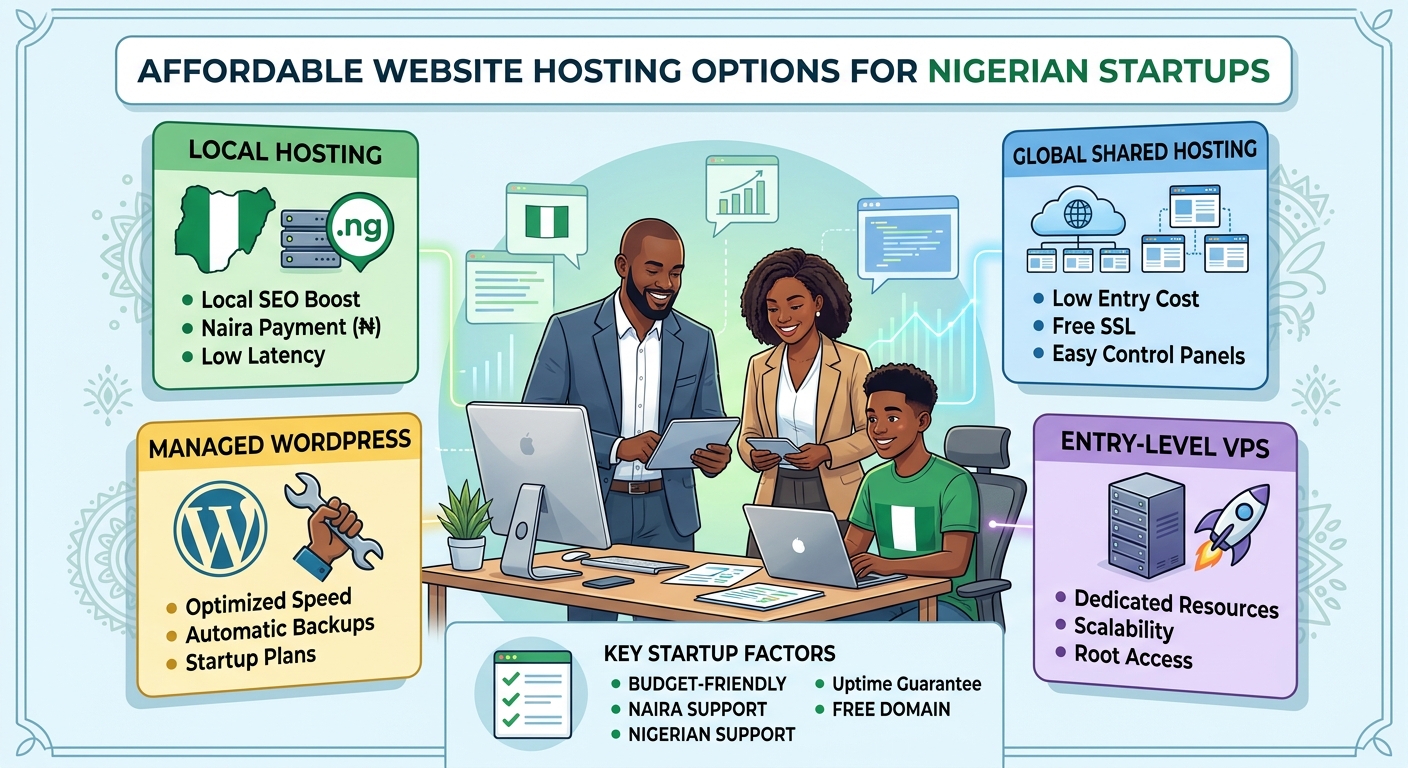
Affordable Website Hosting Options for Nigerian Startups

For a Nigerian startup, a website can support credibility, customer enquiries, online sales and business growth. However, hosting costs and technical decisions can feel difficult when you are working with a limited budget. The cheapest plan is not always the best choice, while an expensive package may include features your business does not yet need.

The right approach is to choose hosting that matches your current website, expected traffic and plans for growth. This guide explains the main hosting options available to Nigerian startups and the factors to consider before making a decision.

What is website hosting?

Website hosting is the service that stores your website files and makes them available to people online. When someone enters your domain name into a browser, the hosting server delivers your website’s pages, images and other content.

Hosting is different from a domain name. A domain is your website address, such as yourbusiness.ng or yourbusiness.com. Hosting is the space and technology used to store and serve the website. Most businesses need both a domain and a hosting plan.

A suitable hosting provider can also make important tasks easier, including setting up email, installing a content management system, creating backups and managing security settings.

Affordable hosting options for startups

Different hosting types suit different stages of business. Understanding the differences can help you avoid overspending or choosing a plan that cannot support your website.

Shared hosting

Shared hosting is often the most accessible option for a new startup. Several websites use resources on the same server, which allows the provider to offer hosting at a lower cost.

It can be suitable for:

  • Company websites with a small number of pages
  • New blogs and content websites
  • Landing pages for services or products
  • Small church, law firm or professional-service websites
  • Websites that are still building their audience

The main advantage is affordability and simplicity. Many shared hosting plans include a control panel and tools that help users install popular website platforms without advanced technical knowledge.

The trade-off is that your website shares server resources with other customers. Performance may be affected if a site on the same server uses unusually high resources. For a new or modestly sized website, however, a well-managed shared hosting plan may provide practical value.

WordPress hosting

WordPress hosting is designed for websites built with WordPress. It may include WordPress installation, updates, security features, backups or performance settings suited to the platform.

This option can be useful for startups that want to create a website quickly without building everything from scratch. WordPress supports company websites, blogs, service pages, news sections and many types of business content.

Before choosing a WordPress plan, check whether it gives you control over your website and whether important features are included. A low-cost plan may still require you to manage updates, plugins and backups yourself, while a managed service may provide more assistance at a higher cost.

Cloud hosting

Cloud hosting uses connected servers and infrastructure rather than relying on one physical server alone. Depending on the provider and plan, this can offer flexibility, scalability and improved resilience.

Cloud hosting may be appropriate for a startup with:

  • Growing visitor numbers
  • A web application or customer portal
  • More demanding business software
  • Seasonal changes in website traffic
  • A need to increase resources as the business develops

Cloud hosting is not automatically the most affordable option for every business. Its value depends on how resources are allocated and billed. A startup should understand the plan’s limits and charges before selecting it.

VPS hosting

A virtual private server, or VPS, provides an allocated virtual environment on a physical server. It generally offers more control and dedicated resources than basic shared hosting.

A VPS can be a good next step when a website has outgrown shared hosting or needs specific server software and configurations. It may also suit developers and businesses running applications that require more control.

However, VPS hosting often requires more technical administration. You may need to manage server updates, security, monitoring and backups, or pay for additional management. It is important to consider the full cost of running a VPS rather than looking only at the advertised hosting fee.

How to choose cost-effective hosting in Nigeria

Match the plan to your website

Start by identifying what you are building. A five-page business website does not need the same resources as an online store, membership platform or software application.

Consider the number of pages, expected visitors, image and video usage, databases, email accounts and any special software requirements. Choosing based on actual needs helps prevent both overspending and performance problems.

Check what is included

Hosting plans can vary significantly in what they provide. Review the details rather than comparing only headline prices.

Useful features may include:

  • Storage suitable for your website files
  • Bandwidth or traffic allowances
  • SSL support for secure browsing
  • Website backups
  • Malware monitoring or security tools
  • Database support
  • Email services, if required
  • A clear control panel
  • Migration assistance
  • Customer support

Some providers list certain features as optional add-ons. Knowing this in advance makes it easier to compare the total cost of each option.

Consider payment and renewal terms

Hosting is usually an ongoing service rather than a one-time purchase. Review the renewal terms, billing cycle and accepted payment methods before committing. A promotional starting price may not be the same as the price at renewal.

Nigerian startups should also consider whether the provider makes account management and payments convenient for their team. Clear invoices, accessible support and straightforward renewal information can reduce administrative problems later.

Look beyond server location

Some buyers assume that a server must be physically located in Nigeria for a website to perform well for Nigerian visitors. Server location can influence latency, but it is only one factor. Network quality, server configuration, caching, image optimisation and website code also affect speed.

Ask the provider how performance is managed and whether the service can support your expected audience. Avoid choosing solely because of a location claim without considering the complete hosting environment.

Review support quality

When a website becomes unavailable, quick and useful support matters. Check how customers can contact the provider and whether the support team can assist with common issues such as domain connections, email setup, website migration and hosting errors.

Support is especially important for business owners who do not have an in-house technical team. A slightly lower-priced plan may not be good value if resolving problems takes too long or requires specialist knowledge.

Ways to reduce hosting costs

Affordability does not mean choosing the smallest plan indefinitely. It means using resources carefully and avoiding unnecessary costs.

  1. Begin with a suitable entry plan: Choose enough storage and performance for your current website, with a clear path to upgrade.
  2. Keep your website efficient: Compress images, remove unused plugins and use a lightweight design where possible.
  3. Separate essential and optional services: Decide whether you need premium email, advanced security or specialist server management immediately.
  4. Maintain regular backups: A backup can help prevent the cost and disruption of rebuilding a website after a serious error.
  5. Track website usage: Monitor storage, traffic and resource consumption so you can change plans based on evidence.
  6. Protect your domain: Keep domain renewal information current and ensure the business retains control of the domain account.

Common mistakes to avoid

Startups sometimes choose hosting based only on the lowest advertised price. This can lead to unexpected renewal costs, limited support or a plan that cannot handle the website’s needs.

Other common mistakes include ignoring backups, using outdated software, selecting a VPS without the skills to manage it, and buying more resources before they are needed. It is also risky to register a domain or hosting account under the details of someone who may not remain involved in the business.

A practical hosting path for a new startup

A simple business website will often be able to begin with reliable shared hosting or a suitable WordPress plan. As the website gains visitors or requires more complex features, the business can review its resource usage and consider cloud or VPS hosting.

This staged approach keeps early costs manageable while leaving room for growth. The best provider should make upgrading clear and help you move to a more suitable environment when your needs change.

Conclusion

Affordable website hosting for a Nigerian startup should provide more than a low starting price. It should offer the resources, security, support and flexibility your business needs at its current stage.

Compare shared hosting, WordPress hosting, cloud hosting and VPS hosting according to your website’s purpose and expected growth. Check renewal terms, included features, support quality and upgrade options. With a thoughtful choice, your startup can establish a professional online presence without paying for complexity it does not yet need.

A man seated on a table in front of a laptop, with three servers stacked vertically beside him representing Reliable Cloud Hosting In Nigeria

Reliable Cloud Hosting for Businesses in Nigeria

Today, many businesses in Nigeria are using the internet to run their daily work. They sell goods online, keep customer records, store files, and run websites. To do all these things, they need a place to keep their data safe and easy to reach. That place is called the “cloud.”

Cloud hosting is a way for businesses to store their data and run their websites on the internet instead of on their own computers. This helps companies save money, work faster, and keep their information safe. But the cloud must be reliable. If it is slow or goes down, it can hurt the business. That is why choosing a reliable cloud hosting service is very important.

What Is Cloud Hosting?

Cloud hosting that is eco-friendly

Cloud hosting means using a group of connected computers (called servers) to store data, run websites, and support apps. These servers are not in your office. They are in special buildings called data centers, and you can access them online from anywhere.

When you use cloud hosting, you do not need to buy expensive hardware. You just pay for what you use. This makes it a good choice for small and large businesses alike.

Why Businesses in Nigeria Need Cloud Hosting

Nigerian flag featuring a cloud hosting server

Businesses in Nigeria are growing fast. Many are going digital to reach more customers. Here are some reasons why cloud hosting is useful for them:

1. Cost Saving

Buying servers and setting up your own IT team is expensive. With cloud hosting, you don’t need to do that. You just pay a monthly or yearly fee and the hosting company takes care of everything.

2. Easy Access

Cloud hosting lets you reach your data anytime, from anywhere. This is very helpful for businesses that have teams working in different places or from home.

3. Better Security

Good cloud hosting companies protect your data with strong security tools. They back up your files and keep them safe from hackers, viruses, or power problems.

4. Scalability

This means you can grow your hosting space as your business grows. If you need more power or space, you can get it easily. You don’t have to buy new hardware every time your business expands.

5. Support and Maintenance

Cloud hosting companies provide 24/7 support. If anything goes wrong, you can get help fast. They also handle updates and maintenance, so you don’t have to worry about technical problems.

Challenges in Nigeria

While cloud hosting has many benefits, there are still some challenges in Nigeria:

1. Internet Speed

Many areas in Nigeria still have slow or unstable internet. Cloud hosting needs good internet to work well. Without it, businesses may face delays and trouble accessing their data.

2. Power Supply

Unstable electricity can affect business operations. If the internet or office devices go off during work, it can stop access to the cloud. Some companies use backup power (like generators or solar) to avoid this issue.

3. Cost of Data

Mobile data and broadband can be expensive in Nigeria. This makes it harder for some businesses to use cloud services fully.

4. Lack of Knowledge

Some business owners don’t fully understand what cloud hosting is or how to use it. They may fear losing control over their data or think it’s too technical. More education and awareness are needed.

What to Look for in a Reliable Cloud Hosting Provider

A huge cloud and hosting servers on the ground

If you want to choose a reliable cloud hosting service in Nigeria, here are some things to check:

1. Uptime Guarantee

Uptime means how often your website or app is online and working. A good hosting provider should promise 99.9% uptime. This means your service will hardly ever go down.

2. Speed and Performance

Your website should load fast. Slow websites can make customers leave. Check that the hosting provider uses high-speed servers and has data centers near Africa.

3. Security Features

Look for services with firewalls, encryption, backup options, and protection from cyber attacks. Your data must stay safe.

4. Customer Support

You should be able to reach support any time—day or night. Choose providers with good reviews for support service.

5. Flexible Plans

Your needs may change. Look for plans that let you upgrade or reduce your services easily without losing money.

6. Local Presence

Some hosting companies have offices or data centers in Nigeria. This can improve speed and support and help you follow local laws.

Top Cloud Hosting Providers for Nigerian Businesses

Here are some reliable cloud hosting options for businesses in Nigeria:

1. Sonhosting

Sonhosting is a local hosting company. It is easy to use, affordable, and offers good support. They provide both shared and cloud hosting.

2. Whogohost

Whogohost is one of the biggest web hosting companies in Nigeria. They offer cloud hosting, email hosting, and domain registration. Their support is local, and they accept payments in Naira.

3. Smartweb

Smartweb is another Nigerian company. It offers VPS, cloud hosting, and server options. Their prices are fair and they provide good security.

4. Hostinger

Hostinger is an international company with low prices and fast service. Their servers are not in Nigeria, but their global reach gives good speed.

5. Google Cloud / Microsoft Azure / Amazon Web Services (AWS)

These are global cloud giants. They offer powerful tools, high speed, and strong security. But they are more expensive and may require more technical knowledge.

You May Also Like: The 11 Shocking Benefits of Cloud Hosting: Explained In Layman Terms

Tips for Using Cloud Hosting Well

To get the most out of cloud hosting, follow these tips:

  • Choose the right plan: Don’t buy too much or too little. Start with what you need and grow from there.
  • Back up your data: Even though cloud services do backups, you should also keep your own copy.
  • Train your team: Make sure your staff knows how to use cloud tools properly.
  • Monitor your usage: Keep an eye on your monthly use so you don’t get surprised by the bill.

Cloud hosting is a smart choice for Nigerian businesses that want to grow, save money, and work better. It helps you keep your data safe, reach more customers, and work from anywhere. But you need a reliable provider to enjoy the full benefits.

Before choosing, compare hosting companies, read reviews, and make sure they offer the features your business needs. With the right setup, cloud hosting can help Nigerian businesses succeed in a digital world.

Your Cart

©2018 - currentyear Sonhosting • By Digital Nigeria - RC 7487481
All Rights Reserved
Powered by ShootOut Now Services