Blog

VPS Hosting for Nigerian E-commerce Websites: Is It the Right Choice?

VPS Hosting for Nigerian E-commerce Websites: Is It the Right Choice?

For an online shop, hosting problems can quickly become business problems. Slow product pages may discourage visitors, an unavailable checkout can interrupt sales, and weak security can put customer information at risk. As a Nigerian e-commerce website grows, shared hosting may no longer provide the control or resources it needs.

VPS hosting can be a useful step between shared hosting and a much larger dedicated server. It gives your website an allocated virtual environment on a physical server, with more control and resources than a typical shared account. However, a VPS is not automatically the best choice for every online business. The right decision depends on your traffic, website software, technical requirements and willingness to manage a server.

What is VPS hosting?

VPS stands for Virtual Private Server. One physical server is divided into separate virtual servers using virtualisation technology. Each VPS operates with its own operating system and configurable resources, such as processing power, memory and storage.

Unlike shared hosting, where many websites use the same hosting environment with limited control, a VPS gives your website a more isolated space. You can usually configure server software, install specific applications and adjust settings that are not available on a basic shared plan.

It is important to understand what “private” means in this context. A VPS is not usually a separate physical machine. It is a virtual server running alongside other virtual servers. The practical advantage is greater control and more predictable resource allocation, not complete physical isolation.

Why Nigerian e-commerce websites may need a VPS

An online shop often has more demanding requirements than a simple company website. It may contain product images, search and filtering tools, customer accounts, shopping-cart functions, payment integrations, order management and promotional campaigns. These features can place greater demands on hosting resources.

More consistent performance

When a website shares resources with many unrelated websites, activity elsewhere on the server can sometimes affect performance. A VPS provides allocated resources that can make website behaviour more consistent, particularly when several customers browse products or place orders at the same time.

Hosting alone cannot make an inefficient website fast. Large images, excessive plugins, poorly written code and an overloaded database can still slow down a VPS. The benefit is that the hosting environment is less likely to be the immediate limitation as your store becomes more active.

Greater control for specialised software

E-commerce websites may require particular versions of PHP, database software, caching tools, background processes or other server settings. A VPS can provide the flexibility needed for these configurations.

This is especially relevant when a store has moved beyond a standard WordPress and WooCommerce setup, uses custom applications or connects to several external systems. The technical flexibility can help developers create a more suitable environment, but it also creates more responsibility for configuration and maintenance.

Better separation from other websites

A VPS generally gives your website a more independent environment than shared hosting. This can reduce the impact of unrelated websites using excessive resources. It also makes it easier to apply your own access controls, security settings and software configuration.

Security still requires active attention. A VPS does not automatically protect an online shop from weak passwords, outdated software, vulnerable plugins, malware or incorrect server settings.

When should an online shop consider VPS hosting?

There is no single visitor number that determines when a business should upgrade. Instead, look for practical signs that your current hosting plan is no longer suitable.

  • Your website becomes slow during promotions or busy shopping periods.
  • You regularly reach memory, CPU, storage or process limits.
  • Your store needs software or server settings unavailable on shared hosting.
  • Product management, search or checkout operations are placing pressure on the database.
  • You need more control over security rules, caching or background tasks.
  • You are preparing for a significant campaign and have tested that your current plan may not cope.
  • Your website has become an important sales channel and hosting reliability is now a business priority.

Frequent errors are not always proof that a VPS is required. The cause may be a faulty plugin, an oversized database, poor image optimisation, an expired SSL certificate or a misconfigured application. Diagnose the problem before changing hosting plans.

Managed and unmanaged VPS hosting

The most important choice is often not simply VPS versus shared hosting. It is whether you want to manage the server yourself.

Unmanaged VPS

With an unmanaged VPS, you or your technical team are responsible for much of the server administration. This may include operating-system updates, firewall configuration, user permissions, software installation, monitoring, backups and troubleshooting.

This option can suit a developer or organisation with server administration skills. It may also offer more direct control. However, a low monthly hosting price does not remove the cost of technical time. If nobody is responsible for maintaining the server, problems can remain unnoticed until they affect customers.

Managed VPS

With managed VPS hosting, the provider handles some of the technical administration and support. The exact service differs between providers, so confirm what is included rather than relying on the word “managed”. Ask about updates, monitoring, backups, security assistance, migrations and support boundaries.

Managed hosting can be a practical choice for Nigerian small businesses and entrepreneurs who need a dependable online shop but do not want to become server administrators. It aligns with a simple principle: technical complexity should be handled behind the scenes where practical, while the business owner receives clear explanations and useful support.

A practical VPS selection framework

Before choosing a plan, write down the actual needs of your store. This prevents you from buying either too little capacity or more technical complexity than necessary.

  1. Assess the website. Note whether it uses WooCommerce, another e-commerce platform or custom software. Record the database size, media storage needs and important integrations.
  2. Review current problems. Identify whether the main issue is speed, resource limits, outages, software compatibility or security management.
  3. Estimate growth carefully. Consider planned products, marketing campaigns and expected business growth, but avoid paying for capacity based only on an uncertain future.
  4. Choose the management level. Decide who will handle updates, backups, monitoring, security and technical incidents.
  5. Plan for recovery. Confirm how backups work, where they are stored, how often they run and how restoration is tested.
  6. Check account ownership. Keep accurate access to your domain, hosting account, website files, database and business email. A developer or employee may help manage these assets, but the business should retain control.

VPS hosting, website speed and customer trust

Performance affects more than technical reports. A shopper may abandon a product page that takes too long to load or lose confidence when checkout repeatedly fails. Nigerian e-commerce businesses should also consider mobile-first visitors, because many customers browse and buy using phones and variable network connections.

A suitable VPS can support performance improvements, but it should be part of a wider process. Compress product images, use sensible caching, remove unnecessary plugins, keep the database maintained and test key pages on mobile devices. Monitor the complete customer journey, including product search, cart updates, checkout and order confirmation.

Trust also depends on HTTPS, accurate contact information, professional domain-based email and consistent branding. Hosting is one part of that system. A fast server cannot compensate for an expired domain, unreliable email or an unclear returns and delivery process.

Security and backup responsibilities

Moving to a VPS does not remove the need for security planning. Use strong, unique passwords and limit administrative access. Keep the operating system, website platform, themes, plugins and server software updated. Remove unused accounts and applications, and use HTTPS for customer-facing pages.

Backups should be separate from the live server where possible. A backup that cannot be restored is not a dependable recovery plan, so restoration should be tested periodically. Keep records of who can access the server and where domain, hosting and email credentials are stored.

Is VPS hosting right for your store?

VPS hosting is often appropriate when an online shop needs more consistent resources, specialised configuration or greater control than shared hosting provides. It is less suitable when the website is small, receives modest traffic and does not require custom server settings. In that situation, a reliable shared or managed hosting plan may be simpler and more economical.

The best hosting choice is not the most powerful option available. It is the option that matches the store’s current workload, growth plans, budget and technical support needs. For many Nigerian businesses, managed VPS hosting can provide a useful balance: more room for an expanding e-commerce website without requiring the owner to handle every server task personally.

Before upgrading, investigate the actual cause of performance or reliability problems, list the services that must continue working, and confirm how migration and backups will be handled. A well-planned VPS move should make the business easier to run—not create another technical burden.


VPS Hosting for Law Firm Websites: Key Considerations

VPS Hosting for Law Firm Websites: Key Considerations

A law firm website has a different risk profile from a basic personal blog. It may publish sensitive contact information, collect enquiry details, support client communication and represent the firm’s professionalism to prospective clients. If the website is slow, frequently unavailable or poorly secured, the effect can go beyond inconvenience: it may reduce trust and cause potential clients to look elsewhere.

VPS hosting can provide more control and resources than many entry-level hosting plans. However, it is not automatically the right choice for every law firm. The best decision depends on the website’s traffic, applications, security requirements, email needs, budget and willingness to manage technical systems.

What VPS hosting means for a law firm

A virtual private server, or VPS, is a hosting environment created on a physical server and allocated to one customer. The customer receives defined computing resources and greater control over the server environment than is usually available with shared hosting.

With shared hosting, several websites use the same underlying server environment. This can be suitable for a small brochure website with modest traffic. With a VPS, the firm generally has more control over software settings, resource allocation and server configuration. That additional control can be useful when a website has demanding applications or specific technical requirements.

It is important to understand what a VPS does not mean. A VPS is not automatically secure simply because it is a VPS. It does not replace strong passwords, software updates, backups, malware monitoring or careful access control. In many cases, the customer also has more responsibility for maintaining the server.

When should a law firm consider a VPS?

A VPS may be worth considering when one or more of the following situations apply:

  • The firm’s website has grown beyond the practical limits of its current hosting plan.
  • The website receives consistently high traffic or experiences resource-related slowdowns.
  • The site runs a client portal, document system, case-related application or other resource-intensive software.
  • The firm needs server-level configuration that standard hosting does not provide.
  • The organisation wants greater separation from other websites on a shared server.
  • There are plans to host several websites, applications or internal tools in one controlled environment.

A small law office with a fast WordPress website, a few professional email accounts and basic pages for services, lawyers and contact information may not need a VPS. A well-managed standard hosting plan may provide a simpler and more economical solution.

The decision should be based on actual requirements rather than the assumption that a more expensive plan is always better.

Security should be considered in layers

Law firms should treat security as a combination of controls rather than a single hosting feature. A VPS can offer more isolation and configuration flexibility, but the website and accounts still need careful protection.

At a minimum, ask how the hosting arrangement supports:

  • HTTPS: The website should use an SSL certificate so connections between visitors and the site are encrypted.
  • Access control: Administrative accounts should use unique, strong passwords and, where available, multi-factor authentication.
  • Software updates: WordPress, plugins, themes, server software and other applications need timely maintenance.
  • Malware and intrusion monitoring: The hosting plan should make it possible to identify suspicious activity and respond promptly.
  • Least-privilege access: Developers, staff and suppliers should receive only the access they need.
  • Account ownership: The firm should retain access to its domain, hosting, website and email accounts rather than depending entirely on a former employee or developer.

HTTPS protects data while it is being transferred, but it does not make an entire website safe by itself. A firm should also avoid collecting confidential client information through ordinary website forms unless the form and the wider workflow are designed to handle that information appropriately.

Backups and recovery matter as much as prevention

Even a carefully maintained website can be affected by human error, software problems, compromised accounts or server failures. A VPS hosting decision should therefore include a clear backup and recovery plan.

Ask what is backed up, how often backups run, where they are stored and how restoration works. Website files and databases should both be included where applicable. A backup stored only on the same server may not be sufficient if that server becomes inaccessible.

It is also useful to know whether restoration is handled by the hosting provider, the firm’s technical team or an external developer. The answer affects response time and the level of technical skill the firm needs internally. A backup that has never been tested may not be reliable when it is urgently needed, so restoration procedures should be checked periodically.

Performance and reliability for prospective clients

Visitors may reach a law firm website from mobile devices and variable internet connections. They are likely to look for practical information quickly: areas of practice, office details, contact options, lawyer profiles and answers to common questions.

VPS hosting can help when a website needs additional processing capacity, but hosting is only one part of performance. Large images, unoptimised plugins, poor website code, excessive scripts and a slow database can affect speed even on a powerful server.

Before moving to a VPS, review the source of the problem. A useful assessment may include:

  • Checking whether the current account is reaching memory, processing or storage limits.
  • Reviewing WordPress plugins and removing those that are unnecessary or poorly maintained.
  • Compressing images and improving mobile page layouts.
  • Checking database health and website error logs.
  • Confirming that DNS, SSL and caching are configured correctly.

For firms serving clients in Nigeria and West Africa, accessible support can also be valuable when a website becomes unavailable or unusually slow. The ability to explain the problem clearly and respond without unnecessary jargon may matter more than having a technically impressive plan that nobody at the firm can manage.

Do not overlook business email

A law firm’s online presence includes more than its website. Domain-based email, such as name@firmdomain, generally presents a more professional identity than a personal consumer email address and keeps communication connected to the firm’s domain.

Website hosting and email hosting are related but separate services. Moving a website to a VPS does not automatically solve email delivery, mailbox storage, spam filtering or account security. Before changing hosting, document existing email accounts, DNS records, forwarding rules and applications that send messages from the website.

Use separate, secure accounts for administrators and staff, and make sure the firm can retain access if a staff member leaves. Domain renewal and account recovery details should also be monitored so an administrative oversight does not interrupt the firm’s website or email.

Managed or self-managed VPS?

The most important VPS choice may be the level of management. A self-managed VPS can provide flexibility, but the customer may be responsible for operating-system updates, firewall rules, server hardening, monitoring, backups and troubleshooting.

A managed VPS shifts more of those technical responsibilities to the hosting provider. This can be a practical option for a law firm that wants a reliable online presence without building an internal server administration team. Managed support does not remove the firm’s responsibility for user access, content, legal processes or confidential information, but it can reduce the technical burden behind the website.

When comparing providers, ask:

  • Which server maintenance tasks are included?
  • Who responds to security alerts and service problems?
  • Are backups included, and how are they restored?
  • What support channels are available and during what hours?
  • Can the firm keep full access to its domain and hosting account?
  • What happens if the firm later wants to migrate to another provider?

A practical decision example

Consider a small Nigerian law firm with a professional WordPress website, five business email accounts, service pages and a contact form. Its traffic is moderate, the site has no client portal and its main concern is reliable maintenance. A standard hosting package with SSL, backups, WordPress support and business email may be more appropriate than a VPS.

Now consider a larger practice operating several websites alongside a resource-heavy legal application, with an internal technical contact who needs server-level control. A managed VPS could be a better fit, provided the firm defines its backup, access and security responsibilities before moving.

In both cases, the firm should maintain accurate domain ownership details, control its essential accounts and ensure that website content gives visitors clear ways to request information without unnecessarily exposing confidential details.

The right question to ask

Choosing VPS hosting for a law firm is not mainly a question of choosing the biggest server. It is a question of matching infrastructure to risk, workload and management capacity.

Review the current website first, identify the actual limitation, and then compare VPS options by security practices, backup arrangements, support, email compatibility, scalability and total management effort. For many firms, dependable support and clear ownership of digital assets are more valuable than unused technical capacity.

A suitable hosting arrangement should make the firm’s website secure, available and manageable while allowing lawyers and staff to focus on serving clients. The best plan is the one that meets those needs without turning hosting into another specialist responsibility the business must carry alone.

VPS Hosting for Church Websites and Online Services

VPS Hosting for Church Websites and Online Services

A church website may begin as a simple place to display service times, contact details and announcements. As the church grows, it may also need to publish sermons, stream services, accept online donations, manage event registrations, send email updates and serve visitors from different locations.

At that point, shared hosting may no longer provide the level of control or resources the church needs. A virtual private server, commonly called a VPS, can offer a more flexible hosting environment without requiring the church to operate its own physical server.

However, VPS hosting is not automatically the best choice for every church. It involves more responsibility than basic hosting, and the right decision depends on the website’s traffic, features, technical support needs and budget.

What is VPS hosting?

A VPS is a virtual server created on a physical server. Although several VPS accounts may use the same physical machine, each account has an allocated portion of computing resources and its own operating environment.

This gives a church more control than typical shared hosting. Depending on the provider and plan, the church may have more access to server settings, software configurations, storage and performance resources.

The important distinction is that VPS hosting is still different from owning a dedicated physical server. A dedicated server is used by one customer, while a VPS is a virtual environment hosted on shared physical infrastructure. For many growing organisations, a VPS provides a useful middle ground between simple hosting and a much more advanced server setup.

Why a church may consider a VPS

More room for a growing website

Church websites can become resource-intensive when they contain sermon recordings, downloadable files, photo galleries, event pages, registration tools and several WordPress plugins. A VPS may provide more predictable resources for these features than a basic shared hosting account.

This does not mean that a VPS will solve every performance problem. Large images, poorly configured plugins, unoptimised databases and video files can still slow down a website. Good website maintenance remains important regardless of the hosting plan.

Better control over the hosting environment

Some churches need particular software versions, server settings or background processes for their website and online services. A VPS can provide greater control over these technical details.

This may be useful for a church with a custom website, a membership system, a private administration portal or integrations with other services. It is less important for a small informational website that uses a carefully maintained WordPress installation.

Support for multiple digital services

A church may operate more than one website or digital project. For example, it may have a main church website, a conference website, a youth ministry site and a private area for volunteers or members.

A VPS can make it easier to organise several websites in one managed environment. The setup still needs careful planning, including separate accounts, access controls, backups and security measures. Combining multiple sites without proper isolation can create unnecessary risk.

Improved handling during busy periods

Church websites may experience sudden increases in visitors when a major event is announced, registration opens, a popular sermon is published or an important service is being promoted. A VPS may offer additional capacity and control during these periods.

It is important to distinguish the website from livestream delivery. A VPS can host a church website and related pages, but it is not always the best place to distribute live video to a large audience. Video streaming can require substantial bandwidth and specialised delivery services. A church should assess livestream hosting separately rather than assuming that a VPS alone will handle every part of an online service.

VPS hosting and online church services

Online church services often involve several connected parts: a website, a livestream platform, event or prayer request forms, online giving, email communication and recorded media. Hosting affects some of these functions directly, but not all of them.

A practical setup might use the church website as the central information hub. It can provide the service schedule, livestream links, sermon archive, contact information and instructions for giving. The live video itself may be delivered through a specialised streaming platform, while the website helps visitors find the correct service and next steps.

This approach can be more dependable than trying to make the church website perform every role. It also gives visitors a clear, stable digital home that the church controls through its own domain and hosting account.

When shared hosting may be enough

A VPS is not necessary simply because a website belongs to an organisation. Shared hosting may be suitable when the church has:

  • A small or moderate-traffic informational website
  • Service times, announcements, contact forms and basic pages
  • A modest WordPress site with well-maintained plugins
  • Limited technical staff or no server administrator
  • A need to keep hosting straightforward and budget-conscious

For these requirements, moving to a VPS could add complexity without providing a meaningful benefit. A reliable shared hosting plan with SSL, backups, practical support and appropriate WordPress management may be a better fit.

The goal should not be to choose the most powerful hosting option. It should be to choose a service that supports the church’s actual work and can be managed responsibly.

Signs that a VPS may be appropriate

A church may want to evaluate VPS hosting if several of the following situations apply:

  • The website regularly reaches the limits of its current hosting plan.
  • Traffic increases significantly during events or registration periods.
  • The church manages multiple websites or applications.
  • The website requires custom server software or configurations.
  • Large media libraries or resource-heavy tools are part of the site.
  • The church has a developer or hosting provider who can manage server responsibilities.
  • The organisation needs greater separation between websites or services.

These signs do not automatically prove that a VPS is required. They indicate that the church should review its current hosting resources, website configuration and future plans instead of upgrading based only on guesswork.

Managed VPS versus unmanaged VPS

One of the most important decisions is whether the VPS will be managed or unmanaged.

With an unmanaged VPS, the customer is generally responsible for tasks such as operating system updates, firewall configuration, user access, server monitoring, malware response, software installation and troubleshooting. This option may suit an experienced technical team, but it can become a burden for a church that wants to focus on ministry and community service.

A managed VPS includes technical assistance with some or many of these responsibilities, depending on the provider’s service terms. Management does not remove the need for good passwords, responsible users, backups and website maintenance, but it can reduce the amount of server administration the church must handle internally.

For many churches, managed hosting is worth considering because technical work should be handled by people with the time and expertise to do it properly. Before choosing a service, ask what management includes, how support works, whether backups are included and which tasks remain the church’s responsibility.

Security and continuity should come first

A church website may collect contact details, prayer requests, event registrations or donation-related information. It should therefore be treated as an important organisational asset, not merely an online noticeboard.

Useful safeguards include:

  • HTTPS through a valid SSL certificate
  • Strong, unique passwords and multi-factor authentication where available
  • Separate administrator accounts instead of one shared login
  • Regular WordPress, plugin and theme updates
  • Tested backups stored separately from the live website
  • Limited access for volunteers, staff and external developers
  • Monitoring for suspicious activity and unexpected changes

The church should also retain access to its domain, hosting account, website files and important email accounts. Domain registration details and renewal information should be accurate. If everything is controlled by a former volunteer, developer or unknown third party, the church may struggle to recover its digital assets when responsibilities change.

A practical decision process

Before moving to a VPS, document the website’s current needs. Record the number of websites, approximate traffic patterns, storage requirements, important plugins, email needs, media plans and any recurring errors.

Next, identify the real problem. If the site is slow because images are too large or plugins are poorly configured, a VPS may not fix it. If the issue is limited resources, multiple applications or a need for custom server control, VPS hosting may be more suitable.

Finally, decide who will manage the environment. A church should not choose an unmanaged server without assigning clear responsibility for updates, security, backups and incident response. If there is no internal technical resource, a managed option may be more practical.

The main takeaway

VPS hosting can support a growing church website that needs more resources, greater control or several connected digital services. It can be especially useful for organisations publishing substantial content, managing multiple websites or preparing for periods of increased traffic.

But a VPS is not a substitute for good website structure, secure account management, backups or a suitable livestream strategy. Start with the church’s actual requirements, consider the level of technical support available and choose the simplest hosting environment that can reliably support the mission. For many churches, that may be managed VPS hosting; for others, dependable managed WordPress or shared hosting will be the more sensible choice.

The Main Types of Web Hosting Explained

The Main Types of Web Hosting Explained

Choosing web hosting can feel confusing because providers use different names for plans that may appear similar. Shared hosting, VPS hosting, dedicated hosting, cloud hosting and managed WordPress hosting all serve different needs. The most suitable option depends on your website’s size, expected traffic, budget, email requirements and how much technical work you want to manage yourself.

For a Nigerian small business, entrepreneur or organisation, the best hosting plan is not automatically the most powerful one. It is the plan that keeps the website dependable, secure and manageable without paying for resources you do not need.

What web hosting actually does

Web hosting provides the server space and services needed to make a website available online. When someone enters your domain name, such as yourbusiness.com, hosting helps deliver the website’s files, images, databases and other content to that visitor’s browser.

A domain name and hosting are related, but they are not the same thing. The domain is the address people use to find your website. Hosting is the service that stores and delivers the website. A complete online presence may also require business email, an SSL certificate, backups, website software and ongoing maintenance.

Shared hosting: a practical starting point

Shared hosting places multiple websites on the same physical server. The websites share server resources, while each account remains separately managed within the hosting environment.

This is often a suitable choice for:

  • Small business websites
  • Personal websites and portfolios
  • Blogs and creator websites
  • New WordPress websites
  • Simple organisation or information websites

The main advantage is simplicity and affordability. You can usually manage domains, email accounts, website files and databases through a hosting control panel rather than configuring a server from the beginning.

The limitation is that your website shares resources with other accounts. A busy or poorly managed site on the same server may affect the available capacity, depending on how the hosting environment is configured. Shared hosting may also become less suitable as a website grows or requires specialised server settings.

For many small websites, however, shared hosting is a sensible first step. A company does not need a VPS simply because it wants a professional website.

VPS hosting: more control and dedicated resources

VPS stands for Virtual Private Server. A physical server is divided into separate virtual environments, giving each VPS a defined allocation of resources and a greater degree of isolation than ordinary shared hosting.

VPS hosting may suit:

  • Growing websites with higher resource requirements
  • Web applications needing specific server settings
  • Online stores with increasing activity
  • Businesses running several websites or services
  • Users who need more control than shared hosting provides

A VPS can offer improved control, scalability and predictable resource allocation. It may also support custom software or configurations that are unavailable on a basic hosting plan.

That additional control creates additional responsibility. Depending on the service, you may need to manage operating system updates, server security, backups, performance settings and software installation. A managed VPS can reduce this burden by providing technical administration and support, while an unmanaged VPS is generally better suited to someone comfortable with server management.

Before choosing a VPS, consider whether you need its capabilities or whether you are simply responding to technical terminology. If your website is a normal business site with moderate traffic, a well-supported shared or managed WordPress plan may be more practical.

Dedicated hosting: an entire server for one customer

Dedicated hosting gives one customer access to an entire physical server. There are no other hosting accounts competing for the server’s processing capacity, memory or storage.

This option can be appropriate for organisations with demanding applications, large databases, high and consistent resource requirements, or specialised compliance and configuration needs. It may also be useful when an organisation needs complete control over the server environment.

The trade-off is cost and complexity. Dedicated hosting requires more planning and technical knowledge, and the customer may be responsible for many areas of server operation. It is rarely necessary for a basic company website, portfolio or small blog.

Businesses considering dedicated hosting should first identify the specific problem it will solve. If the concern is slow website performance, the cause could instead be an unoptimised website, oversized images, a plugin problem, limited database performance or a configuration issue. Upgrading to an entire server may not fix the real problem.

Cloud hosting: flexible resources across an infrastructure

Cloud hosting uses a network of connected servers or computing resources rather than relying on one traditional server alone. The exact design varies between providers, but the general idea is that websites can use resources from a broader infrastructure.

Cloud hosting may be useful for websites with changing workloads, applications that need flexible scaling, or organisations planning for growth. It can also provide options for distributing services and handling resource demand differently from a single-server arrangement.

However, “cloud” is not automatically a guarantee of better performance, security or availability. The quality of the service depends on its architecture, configuration, support, backups and management. A small business should ask what resources are included, how scaling works, what technical support is provided and how costs are calculated.

For some websites, cloud hosting is a valuable growth option. For others, a straightforward hosting plan provides all the capacity and simplicity required.

Managed WordPress hosting: WordPress with technical support

Managed WordPress hosting is designed specifically for websites built with WordPress. The hosting environment and support processes may be tailored to WordPress, with assistance for updates, performance, security and routine maintenance depending on the provider and plan.

This can be helpful for business owners who want WordPress flexibility without becoming responsible for every technical task. Managed support may include tools or services for WordPress installation, updates, backups, security monitoring or troubleshooting. The exact features should always be confirmed before purchase.

Managed WordPress hosting is a strong option when:

  • Your website uses WordPress as its main content management system
  • You want help with routine maintenance
  • You prefer not to administer a server
  • Your website is important to daily business operations
  • You need practical support when WordPress problems occur

It may be less suitable if you need to host several different applications or require a highly customised server environment. Some managed WordPress services also limit certain plugins or configurations to protect performance and security.

How to choose the right hosting type

Use your business requirements rather than the plan name as the starting point. Ask these questions:

  • What is the website for? A brochure website, blog, online store and custom application may need different resources.
  • How much traffic is expected? Consider normal visitors as well as campaigns, launches or seasonal demand.
  • How much technical work can you manage? If you do not want server administration to become another business responsibility, managed support may be worthwhile.
  • Do you need business email? Website hosting and email arrangements can differ. Confirm how many mailboxes, storage and support options are included.
  • What security and backup arrangements exist? Look for clear information about SSL, account security, backups and restoration rather than assuming they are automatic.
  • How will the website grow? Choose a service that offers a sensible upgrade path without requiring an immediate move to an expensive setup.

A practical example

Imagine a Nigerian consulting business launching a website with five pages, a contact form, a blog and domain-based email. It receives most visitors from mobile devices and does not have a technical employee.

A suitable starting point may be reliable shared hosting or managed WordPress hosting, depending on whether the site uses WordPress and how much maintenance support is wanted. The business should also confirm that its domain is registered under accurate ownership details, that important accounts remain accessible, and that the website has HTTPS, backups and clear contact information.

If the business later adds a busy membership platform or a resource-intensive application, it can review its hosting based on measured resource needs. Moving to a VPS may then be justified. The upgrade should respond to a real requirement, not simply the belief that a more advanced hosting label is always better.

Hosting is part of business reliability

Hosting affects more than whether a website appears online. It influences how easily the site can be maintained, how securely accounts are managed, whether email works reliably and how quickly problems can be resolved.

Keep control of your domain, hosting and email accounts. Use strong, unique passwords and appropriate account protection. Monitor renewals, maintain current contact information and keep backups that can be restored. These basic responsibilities help prevent avoidable disruption, especially when a website was originally created by a developer, former employee or third party.

The right hosting choice should make technology less burdensome. For many small businesses and entrepreneurs, that means starting with a well-supported shared or managed WordPress service, then upgrading only when the website’s requirements clearly demand it. VPS, cloud and dedicated hosting are valuable options, but they are tools for specific needs—not automatic signs of a more professional website.

Should a Church Buy Shared Hosting or VPS Hosting?

Should a Church Buy Shared Hosting or VPS Hosting?

Choosing hosting for a church website can feel more complicated than it needs to be. You may need a site for service times, sermons, events, announcements, donations, online forms and ministry information—but that does not automatically mean you need the most powerful hosting package available.

For many churches, shared hosting is a sensible starting point. A VPS becomes more appropriate when the website has consistent traffic, demanding applications, strict performance requirements or a technical team capable of managing a more advanced server environment.

The right choice depends less on the size of the church building and more on what the website must do, how many people use it at the same time and who will maintain the hosting.

What is shared hosting?

With shared hosting, several websites use resources on the same physical server. The hosting provider manages the server’s operating system, core security, hardware and much of the technical maintenance.

This arrangement keeps shared hosting relatively affordable and straightforward. A church administrator or volunteer can usually manage the website through a control panel, install WordPress and create email accounts without needing advanced server knowledge.

Shared hosting is often suitable for a church website that includes:

  • Service times, location and contact details
  • Pastor or ministry information
  • Event calendars and registration forms
  • News, announcements and blog posts
  • Photo galleries and downloadable documents
  • Audio sermons or links to media hosted elsewhere
  • A modest online giving or donation page

The main limitation is that your website shares server resources with other customers. If another site experiences unusually high activity or poor configuration, it may affect the available performance on the server, although reputable providers use controls to reduce this risk.

What is VPS hosting?

VPS stands for Virtual Private Server. A physical server is divided into separate virtual environments, giving each customer a more defined allocation of resources such as processing power, memory and storage.

A VPS normally provides greater control and more predictable performance than shared hosting. Depending on the service, you may be able to configure software, security settings and server-level applications that are not available on a standard shared plan.

That flexibility also creates responsibility. An unmanaged VPS may require knowledge of server administration, operating system updates, firewalls, backups, malware protection and performance monitoring. A managed VPS reduces this burden, but it usually costs more than shared hosting.

When shared hosting is the better choice

Your website is mainly informational

If visitors come to read basic information, view a calendar, download a bulletin or submit a contact form, shared hosting will often provide enough capacity. A simple church website does not need a dedicated server merely because it represents an active organisation.

Your church has a limited technical budget

Churches often need to prioritise funds across facilities, staff, outreach and community programmes. Shared hosting can provide the essential foundation—domain connection, website storage, SSL protection and email—without committing to infrastructure that may not yet be necessary.

No one is available to manage a server

This is one of the strongest reasons to choose shared hosting. If the website is maintained by a volunteer who only updates content occasionally, a provider-managed environment is usually safer and more practical than an unmanaged VPS.

You use WordPress with ordinary requirements

WordPress can work well on shared hosting when the site is properly maintained. Keep themes and plugins updated, remove extensions that are no longer needed, use strong administrator passwords and maintain reliable backups. Managed WordPress support can be particularly useful when a church does not have an in-house technical person.

When a VPS may be worth considering

The site receives high or unpredictable traffic

A church may experience traffic spikes during a major conference, registration period, public announcement or widely shared event. If the website regularly struggles during busy periods, a VPS may provide more consistent resources.

However, hosting alone does not solve every traffic problem. Large images, inefficient plugins, unoptimised databases and poorly configured caching can slow a site regardless of the hosting type. Performance should be reviewed before upgrading.

The website runs demanding applications

A basic WordPress site is different from a website that hosts a member portal, private content area, complex booking system, learning platform or custom ministry application. These uses may require more memory, processing capacity or server-level control.

Your church needs greater isolation or custom configuration

Some organisations want a more isolated environment for internal tools, databases or specific software requirements. A VPS can offer more control than shared hosting, although it is not automatically secure. Security still depends on proper configuration, updates, access controls and monitoring.

You have technical support available

A VPS makes more sense when a trusted developer, agency or managed hosting provider can handle server administration. Without that support, the extra control can become an operational risk rather than an advantage.

Shared hosting versus VPS hosting

Consideration Shared hosting VPS hosting
Cost Usually the more affordable option Usually costs more because resources and control are greater
Ease of use Designed for simpler website management May require technical administration
Performance Suitable for small to moderate websites More predictable resources for demanding sites
Control Limited server-level customisation Greater software and configuration control
Maintenance More server maintenance handled by the provider May require updates, security and monitoring by you or your provider
Best fit Informational sites and ordinary WordPress websites High-traffic, resource-intensive or custom applications

Do not confuse website hosting with livestream hosting

Many churches assume they need a VPS because they stream worship services. In most cases, a website should not directly carry the full burden of livestream video delivery. Video streaming can use substantial bandwidth and server resources.

A more practical arrangement is often to use a specialist video or streaming platform, then embed the stream or link to it from the church website. The website can remain on shared hosting while visitors access the live video through the service designed to deliver it.

The same principle applies to large audio libraries and high-resolution media. Store and deliver heavy files using suitable media tools where appropriate, rather than upgrading hosting without checking the actual source of the problem.

What to check before choosing a plan

Ask the hosting provider specific questions rather than comparing package names alone:

  • Is SSL included and automatically maintained?
  • Are backups provided, and how often can they be restored?
  • What support is available if the website goes offline?
  • Can the plan run the church’s chosen WordPress version, theme and plugins?
  • Are business email accounts included, and what storage limits apply?
  • What happens if traffic increases during an important event?
  • Can the church upgrade without moving immediately to a completely different provider?
  • Is VPS management included, or will the church be responsible for server administration?

For a Nigerian church, dependable support and clear communication may matter as much as technical specifications. A provider serving Nigerian businesses and organisations should make it easy to manage domains, SSL, website hosting and email in one practical setup, while explaining limitations honestly.

Security and reliability matter on either option

Moving from shared hosting to a VPS does not replace basic website security. Whichever option you choose, use SSL, keep WordPress and plugins current, limit administrator access and maintain tested backups. Protect church email accounts with strong, unique passwords and appropriate account controls.

Also plan for ownership and continuity. The church should know who controls the domain registration, hosting account, website administrator accounts and recovery email address. If a volunteer leaves, the organisation should not lose access to its digital presence.

A practical decision for most churches

Choose shared hosting if the church needs a reliable website, normal WordPress features, professional email and a manageable monthly service without maintaining a server. Start with a reputable provider and monitor real performance instead of paying for capacity you may never use.

Consider a managed VPS when the website has demonstrated resource demands, requires custom server software, experiences persistent performance limitations after optimisation or supports applications that shared hosting cannot run reliably. Managed support is especially important if the church does not employ a server administrator.

The best hosting decision is not the one with the most impressive technical specifications. It is the one that keeps the church website available, secure, maintainable and appropriate for the people it serves. Begin with the simplest platform that meets today’s needs, then upgrade when evidence—not guesswork—shows that greater control or capacity is necessary.

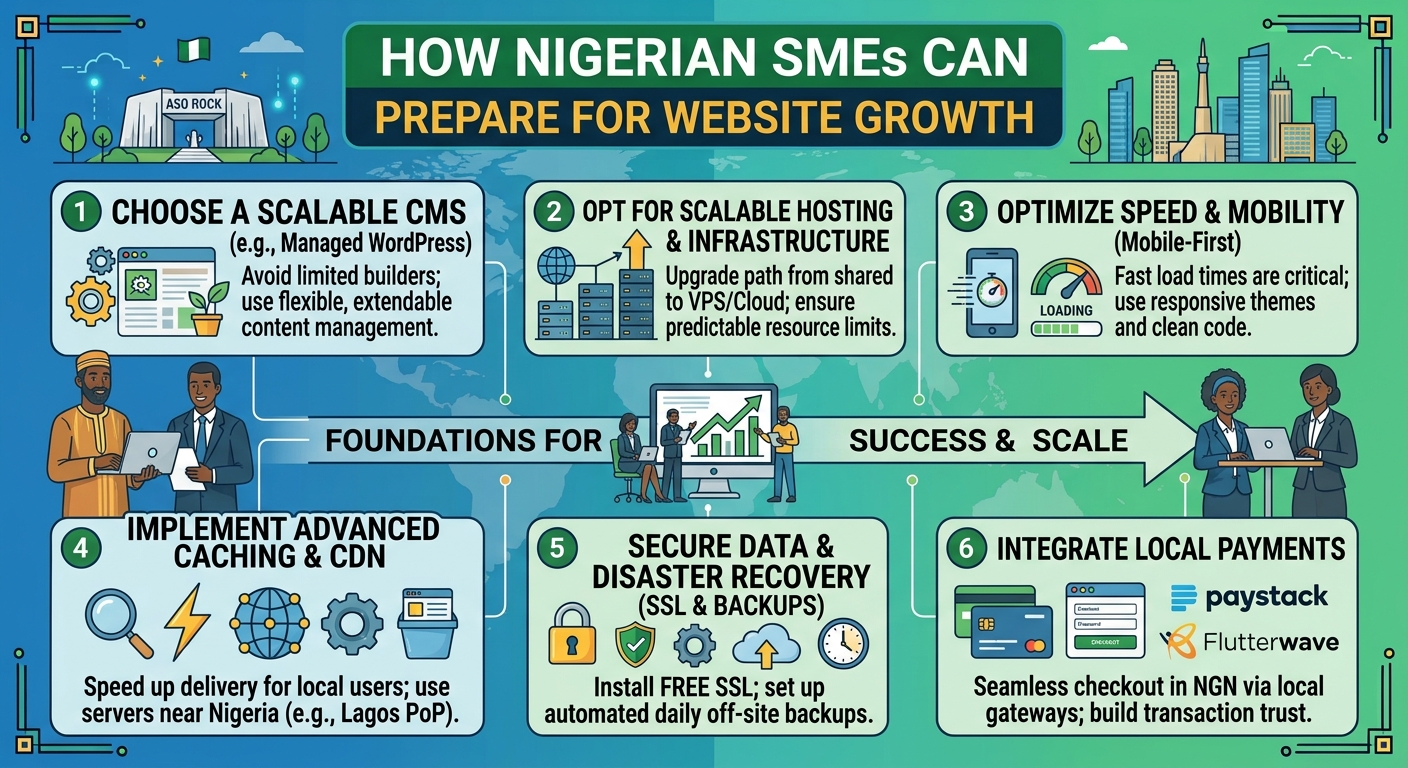
How Nigerian SMEs Can Prepare for Website Growth

For many Nigerian businesses, a website begins as a simple online presence: a few pages, contact details and information about the organisation. As the business attracts more customers, publishes more content or starts selling online, that same website may need to handle more visitors, files, enquiries and online activity.

Planning for growth early can help you avoid unnecessary downtime, slow loading speeds and a rushed move to a more powerful hosting service. Whether you run an SME, church, law firm or professional practice, the goal is to build a website foundation that can support your organisation as it develops.

Start with a clear picture of your website goals

Website growth is not only about having more visitors. A website may grow because it has more pages, receives more enquiries, stores larger files, adds online payments or connects with other business tools.

Before choosing a hosting plan, consider what you want the website to do over the next one to three years. Useful questions include:

  • Will the website mainly provide information, or will it support online sales and bookings?
  • Will you publish regular articles, announcements, sermons, legal resources or downloadable documents?
  • How many people will need to update the website?
  • Will customers contact you through forms, live chat or other online tools?
  • Could seasonal campaigns or special events bring a sudden increase in visitors?

These answers help you choose a suitable starting point and identify the features your hosting account may need later.

Choose a domain name that can grow with the organisation

Your domain is one of the most important parts of your online identity. It appears on your website, email addresses, marketing materials and search results. A domain that is clear, easy to remember and closely connected to your organisation can remain useful as your business expands.

Avoid choosing a name that is too narrow if you expect your products, services or location to change. For example, a domain based on one temporary product may become limiting if you later offer a wider range of services.

Before purchasing a domain, check that:

  • The name is easy to spell and pronounce.
  • It does not create confusion with another organisation.
  • Your business can use it consistently on social media and printed materials.
  • The registration details and renewal arrangements are properly managed.

Keep a record of the domain account, renewal information and the person responsible for managing it. Losing access to a domain can disrupt both the website and business email.

Select hosting based on needs, not just the lowest price

Affordable hosting can be a sensible starting point for a new website, but the cheapest option is not always the best long-term choice. Hosting affects website performance, storage, reliability, security features and the ease of managing future upgrades.

Many small websites can begin with a standard hosting plan. This may be appropriate for a company profile, church website, blog or professional service website with moderate traffic. As the website becomes more demanding, you may need additional resources or a different hosting environment.

When comparing hosting options, look beyond storage space. Consider:

  • Resources: Check whether the plan provides enough processing capacity, memory and storage for the website.
  • Scalability: Find out whether you can upgrade without rebuilding the entire website.
  • Support: Choose a provider with a practical way to get assistance when technical problems arise.
  • Backups: Confirm how backups are handled and how restoration works.
  • Security: Look for sensible security controls and support for secure website connections.
  • Management: A straightforward control panel can save time for teams without specialist technical knowledge.

The right plan should balance present needs with a realistic path for future growth.

Understand when an upgrade may be necessary

A hosting upgrade may be worth considering when your website becomes slow, experiences errors during busy periods or regularly reaches its allocated resources. An increase in traffic is one possible reason, but it is not the only one. Large images, poorly optimised software, excessive plugins and inefficient website code can also affect performance.

Before upgrading, identify the cause of the problem. Improving image sizes, removing unused plugins, updating software and reviewing the website configuration may solve some issues without requiring a more powerful plan.

If the website has genuinely outgrown its current environment, you may consider options such as a virtual private server or cloud hosting. These services can provide more control and resources, but they may also require more technical administration. Choose them because your website has a clear need, not simply because they sound more advanced.

Build performance into the website from the beginning

A fast website is easier for visitors to use and can make it simpler for potential customers to find information. Performance is especially important for people browsing on mobile devices or using inconsistent internet connections.

Good preparation includes:

  • Compressing images before uploading them.
  • Using modern, well-maintained website themes and extensions.
  • Removing pages, files and plugins that are no longer needed.
  • Keeping the content structure simple and easy to navigate.
  • Testing important pages on mobile devices.
  • Monitoring loading speed after major design or software changes.

Do not assume that a powerful hosting plan can compensate for an inefficient website. Hosting and website optimisation should support each other.

Protect the website, domain and business data

Growth often means that a website holds more valuable information. This may include customer enquiries, staff access details, documents, payment-related information or private organisational content. Security should therefore be part of the plan from the start.

Use strong, unique passwords for hosting, domain and website administration accounts. Limit access to people who need it, and remove access when someone leaves the organisation or changes responsibilities. Keep the website software, themes and extensions updated, and use secure connections for website visitors.

Backups are equally important. A backup should be more than a feature listed in a hosting package; you should understand what is backed up, how often it happens and how the website would be restored. Keep an independent copy where appropriate, and periodically confirm that restoration is possible.

Plan content and administration as the website expands

A growing website needs an organised content process. Without one, pages can become outdated, duplicated or difficult to manage. Assign responsibility for reviewing contact details, service descriptions, announcements and downloadable documents.

For churches, this may include service schedules, event information and media resources. For law firms, it may include practice areas, team profiles and educational articles. For SMEs, it could include product details, customer guidance and frequently asked questions.

Create a simple schedule for checking important content. Decide who approves changes and who has permission to publish them. This reduces mistakes and helps the website remain useful as the organisation changes.

Prepare for changes in traffic and demand

Website traffic may not increase gradually. A marketing campaign, media mention, public event, product launch or seasonal service can bring many visitors in a short period. Before an important campaign, check that your hosting plan, website software, contact forms and payment processes are ready.

Remove unnecessary files, test the main visitor journeys and make sure your team knows how to respond to enquiries. If you expect an unusually busy period, speak with your hosting provider about available upgrade options before the campaign begins.

Create a practical growth plan

You do not need to predict every future requirement. A simple plan is enough to make growth easier to manage. Record your current hosting package, domain details, website software, responsible team members and backup process. Then identify the signs that would trigger a review, such as increasing traffic, slower performance, more storage requirements or a new online service.

Review the plan whenever the organisation launches a major service, changes its website or begins a new campaign. This approach helps you make informed hosting decisions rather than waiting for a problem to force an urgent change.

Conclusion

Preparing for website growth means choosing a dependable foundation and maintaining it carefully. Start with clear goals, select a suitable domain and hosting plan, protect access and data, optimise performance and understand how upgrades work. With these steps in place, Nigerian SMEs, churches and professional firms can build an online presence that is easier to manage today and better prepared for tomorrow.

How Many Domains Can One Business Own?

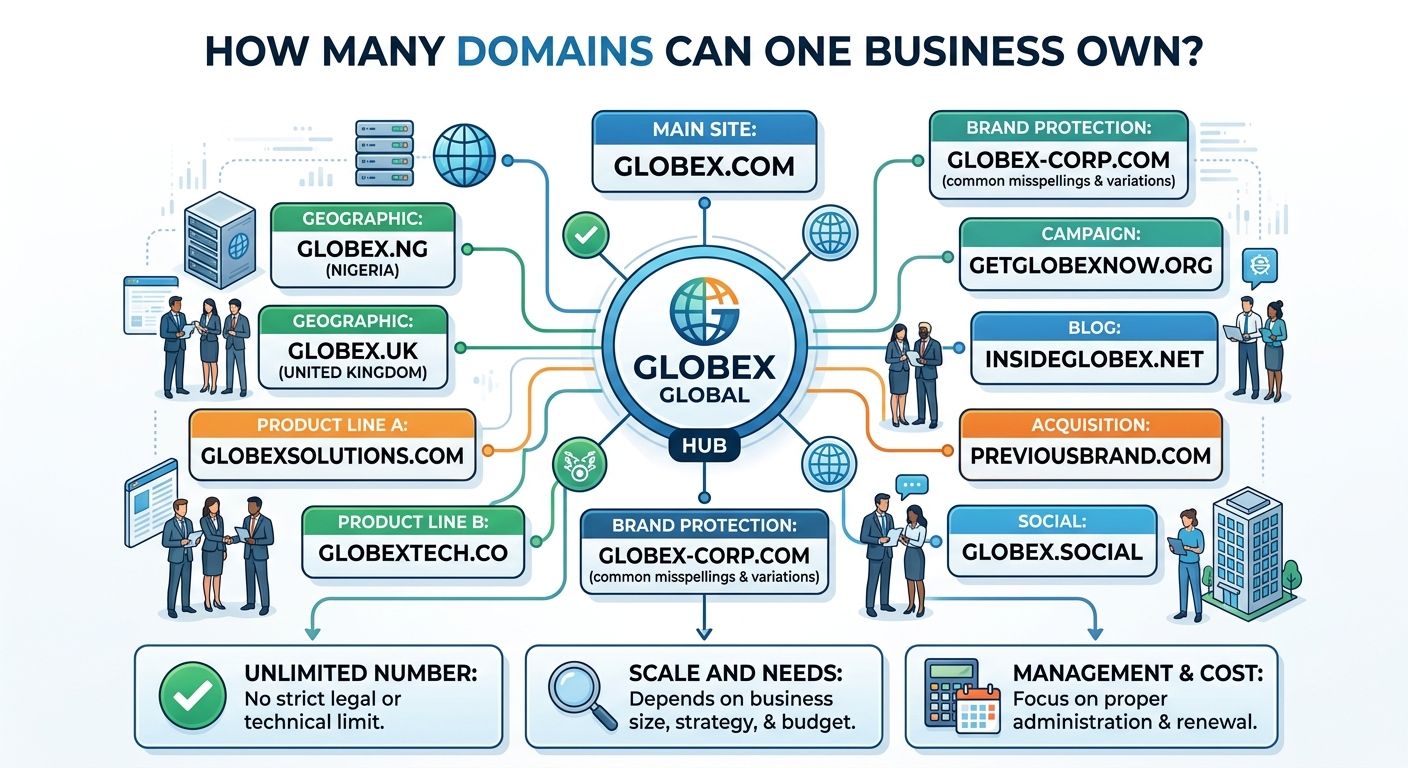
There is usually no single limit on the number of domain names one business can own. A company may register one domain for its main website or manage dozens of domains for different brands, services, locations and marketing campaigns.

However, the practical limit depends on the domain registrar, the domain extensions you choose, registration requirements, budget and your ability to manage the portfolio properly. For businesses in Nigeria, this may include a combination of international extensions such as .com and country-code domains such as .ng or other relevant options.

Before buying several domains, it is important to understand why you need them and how each one will be used. A well-planned domain strategy can protect your brand and support growth. Buying names without a clear purpose can create unnecessary renewal costs and administrative work.

Is there a legal limit on business domain ownership?

In most cases, there is no general rule that restricts a business to one domain name. Businesses can register multiple domains as long as they follow the terms set by the registrar and the relevant domain registry.

Different domain extensions may have different requirements. Some are open for general registration, while others may require proof of eligibility, local presence or specific business information. Registration policies can also vary between providers and may change over time.

A business should provide accurate information when registering domains and should avoid using names that infringe another organisation’s trademark or identity. Owning a domain does not automatically give a business the right to use a protected brand name.

Why would a business need multiple domains?

Most companies do not need a large collection of domains, but owning more than one can be useful in several situations.

Protecting your business name

A company may register its main brand under more than one extension to reduce the risk of confusion or impersonation. For example, a business might use one domain for its website while registering a related extension to prevent another party from using a similar address.

These additional domains can redirect visitors to the main website. They may also help customers recognise the official online presence of the business.

Supporting different brands or services

A company with several brands may use separate domains for each brand. A hosting company, for example, could have one main corporate domain and different domains for specialised services, provided each website has a clear business purpose.

Separate domains can make it easier for customers to find information about a particular product or service. They can also help keep different audiences and website content organised.

Serving different locations

Businesses operating in multiple cities, regions or countries may use domains that reflect their target markets. A Nigerian business may choose a country-code domain for its local audience and an international extension for customers outside Nigeria.

A location-specific domain can support a local marketing strategy, but it should not be purchased simply because it is available. The website, contact information and content should clearly serve the intended market.

Using campaign or promotional domains

Some businesses register short, memorable domains for advertising campaigns, events or specific landing pages. These domains can be easier to communicate in print, radio, social media or offline marketing.

Campaign domains should be managed carefully. When a campaign ends, the business must decide whether to renew the domain, redirect it to a permanent page or allow it to expire.

Redirecting common variations

Customers may type a business name incorrectly or use a different extension by mistake. Registering a small number of common variations can help direct those visitors to the correct website.

This approach is most useful when the variations are closely connected to the brand. Registering many random spellings can quickly become expensive without providing meaningful protection.

How many domains does a typical business need?

There is no ideal number for every business. A small business, church, law firm or growing enterprise may only need one primary domain. A second domain may be worthwhile for brand protection, a major service or a distinct location.

Larger organisations may need more domains because they operate multiple brands, regions or online services. The important question is not “How many can we buy?” but “What role does each domain serve?”

Before registering a domain, write down its purpose. A simple review can include:

  • What website, page or service will use this domain?
  • Will it redirect to another website or host separate content?
  • Does it protect a valuable brand name?
  • Who is the intended audience?
  • How will the domain be promoted and maintained?
  • Is the expected benefit greater than the ongoing renewal cost?

What does owning multiple domains involve?

Every domain normally needs to be renewed according to the registrar’s schedule. Owning several domains means tracking renewal dates, registration details, DNS settings and access permissions.

A domain portfolio can become difficult to manage when domains are registered under different accounts or email addresses. For better control, businesses should keep domains in an account owned by the organisation rather than by an individual employee, agency or contractor.

Maintain a simple domain register containing:

  • The domain name and extension
  • The registrar and account owner
  • The registration and renewal dates
  • The purpose of the domain
  • Where the domain points, such as a website, email service or redirect
  • The staff members or providers authorised to manage it

This information makes it easier to renew important domains and remove unused ones. It also reduces the risk of losing access when a staff member leaves the business.

Domains, websites and email are separate services

Buying a domain does not automatically create a website. It is the address visitors use to find your online presence. Website files require hosting, while business email may require a separate email service or hosting arrangement.

A domain can point to a website hosted on shared hosting, a VPS or cloud hosting, depending on the organisation’s technical and performance requirements. Several domains can also point to the same website through redirects or domain configuration.

Businesses should be careful when changing DNS settings. Incorrect records can make a website or email service unavailable. If you are unsure which records to change, ask your hosting provider or technical administrator before making updates.

How to manage multiple domains securely

Domain names are valuable business assets, especially when they are connected to a website, email accounts and customer communications. Basic security controls can help protect them.

  • Use a strong, unique password for the registrar account.
  • Enable two-factor authentication when the provider offers it.
  • Keep account recovery email addresses and phone details current.
  • Limit account access to people who need it.
  • Record renewal dates and enable reminders or automatic renewal where appropriate.
  • Review domain permissions when an employee or service provider no longer works with the business.
  • Be cautious with emails requesting urgent domain transfers or payment changes.

Businesses should also confirm that important domains are registered using accurate legal and contact information. Keep copies of invoices and registration records for internal administration.

Should you register every available domain extension?

No. Registering every possible extension is rarely necessary. The best choice depends on your brand, customers, location and long-term plans.

Start with the domain that will be your primary public address. Then consider a limited number of alternatives that protect the brand or support a genuine business objective. Avoid buying domains solely because they are cheap or available if there is no plan to use or monitor them.

It is also wise to check the name before registration. Search for possible trademark conflicts, confusingly similar businesses and meanings that could create problems in your target market.

When should a business let a domain expire?

A domain may no longer be useful when a campaign has ended, a service has been discontinued or a brand has been replaced. Before allowing it to expire, check whether it is connected to website redirects, email addresses, advertising materials or customer bookmarks.

Unused domains can sometimes be redirected to a current website, but keeping them indefinitely is not always the best option. Review the portfolio periodically and retain domains that provide clear protection or business value.

Conclusion

One business can usually own multiple domain names, and there is no universal number that suits every organisation. The right portfolio may contain one domain or several, depending on your brands, services, markets and marketing plans.

Choose domains with a clear purpose, keep them in a business-controlled account and track renewals carefully. If you need help connecting domains to hosting, email or a new website, a reliable hosting provider can help you manage the technical setup while you focus on running the business.

Essential Pages Every Small Business Website Needs

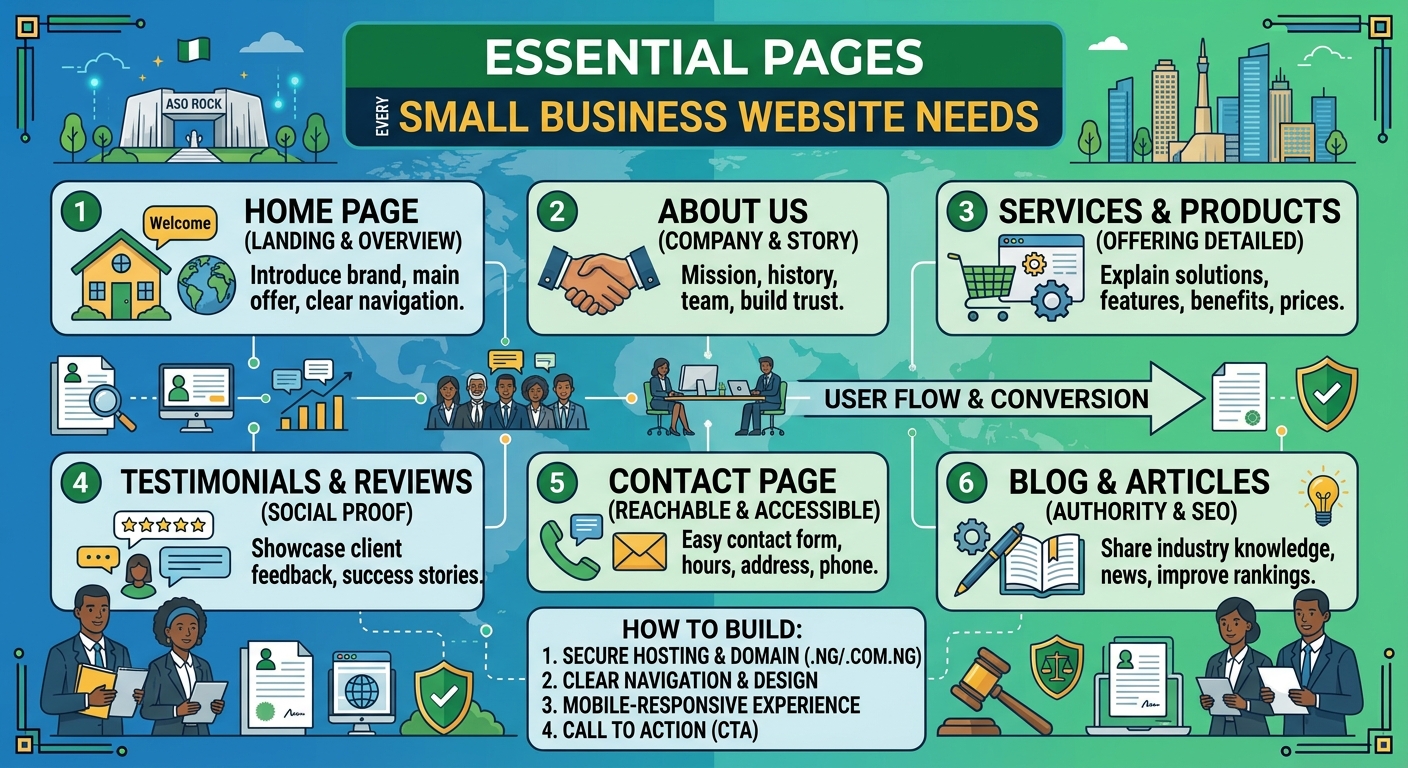
A business website should do more than look professional. It should answer customers’ questions, explain what you offer and make it easy for the right people to contact you. Whether you run a small company, church, law firm or growing professional practice in Nigeria, the pages on your website play an important role in turning visitors into enquiries.

You do not need dozens of pages to get started. A clear, well-organised website with the right information is usually more useful than a large site that is difficult to navigate. The following pages form a practical foundation for most small business websites.

1. Home page

Your home page is often the first page a visitor sees. It should quickly communicate who you are, what you do and who you help. Avoid making visitors search for basic information.

A useful home page typically includes:

  • A clear headline explaining your main service or value
  • A short introduction to the business
  • Your most important products or services
  • Reasons customers should consider working with you
  • A prominent call to action, such as Request a consultation or Contact us
  • Links to important pages and contact details

For example, a law firm may lead with its main areas of practice, while a church may highlight service information, location and upcoming activities. The content should reflect what visitors are most likely to need first.

2. About page

The About page gives visitors more context about your organisation. It is an opportunity to explain your experience, approach and values in a straightforward way.

Good About page content may include:

  • When and why the business was established, if relevant
  • The problem your organisation helps customers solve
  • Your team or leadership
  • Your working principles
  • The communities or types of customers you serve

Keep the focus on the reader. Instead of listing background information without context, explain how your experience benefits clients, customers, members or the wider community. Use genuine photographs where appropriate, and only include claims that you can support.

3. Services or products page

Visitors need a clear explanation of what they can buy or request from you. A Services page can provide an overview, with separate pages for important services that require more detail.

For each service, explain:

  • What the service includes
  • Who it is designed for
  • The problem it addresses
  • What the process involves
  • What the visitor should do next

A hosting provider, for instance, may separate website hosting, domain registration, VPS and cloud hosting into clearly described options. A law firm may organise its content by practice area. Clear structure helps visitors find relevant information without needing to contact you simply to understand your basic offer.

4. Contact page

Your Contact page should make getting in touch simple. Include the contact methods your organisation actively monitors, such as an email address, telephone number, office location or social media channel.

Depending on your organisation, you may also include:

  • Business hours or response hours
  • Directions or service-area information
  • A general enquiry email
  • Information about what to include in an enquiry
  • Links to relevant social media profiles

Do not include contact channels that are rarely checked. A visitor who receives no response may assume that the business is inactive. If you use a contact form, keep it focused on essential information and explain what happens after submission.

5. FAQ page

An FAQ page answers common questions before they become obstacles. It can reduce repeated enquiries and help potential customers feel more confident about contacting you.

Questions may cover:

  • How your service works
  • Who can use your service
  • What information customers need to provide
  • Typical timelines or stages
  • Payment or booking procedures
  • Support and after-sales communication

Use real questions that customers ask, rather than filling the page with generic statements. Review the page periodically as your services and customers’ needs change.

6. Testimonials, case studies or trust page

New visitors often want evidence that your organisation is reliable. A testimonials or case studies page can show how you have helped customers, provided that the content is genuine and used with permission.

A useful case study can describe the customer’s situation, the service provided and the result without making exaggerated promises. Testimonials should be accurate and clearly attributed where the person or organisation has agreed to be identified.

If testimonials are not appropriate for your organisation, consider a trust-focused page explaining your process, professional approach, service standards or community work. Trust should be built through clear information, not unsupported claims.

7. Blog, news or resources page

A blog or resources section is not essential for every small business at launch, but it can be valuable when you have useful information to share. Articles can answer customer questions, explain industry terms and demonstrate your knowledge.

Possible topics include:

  • Guides to choosing a service
  • Answers to common customer problems
  • Explanations of technical or legal terms
  • Updates about your organisation
  • Practical advice for your local audience

Quality matters more than publishing frequently. An outdated page with several years of old announcements may create a poor impression, so only create a blog if you can maintain it realistically.

8. Privacy policy and other important policies

Visitors should be able to understand how your website handles personal information. A Privacy Policy can explain what information you collect, why you collect it and how people can contact you about their information.

You may also need other policy pages depending on your website and operations, such as terms of use, service terms, refund information or a cookie notice. The correct requirements depend on how your organisation operates and the information your website collects. Obtain appropriate professional advice where necessary, especially if your business handles sensitive information or operates in a regulated field.

9. A clear page structure and navigation

Essential pages are only useful if visitors can find them. Keep the main navigation short and use familiar labels such as Home, About, Services, Resources and Contact.

Check that important pages are accessible on mobile devices as well as larger screens. Make sure links work, headings are easy to scan and calls to action are visible without overwhelming the page. A visitor using a phone should not have to zoom in or scroll through a confusing menu to find your contact details.

How to prioritise your website pages

If you are launching a new website, start with the pages that support your immediate business goals. In many cases, this means:

  1. Home
  2. About
  3. Services or products
  4. Contact
  5. Privacy and relevant policy pages

Add FAQs, case studies and resources as you learn what visitors need. This approach can help you control website creation costs while still presenting a professional online presence. Reliable hosting and a suitable domain also provide the foundation for keeping these pages available to visitors.

Final thoughts

The best small business websites are not necessarily the largest. They are clear, trustworthy and easy to use. Start with the pages that answer your customers’ most important questions, keep the information accurate and give visitors a clear next step.

With the right page structure, dependable hosting and regular updates, your website can become a useful business tool rather than simply an online brochure.

Domain Name Tips for Nigerian Law Firms

For a Nigerian law firm, a domain name is more than a website address. It is part of the firm’s professional identity and may appear on letterheads, business cards, email signatures, legal articles and online directories. A clear, credible domain can make it easier for prospective clients to find the firm and feel confident when contacting it.

Choosing a domain name requires more thought than simply selecting an available word. The name should be easy to remember, connected to the firm’s identity and practical for use over many years. The following tips can help Nigerian law firms make a sound decision.

Choose a name that reflects the firm

The safest starting point is usually the firm’s established name or a clear abbreviation of it. A domain that closely matches the name clients already know can support brand recognition and reduce confusion.

For example, a firm might consider a domain based on:

  • The firm’s full name
  • A distinctive shortened version of the firm’s name
  • The firm’s initials, if they are already well known
  • The firm’s name combined with a relevant location or practice focus

Avoid names that are so broad or generic that visitors cannot tell which organisation operates the website. It is also wise to avoid unusual spellings, excessive hyphens and strings of numbers. These features can make a domain harder to communicate over the phone and easier to mistype.

Select an appropriate domain extension

The extension is the part after the final dot, such as .com or a Nigerian country-code extension. A Nigerian law firm may consider both a general commercial extension and an extension associated with Nigeria, depending on availability, eligibility requirements and its branding goals.

A Nigerian-focused extension can help communicate the firm’s connection to the local market. A .com domain may be familiar to a wider audience, particularly if the firm works with international clients. Neither choice automatically makes a website more trustworthy; the quality of the website, the firm’s professionalism and the accuracy of its information remain important.

Before registering a country-code domain, check the current requirements set by the relevant registry or accredited registrar. Requirements, documentation and available options can change. If the preferred name is available in more than one extension, registering suitable variations may help protect the firm’s online identity.

Keep the domain short, clear and easy to say

A good legal-services domain should be simple enough for a client to remember after hearing it once. Read the proposed name aloud and ask whether another person would know how to spell it.

Consider these practical checks:

  • Can someone type it correctly without seeing it written down?
  • Does it contain words that could be misunderstood when joined together?
  • Is it short enough to fit comfortably in an email address and printed material?
  • Will the name still make sense if the firm expands its services?

Do not select a highly specific domain if the firm may soon add new practice areas or open offices in other Nigerian cities. A flexible name can remain useful as the business develops.

Check name availability and possible conflicts

Domain availability is not the same as permission to use a name. Before registering a domain, the firm should consider whether it is confusingly similar to another law firm, business or recognised brand. A domain that appears available may still create disputes or reputational problems.

Search for similar business names and review relevant business and professional records where appropriate. If the domain will be used as part of a broader brand, the firm may also wish to obtain professional advice about name protection and intellectual property considerations. This is especially important where the proposed name is distinctive, commercially valuable or similar to an existing organisation.

Register the domain in the correct legal or business identity where possible, rather than using an individual employee’s personal details. This helps the firm maintain control if staff or service providers change.

Use a professional email address

A domain becomes more valuable when it is used consistently for professional email. Addresses such as info@yourfirmdomain or contact@yourfirmdomain can look more established than a free personal email address and make it easier for clients to identify official correspondence.

Law firms should create separate addresses for common functions, such as general enquiries, billing, recruitment or specific departments. Personal staff addresses should follow a consistent format. The firm should also establish clear procedures for managing former employees’ accounts and preserving important business correspondence.

Email authentication and strong account security are important because legal practices handle confidential client information. Use strong, unique passwords, enable multi-factor authentication where available and restrict administrative access to trusted personnel.

Register the domain through a reliable provider

When comparing domain providers, look beyond the first-year registration offer. Check the renewal terms, domain management tools, support options, transfer process and the way ownership details are recorded. A low introductory price may not represent the long-term cost or service experience.

The firm should receive direct access to its domain account and retain control of the account’s main email address. Avoid arrangements where a web designer or employee is the only person who can renew, update or transfer the domain. Service providers can assist with management, but ownership and administrative control should remain with the firm.

Sonhosting provides domain and web hosting services for organisations that want a simpler way to manage their online tools. When choosing any provider, Nigerian law firms should confirm that the selected plan supports their domain extension, email needs and expected website requirements.

Protect the domain account

A domain account can control the firm’s website and email, so it deserves the same care as other important business systems. Limit access to people who need it and keep recovery information current.

Useful safeguards include:

  • Using a dedicated business email account for domain administration
  • Enabling multi-factor authentication when the provider offers it
  • Keeping registrar login details out of shared public documents
  • Reviewing account users and permissions periodically
  • Enabling available domain-locking or transfer-protection features
  • Keeping accurate records of renewal dates and account ownership

Staff should also be trained to recognise renewal scams. Fraudulent messages may imitate a registrar and ask the recipient to pay an urgent invoice or click a suspicious link. Verify renewal notices by signing in through the provider’s official website rather than relying on an unexpected email link.

Plan for renewals and continuity

Allowing a domain to expire can interrupt the firm’s website and email. In some cases, the name may become difficult or costly to recover. Assign responsibility for renewals to a role rather than relying on one person’s memory.

Keep a simple record containing the registrar, account administrator, renewal date, payment method and recovery contact. If the registrar supports automatic renewal, consider whether it is suitable for the firm and make sure the payment details remain valid. Automatic renewal should supplement, not replace, periodic account reviews.

Review the domain portfolio at least periodically. Remove unused domains only after confirming that they are not connected to old email addresses, redirects, marketing materials or important client communications.

Make the website match the domain

A professional domain should lead to a website that is accurate, secure and easy to use. The site should clearly identify the firm, explain its services in understandable language and provide reliable contact information. Check that the domain works correctly on mobile devices and that links, email addresses and forms are maintained.

Use secure website hosting and keep the website software updated. A hosting plan should provide the resources and support the site needs without making management unnecessarily complicated. For a small or growing practice, the right choice may differ from the requirements of a firm with a large content library or several locations.

Review the domain as the firm grows

A domain decision should support the firm’s future, not only its current website. Reassess the firm’s online identity when there is a merger, name change, new office, major change in services or expansion into a different market.

Do not abandon an old domain immediately after a rebrand. Plan redirects, email continuity and communication with existing clients before changing addresses. Keep relevant records and monitor both domains during the transition so that enquiries are not lost.

Conclusion

The right domain name can give a Nigerian law firm a clear and dependable online identity. Choose a name that matches the firm, check for possible conflicts, select an appropriate extension and register it under the firm’s control. Then protect the account, maintain professional email, renew the domain on time and connect it to a secure, useful website.

With a little planning, the domain can remain a stable business asset while the firm builds its reputation and serves clients online.

Domain Name Ideas for Small Businesses in Nigeria

Choosing a domain name is one of the first important decisions when creating a website for a small business in Nigeria. Your domain is the address customers use to find you online, share your business with others and decide whether your brand feels credible.

A good domain name should be easy to remember, simple to type and closely connected to your business. It should also leave room for your business to grow. Whether you run a shop, church, law firm, consultancy or service-based business, the right domain can make your website easier to promote.

This guide explains how to choose a domain name and provides practical ideas for Nigerian small businesses.

What makes a good domain name?

The best domain names are usually short, clear and easy to say aloud. A customer should be able to hear your domain name and understand how to type it without needing repeated explanations.

When comparing ideas, consider the following qualities:

  • Memorable: It should be easy for customers to recall after seeing or hearing it once.
  • Simple: Avoid unnecessary symbols, complicated spellings and long strings of words.
  • Relevant: The name should give people an idea of what your business does or what your brand represents.
  • Professional: Your domain should be suitable for email addresses, invoices, advertisements and business documents.
  • Flexible: Choose a name that still works if you add new products, services or locations later.

Should you choose a .ng or .com domain?

Many Nigerian businesses consider both a Nigerian country-code domain and a more widely recognised generic extension. The right choice depends on your audience, brand and availability.

A .ng domain can communicate a clear connection to Nigeria. It may be a natural fit for a business that serves customers primarily in Nigeria or wants its local identity to be visible in its web address.

A .com domain is familiar to many internet users and may suit a business that wants a broad or international presence. However, the exact domain you want may not be available under every extension.

Some businesses register more than one suitable domain and direct them to the same website. Before purchasing, check the availability, registration requirements and renewal terms for the extension you are considering.

Domain name ideas by business type

Retail shops and online stores

Retail businesses should choose a name that is easy to connect with products, shopping or the brand itself. If your shop has a distinctive name, using the brand alone is often the clearest option.

Examples of naming patterns include:

  • Brand name: yourbrand.ng
  • Brand plus shop: yourbrandshop.ng
  • Brand plus store: yourbrandstore.com
  • Product focus: yourbrandfashion.ng or yourbrandfoods.ng
  • Location plus brand: yourbrandlagos.ng, if the location is central to your identity

Avoid limiting the domain to one product if you may expand your catalogue. For example, a name based only on shoes may become unsuitable if you later add bags, clothing or accessories.

Professional services and consultancies

Consultants, accountants, marketers, designers and other professionals can usually build a strong domain around their name, firm name or main service.

  • yournameconsulting.com
  • brandadvisory.ng
  • brandpartners.ng
  • brandsolutions.com
  • brandprofessionalservices.ng

Where possible, avoid overly broad words that make the business difficult to distinguish from competitors. A distinctive brand combined with a clear service word is often easier to promote.

Law firms and legal practitioners

Law firms need a domain that looks professional and is easy for clients to identify. A firm name, surname combination or carefully chosen legal brand may work well.

  • firmname.com
  • firmname.ng
  • firmnamelegal.ng
  • firmnamechambers.com
  • surnamepartners.ng

Check that the name accurately represents the practice and does not create confusion with another firm. It is also sensible to consider how the domain will appear on legal documents, email signatures and professional directories.

Churches and faith-based organisations

Churches and ministries often need a domain that is easy for members to remember and share. A concise version of the organisation’s name is usually preferable to a long phrase.

  • churchname.org
  • churchname.ng
  • churchnameonline.org
  • churchnamecity.org
  • churchnamefamily.org

If the organisation has multiple branches, consider a main domain that can support pages or sub-sections for each location. This can create a more organised online presence than registering a completely separate name for every branch.

Schools, training centres and education services

Educational organisations can use their name, subject area or learning focus in the domain. Examples include:

  • schoolname.edu.ng, where the organisation meets the applicable requirements for that extension
  • schoolname.ng
  • schoolnameacademy.com
  • brandlearning.ng
  • brandtraining.com

Use wording that parents, students or professional learners can understand quickly. A domain that is easy to pronounce is especially useful when it will be shared during events, announcements or phone conversations.

Creative ways to develop a domain name

If your exact business name is unavailable, do not immediately choose a complicated alternative. Try adding a relevant word that improves clarity without making the name difficult to remember.

You could add:

  • A service word: studio, legal, foods, homes, health or consulting
  • A location: Nigeria, NG or a city associated with your business
  • A business descriptor: group, company, agency, hub or centre
  • An action word: get, shop, book, visit or join, where it fits the brand

For example, a business called Bright Path might consider BrightPath.ng, BrightPathConsulting.com or BrightPathNigeria.ng, depending on its services and audience.

Common domain name mistakes to avoid

A domain may be technically available but still be a poor choice for your business. Review these common problems before registering:

  • Excessive length: Long domains are harder to type, remember and share.
  • Confusing spelling: Unusual spellings may force customers to ask how to find you.
  • Too many hyphens or numbers: These can be difficult to communicate verbally and may be mistyped.
  • Unclear meaning: A name that sounds unrelated to your business may require extra explanation.
  • Short-term wording: Avoid a domain tied to one product or temporary campaign if you plan to expand.
  • Potential brand conflict: Before registering, check whether the name could be confused with an existing business or protected brand.

A simple checklist before you register

  1. Write down several possible names instead of relying on one idea.
  2. Say each name aloud and ask someone else to spell it.
  3. Check how it looks in lowercase, without spaces.
  4. Confirm that it suits your business and target customers.
  5. Check the domain’s availability through a domain registrar.
  6. Review the registration and renewal terms before completing the purchase.
  7. Consider securing closely related extensions if they are important to your brand.
  8. Use the domain consistently on your website, business email, social profiles and marketing materials.

Make your domain part of a complete online presence

A domain name is only one part of your business website. You also need reliable hosting, clear website content, professional email and a design that works well on mobile devices. These elements help visitors understand your offer and take the next step, such as calling, making an enquiry or placing an order.

When choosing a hosting provider, look for a service that makes domain management and website setup straightforward. Keeping your domain and hosting details organised can save time as your business grows.

Final thoughts

The best domain name for a Nigerian small business is clear, memorable and suitable for the future. Start with your brand, consider whether a .ng or .com extension fits your audience, and test every idea for spelling, pronunciation and professionalism.

Take time to compare several options before registering. A carefully chosen domain can give your business a stronger foundation online and make it easier for customers to find and trust you.

Your Cart

©2018 - currentyear Sonhosting • By Digital Nigeria - RC 7487481
All Rights Reserved
Powered by ShootOut Now Services