Domain Privacy and Security: What Website Owners Should Know

Domain Privacy and Security: What Website Owners Should Know

Your domain name is more than a web address. It may lead customers to your website, business email, online store or booking system. If an unauthorised person takes control of it, your website can become unavailable, your email can stop working and customers may lose confidence in your business.

Domain privacy and domain security are related, but they solve different problems. Privacy helps limit the amount of personal contact information displayed in public registration records. Security helps prevent unauthorised changes, transfers or account access. A responsible website owner should understand both.

What domain privacy means

When you register a domain, the registrar collects contact and registration details. Some registration information may be available through public domain lookup services, although the exact information shown depends on the domain extension, registrar and applicable policies.

Domain privacy, sometimes called WHOIS privacy, is a service or registrar feature that replaces or masks certain personal contact details in public records. Instead of displaying a private individual’s email address or phone number, the record may show a privacy service or a method for contacting the domain holder indirectly.

This can be useful for entrepreneurs, creators and small organisations that do not want personal contact details exposed unnecessarily. It may reduce unwanted messages, automated spam and opportunistic contact.

Privacy does not mean that the registrar has no record of the domain owner. The registrar may still retain accurate registration information and may disclose it where required by law, policy or a valid request. Domain privacy is therefore not a way to make a domain anonymous.

Privacy is not the same as security

A private registration record does not stop someone from guessing your password, accessing your registrar account or tricking support staff into changing domain settings. It also does not protect your website from malware, weak WordPress plugins or stolen hosting credentials.

Think of privacy as reducing unnecessary public exposure. Think of security as protecting control of the domain and the services connected to it.

Protection What it helps with What it does not solve
Domain privacy Limits personal details shown in public registration records Unauthorised account access or website attacks
Strong registrar password Reduces the chance of account takeover Every possible form of phishing or social engineering
Multi-factor authentication Adds another verification step during login Problems caused by lost recovery access
Transfer lock Helps prevent an unauthorised domain transfer Compromised registrar credentials or incorrect ownership records
SSL certificate Encrypts connections between visitors and a website Protection of the domain account itself

Why domain security matters to a business

A domain often connects several important services. The website may use it for customer enquiries, while domain-based email may be used for invoices, password resets and supplier communication. DNS records may also connect the domain to an online store, marketing platform or other business tools.

If an attacker changes the DNS records, visitors could be sent to the wrong website. If email-related records are changed, messages may be delayed, redirected or rejected. A domain takeover can therefore affect more than the website itself.

This is especially important for Nigerian small businesses and professionals building trust online. A business may rely on a mobile-first audience, online enquiries and business email even if most of its operations remain offline. Losing access to the domain can interrupt customer communication at a critical time.

Practical steps to protect your domain

1. Register the domain in the business owner’s name

Use accurate ownership and contact information. A domain registered only through a developer, former employee or agency can create problems when that person becomes unavailable. Your organisation should know who legally owns the domain and how to access the registrar account.

Keep a private record of the registrar, renewal date, account email and recovery method. Do not publish sensitive login details in a shared document or send them casually through chat.

2. Use a unique, strong password

The registrar password should not be reused for email, social media, WordPress or hosting. A password manager can help create and store a long, unique password without requiring you to memorise every login.

Be cautious with messages claiming that a domain is about to expire or that you must urgently confirm payment. Rather than clicking an unexpected link, sign in through the registrar’s known website or contact its support team using an official channel.

3. Enable multi-factor authentication

Where available, multi-factor authentication adds a second check after the password. This can make account access more difficult for someone who obtains the password alone. Make sure the business has a secure recovery method and that more than one authorised person understands the recovery process.

4. Keep transfer protection enabled

Many domain registrars provide a transfer lock or similar setting. It is designed to reduce the risk of an unauthorised transfer to another registrar. Check the lock before making legitimate changes, such as moving the domain to a new provider, and restore it afterwards if appropriate.

5. Monitor renewals

An expired domain can cause website and email disruption. Automatic renewal may help, but it should not replace monitoring. Confirm that the payment method is current, renewal notices reach an actively monitored email address and the domain remains under the business’s control.

Do not rely only on a developer’s inbox for renewal reminders. Set an internal calendar reminder and retain access to the registrar account.

6. Limit access to DNS and hosting accounts

Give access only to people who need it. If a developer or staff member no longer works on the website, remove or review their access. Use separate accounts where possible rather than sharing one administrator login.

Domain security should be considered alongside hosting security. A reliable hosting arrangement, SSL certificate, current software, backups and managed WordPress support can address different parts of the overall risk. None of these replaces the others.

What domain privacy cannot hide

Privacy protection does not remove information from your own website. Visitors may still see the business name, contact details, physical address, social media accounts or information in your site’s legal and contact pages. That information should be accurate and appropriate for customers.

It also does not prevent someone from identifying a business through its website content, public records, email signatures or other online activity. The purpose is not to conceal a legitimate business. It is to avoid exposing unnecessary personal registration details in public domain records.

Some domain extensions or registration arrangements may have different privacy rules. Before registering a domain, review the registrar’s explanation of what information will be displayed and whether privacy protection is included or available.

A simple ownership check for website owners

  • Can the business log in to the registrar without relying on a former developer?
  • Are the registrant details accurate and controlled by the business?
  • Is the renewal date recorded in more than one place?
  • Is multi-factor authentication enabled where available?
  • Is the domain transfer lock active when no transfer is planned?
  • Are the registrar, hosting and business email accounts protected with separate credentials?
  • Does the business have current backups and a documented recovery contact?

The main takeaway

Domain privacy can reduce unnecessary exposure of personal registration information, but it is only one part of protecting a digital business. The most important foundation is clear ownership: your business should control the domain, registrar account, hosting account and domain-based email.

For a Nigerian business or organisation, combining accurate ownership records with strong passwords, multi-factor authentication, renewal monitoring, transfer protection and dependable hosting creates a more resilient online presence. The goal is not to make technology complicated. It is to make sure customers can continue finding, contacting and trusting your business.


Cloud Hosting vs VPS Hosting for Business Websites: Which Is Right for You?

Cloud Hosting vs VPS Hosting for Business Websites: Which Is Right for You?

Choosing between cloud hosting and VPS hosting can be confusing, especially when both options appear to offer better performance than basic shared hosting. For a small business, the important question is not which technology sounds more advanced. It is which hosting arrangement suits your website, budget, traffic, technical confidence and plans for growth.

A business website needs more than server space. Hosting affects how reliably customers can reach you, how quickly pages load, how easily your website can be maintained and how much technical work your team must handle. This matters for Nigerian businesses and entrepreneurs serving customers through mobile devices, online enquiries, bookings, shops or professional services.

Below is a practical comparison of cloud hosting and VPS hosting, including when each option may make sense.

What is VPS hosting?

VPS means Virtual Private Server. A physical server is divided into separate virtual environments. Each VPS receives an allocated share of resources such as processing power, memory and storage, and operates with its own software environment.

Unlike basic shared hosting, a VPS generally gives you more control and greater separation from other customers on the physical server. You may be able to choose server software, configure applications and adjust settings that are not available on a simpler hosting plan.

That control is useful for websites or applications with specific technical requirements. However, it also creates responsibility. An unmanaged VPS may require knowledge of server administration, updates, firewalls, backups, monitoring and troubleshooting. If those responsibilities are outside your experience, a managed VPS or professional support may be more suitable.

What is cloud hosting?

Cloud hosting runs a website or application across a network of connected servers rather than relying on one physical server alone. The exact setup differs between providers, but the general aim is to provide flexible access to computing resources and reduce dependence on a single machine.

Cloud hosting is often chosen for websites whose resource needs can change. A campaign, product launch or busy period may create more visitors than usual. A cloud environment may make it easier to increase resources or distribute workloads, depending on how the service is designed and managed.

Cloud hosting is not automatically unlimited, maintenance-free or faster in every situation. Its performance depends on the provider’s infrastructure, configuration, software and support. You still need sensible website optimisation, security controls and backups.

Cloud hosting vs VPS hosting at a glance

Factor Cloud hosting VPS hosting
Infrastructure Uses connected servers or a cloud platform Uses a virtual environment on a physical server
Scalability Often well suited to changing resource requirements Usually scaled by increasing the VPS plan or moving to another configuration
Control Varies by provider and service type Usually provides substantial control over the virtual server
Technical management May be managed or self-managed May be managed or self-managed
Typical fit Growing websites, applications and variable workloads Websites needing dedicated virtual resources or specific server settings
Main consideration Understand resource limits and billing structure Understand administration and maintenance responsibilities

Performance and reliability

Neither label guarantees a fast or consistently available website. Performance depends on factors such as processor and memory allocation, storage technology, network design, software configuration, database efficiency, image sizes and website code.

A VPS can perform very well when it is correctly sized and maintained. It may be a good choice when you want predictable virtual resources for a WordPress website, online application or business system. However, a poorly configured VPS can become slow or insecure, particularly when updates and monitoring are neglected.

Cloud hosting may be useful when demand changes or when the service is designed to distribute workloads across infrastructure. It can provide a convenient path for growth, but you should ask what happens when resources increase, whether scaling is automatic or manual, and how charges are calculated.

For a business website, reliability also includes practical support. A technically powerful plan is less useful if nobody can help diagnose a problem, restore a backup or explain what needs to be changed.

Scalability and business growth

Consider a small professional services firm that currently receives a modest number of visitors but expects to launch an online booking system. A VPS may provide the control and resources needed for the current website. Cloud hosting may be attractive if traffic and application usage are expected to fluctuate significantly.

Growth does not always mean you need cloud hosting immediately. Many businesses can start with a suitable managed hosting plan and upgrade when their website’s actual requirements become clearer. Paying for complex infrastructure before you need it can divert money from more useful improvements, such as better content, mobile usability, security and customer support.

Before choosing, estimate:

  • How many websites or applications will run on the service
  • Whether traffic is steady or likely to arrive in sudden peaks
  • How much storage and memory your website needs
  • Whether you need a database, custom software or background processes
  • How quickly you may need to add resources

Management and technical responsibility

The biggest practical difference for many small businesses is not the infrastructure. It is who handles the technical work.

With a self-managed VPS, you may be responsible for operating system updates, server hardening, user permissions, malware prevention, backups, log checks and recovery planning. These tasks are important even when the website itself is built with WordPress.

A managed service can reduce this burden, although you should confirm what management includes. Support for the hosting environment may not include website design, custom code, content changes or every WordPress issue.

Cloud hosting also comes in managed and self-managed forms. Do not assume that “cloud” means someone else handles security, updates and backups. Read the service description and ask clear questions before moving a business website.

Security, backups and ownership

Security is a shared responsibility. Your hosting provider may protect the underlying infrastructure, but your business still needs strong passwords, secure account access, updated software, sensible user permissions and a recovery plan.

Backups should be treated separately from hosting. Ask how often backups are created, how long they are retained, where they are stored and whether restoration is available. A backup that has never been tested may not be enough when a website fails.

Keep ownership and access under your control. The business should retain access to its domain account, hosting account, website administrator account and business email. Accurate registration details and monitored renewals also help prevent avoidable loss of essential digital assets.

Which option should a small business choose?

Choose VPS hosting when you need a controlled virtual server environment, more predictable allocated resources or specific software and configuration options. It can be a sensible fit for a growing website or application when the business has technical support available.

Choose cloud hosting when flexible resource growth, changing workloads or a platform designed for distributed infrastructure are important. It may suit businesses expecting variable demand or applications that need a more flexible operating environment.

Choose neither solely because it sounds more powerful. A managed WordPress or business hosting plan may be the better starting point for a typical company website, portfolio, organisation or small online shop. The right service should match your real requirements and the amount of technical responsibility you want to carry.

A practical decision process

  1. Describe the website’s purpose. A brochure website, online shop, membership platform and custom application have different hosting needs.
  2. Review current problems. Identify whether the issue is traffic, slow software, poor optimisation, limited resources, security or inadequate support.
  3. Decide who will manage the server. If no one on your team can maintain it, prioritise managed support.
  4. Ask about limits and scaling. Confirm memory, storage, traffic policies, upgrade steps and billing before committing.
  5. Check recovery arrangements. Understand backups, restoration and what support is available during an incident.
  6. Keep your accounts accessible. Make sure your organisation, not only a developer or former employee, controls domains and hosting credentials.

The useful takeaway

Cloud hosting is generally about flexible infrastructure and changing resource needs, while VPS hosting is generally about a controlled virtual server environment. Both can support serious business websites, but neither removes the need for good maintenance, security, backups and clear ownership.

For Nigerian small businesses and entrepreneurs, the most practical choice is the one that balances performance with support and cost. Start with the website you actually run, consider how it may grow, and choose a service that lets you focus on serving customers rather than becoming a full-time server administrator.

WordPress Hosting Requirements for Beginners

WordPress Hosting Requirements for Beginners

Starting a WordPress website can feel more technical than expected. You may have chosen a domain name, installed WordPress and selected a theme, only to discover unfamiliar terms such as storage, bandwidth, SSL, backups, PHP versions and managed hosting.

The good news is that most beginners do not need to become server administrators. The important task is choosing hosting that gives your website enough resources, protects your data and remains manageable as your business grows.

This guide explains the main WordPress hosting requirements in practical terms, with small businesses, entrepreneurs, creators and organisations in Nigeria and West Africa in mind.

What WordPress hosting actually provides

WordPress is the software used to build and manage your website. Hosting is the service that stores the website files and database on a server and makes them available when someone visits your domain.

A complete WordPress setup usually involves several connected services:

  • Domain registration: Your website address, such as yourbusiness.com or another suitable domain.
  • Web hosting: The server space and resources used to run your website.
  • WordPress: The content management system used to publish pages, posts, images and other content.
  • SSL security: The HTTPS connection that helps protect information exchanged between visitors and your website.
  • Backups: Copies of your website files and database that can help with recovery after a problem.
  • Email hosting: A service for professional addresses using your domain, such as [email protected].

These services may be purchased together or separately, but they need to work correctly as a system. A domain alone does not create a website, and WordPress cannot be used properly without suitable hosting.

The core hosting requirements for WordPress

1. Compatible server software

WordPress needs a hosting environment that supports the software it uses to run. This normally includes a web server, a database and a supported version of PHP, the programming language used by WordPress and many of its plugins and themes.

For a beginner, the practical question is not usually which server technology to configure. Ask whether the hosting provider supports current WordPress requirements and keeps the server environment appropriately maintained. A provider that offers WordPress installation and technical support can reduce the amount of configuration you need to handle yourself.

2. Enough storage

Storage is the amount of space available for your WordPress files, images, videos, databases, email and backups, depending on the hosting plan.

A simple business website with text, compressed images and a few pages may require far less space than a photography portfolio, online publication or website containing many downloadable files. Video files can consume storage quickly and are often better hosted on a dedicated video platform and embedded on the website.

Do not choose a plan based only on the largest storage figure. Check what is included, whether backups count towards the limit and whether email accounts share the same storage. Leave room for website growth rather than operating permanently at the limit.

3. Suitable performance resources

Website speed depends on more than storage. It is also affected by server resources, the website’s theme and plugins, image sizes, caching, code quality and visitor demand.

A small brochure website may work well on an entry-level WordPress hosting plan. A busy online store, membership website or content-heavy organisation may need more processing power and memory. If visitors regularly receive errors or pages take too long to load, the problem may be insufficient resources, poor website configuration or both.

For Nigerian businesses, performance is especially important because many customers access websites through mobile devices and varying network conditions. A lightweight website, optimised images and dependable hosting can improve the experience for visitors who cannot rely on fast connections.

4. SSL and HTTPS

SSL enables your website to use HTTPS. This helps encrypt information sent between a visitor’s browser and the website. Visitors will also expect to see a secure connection when submitting an enquiry, signing in or making a purchase.

HTTPS is not a substitute for strong passwords, updates or secure website practices. It is one part of a broader security approach. When choosing hosting, check whether SSL is supported and whether its installation and renewal are handled clearly.

5. Reliable backups

A WordPress website can be affected by a failed update, a compromised plugin, accidental deletion or an administrative mistake. Backups provide a recovery option when something goes wrong.

Before choosing a plan, find out:

  • Whether backups are included.
  • How frequently they are created.
  • How long backup copies are retained.
  • Whether you can restore the website easily.
  • Whether the backups are stored separately from the live website.

Backups should not be treated as an excuse to install unsafe plugins or ignore maintenance. They are a safety net, not a replacement for prevention.

Managed WordPress hosting: when is it useful?

Managed WordPress support is useful when you want to focus on your business rather than server administration and routine technical tasks. Depending on the service, managed support may help with WordPress installation, updates, troubleshooting, security guidance, backups or performance-related issues.

This can be valuable for an entrepreneur launching a first website, a small organisation without technical staff or a business that needs a reliable website but does not want to learn server management. It can also help when a website is important to daily operations and problems need to be explained in clear business language.

Managed hosting does not mean every website problem disappears automatically. You should still use trusted themes and plugins, protect administrator accounts and review changes before applying them. The benefit is having technical responsibilities handled or supported instead of managing everything alone.

How much hosting do you need?

Use your actual website plans to make the decision rather than choosing the most expensive package automatically.

Website type Typical requirements to consider
Basic business website Several pages, contact information, images, a contact form and professional email.
Personal or creator website More media storage, image optimisation, reliable backups and room for regular publishing.
Online store Stronger security, dependable backups, payment-related considerations, performance and support for periods of increased activity.
Growing organisation or publication More storage, stronger resources, multiple users, maintenance processes and a plan for future upgrades.

This is a starting framework, not a fixed technical rule. Your provider should consider the number of websites, expected visitors, email needs, media files, plugins and growth plans before recommending a plan.

Domain, email and ownership considerations

Your website is only one part of your online presence. A professional domain-based email address can make it easier for customers to recognise official communication and can support a more established image than a personal email address.

Keep accurate ownership and contact information for your domain. Make sure the business retains access to the domain account, hosting account, WordPress administrator account and email administration. If a developer, former employee or third party controls everything, the business may face avoidable problems when renewing the domain or changing providers.

Set renewal reminders and keep payment and account details current. An expired domain can affect the website, email and customer trust at the same time.

A simple setup workflow for beginners

  1. Define the website’s purpose. Decide whether it will present services, publish content, collect enquiries, sell products or support an organisation.
  2. Choose and register a suitable domain. Select a name that is relevant, easy to communicate and controlled by the business.
  3. Select hosting based on real requirements. Consider storage, expected traffic, email, support, backups and future growth.
  4. Install WordPress and SSL. Confirm that the website loads through HTTPS before publishing it widely.
  5. Set up administrator access securely. Use a unique password, limit unnecessary users and enable available account protections.
  6. Configure backups and updates. Establish a routine for keeping WordPress, themes and plugins maintained.
  7. Test the customer journey. Check the website on a phone, submit contact forms, test important links and confirm that business email works.

Questions to ask a hosting provider

  • Is the service suitable for WordPress beginners?
  • What technical support is included?
  • Are SSL and backups available?
  • How are website restores handled?
  • Can the plan support domain-based business email?
  • What happens if the website outgrows the current plan?
  • Will I retain access to my domain, hosting and website accounts?

Clear answers are often more useful than impressive technical terminology. A suitable provider should explain limitations, support processes and upgrade options in language you can understand.

The practical takeaway

For most beginners, the right WordPress hosting is not the plan with the biggest specifications. It is the service that matches the website’s purpose, provides compatible resources, protects the site with HTTPS and backups, supports professional email and gives you practical help when something goes wrong.

Choose a hosting arrangement that keeps your digital assets under your control while handling unnecessary technical complexity behind the scenes. That gives you more time to improve your website, serve customers and grow your business.

What to Do When Your Website Is Down

What to Do When Your Website Is Down

When your website is down, the first priority is not to panic or immediately change random settings. A website can become unavailable because of a hosting issue, an expired domain, a DNS problem, a WordPress error, a security incident or a small configuration change. Each cause needs a different response.

For a Nigerian business, an outage can mean missed enquiries, interrupted sales, failed bookings or customers wondering whether the business is still operating. The right approach is to confirm the problem, collect useful information and escalate it quickly when necessary.

First, confirm that the website is really down

Try opening the website from a different device or internet connection. For example, test it on your phone using mobile data instead of the Wi-Fi connection used by your computer. Ask someone outside your office or home to check it as well.

This simple test helps separate a website-wide problem from a local connection or DNS issue. If the site works for other people but not for you, restart your router, try another browser and clear the browser cache before making changes to the website itself.

Also check whether every page is affected. If the homepage loads but a particular page shows an error, the problem may be limited to a plugin, theme, page setting or internal link. If the hosting control panel, email or other services are also unavailable, the issue may be broader.

Record the exact error message

Do not describe the problem only as “the site is not working.” Save a screenshot and write down the exact message shown in the browser. Common examples include:

  • “This site can’t be reached”: The domain may not be resolving, or the server may not be reachable.
  • “Server not found”: There may be a domain or DNS problem.
  • “500 Internal Server Error”: The server encountered a problem, often involving website code, plugins or configuration.
  • “Error establishing a database connection”: WordPress may be unable to connect to its database.
  • “Your connection is not private”: The SSL certificate may be missing, expired or incorrectly configured.
  • A hosting account or suspension notice: The account may require action from the hosting provider.

The exact wording gives your hosting or website support team a much better starting point than a general report.

Check the domain and hosting account

A website needs both a domain name and hosting. The domain is the address visitors type, while hosting is the service that stores and delivers the website files. If either one has a problem, visitors may not reach the site.

Sign in to the account used to manage the domain and hosting. Check whether:

  • The domain registration is still active.
  • Automatic renewal information is current.
  • The hosting subscription has not expired or been suspended.
  • The domain is pointing to the correct hosting service.
  • Any recent account notices require action.

Domain ownership and account access are especially important for businesses. If the domain was registered by a former employee, developer or third party, make sure the business still has access to the relevant account and accurate registration information. Losing access can make a simple outage much harder to resolve.

Think about what changed recently

Many outages happen shortly after a change. Consider whether anyone recently:

  • Installed or updated a WordPress plugin or theme.
  • Changed DNS records or nameservers.
  • Moved the website to a new host.
  • Changed PHP or other hosting settings.
  • Edited website files.
  • Added a security plugin, redirect or SSL setting.
  • Changed passwords or user permissions.

If the timing matches a recent change, do not keep making additional changes without a backup or a clear plan. In WordPress, a faulty plugin or theme can sometimes cause a complete outage. A qualified administrator or managed WordPress support provider may be able to disable the suspected component and restore access safely.

Check whether the problem affects email

Website hosting and business email may be connected to the same domain but are not always affected in the same way. A website outage does not automatically mean that email has stopped working, and working email does not prove that the website is healthy.

Send a test email from an external address and check whether your business mailbox can send and receive messages. If email is also affected, mention this when contacting support. Avoid changing MX records or other email settings unless you know exactly what they do; an incorrect change can create a second problem.

Contact hosting support with useful information

If the problem is not clearly local or easy to correct, contact your hosting provider promptly. Include:

  • The domain name.
  • The time the problem began, if known.
  • The exact error message.
  • A screenshot or short screen recording.
  • Whether the problem affects all visitors or only one connection.
  • Whether the website, dashboard and email are affected.
  • Any recent updates, migrations or configuration changes.

Do not send your account password in a support ticket or chat. Use the provider’s approved verification process. Good support should explain what is happening in clear language and identify what action is needed from you, rather than leaving you to interpret unfamiliar server messages.

What not to do during an outage

Several rushed responses can make recovery more difficult:

  • Do not repeatedly refresh or reload the site and assume that this will fix a server problem.
  • Do not delete plugins, themes or files without knowing whether a backup exists.
  • Do not change DNS records randomly. DNS updates can take time to spread, and incorrect records may affect both website access and email.
  • Do not create a new hosting account immediately unless a migration plan and complete backups are available.
  • Do not ignore security warnings. An unexpected outage, unfamiliar administrator account or changed website content may indicate compromise.

If you suspect hacking, change relevant passwords from a safe device, avoid making unnecessary edits and ask a hosting or security professional to investigate. The aim is to preserve evidence and restore a trustworthy website, not simply make the error page disappear.

Use a simple recovery workflow

For a small business, the following workflow keeps the response organised:

  1. Confirm: Test the website from another device and connection.
  2. Capture: Save the error message, screenshot and time of failure.
  3. Check: Review domain, hosting, renewal and account notices.
  4. Compare: Identify recent website, DNS, email or security changes.
  5. Protect: Avoid destructive edits and preserve available backups.
  6. Escalate: Contact hosting or managed WordPress support with complete details.
  7. Communicate: If the outage affects customers, use an available channel such as social media, phone or business email to provide a brief update.

Reduce the chance of another outage

Once the website is restored, ask why it failed and what can be improved. Useful preventive measures include keeping domain and hosting renewals under review, maintaining current backups, using strong unique passwords and enabling appropriate account security controls.

WordPress websites also need controlled updates and regular checks. Test important forms, checkout pages, contact details and mobile layouts after major changes. Since many Nigerian customers browse on mobile devices, a website should be checked on both phones and computers, not only on the administrator’s desktop.

Keep a written record of who controls the domain, hosting, website administrator account, business email and backup location. At least two trusted people in the organisation should know how to reach the right provider without sharing passwords informally.

When professional help is the sensible option

You do not need to become a server administrator to run a reliable business website. If the cause involves DNS, SSL, server configuration, malware, database errors or repeated WordPress failures, professional support can reduce the risk of making the problem worse.

The most suitable support depends on the business. A simple brochure website may need dependable shared hosting and responsive assistance. A growing site with heavier traffic, specialised software or greater control requirements may need a different hosting arrangement. The expensive option is not automatically the right one; the decision should reflect traffic, website complexity, email needs, budget and how much technical work the business wants handled for it.

A website outage is stressful, but it is also a process problem that can be managed. Confirm the scope, record the evidence, check the domain and hosting status, avoid random changes and contact support with clear information. After recovery, protect the business with accessible accounts, monitored renewals, reliable backups and a practical maintenance routine.

What Content Should a New Business Website Include?

What Content Should a New Business Website Include?

A new business website does not need dozens of pages to be useful. It needs the right information, organised so visitors can quickly understand what you offer, decide whether they can trust you and take the next step.

This is especially important for small businesses and entrepreneurs in Nigeria and West Africa. Many potential customers will visit from a mobile phone, compare several options and look for clear evidence that a business is real, reachable and able to solve their problem. A website that looks attractive but leaves basic questions unanswered can lose enquiries.

The most effective starting point is to build content around your customers’ decisions. What do they need to know before contacting you, buying from you or visiting your business?

Start with a clear homepage

Your homepage should explain the business within a few seconds. Visitors should not have to interpret a vague slogan or search through several menus to understand what you do.

Include:

  • A direct description of your main product or service
  • The type of customer you help
  • The problem you solve or outcome you support
  • Your service area, where relevant
  • A clear next step, such as requesting a quote, booking a consultation, placing an order or sending an enquiry

For example, a web hosting company might explain that it provides hosting, domain registration, business email and managed WordPress support for businesses that need a dependable online presence. That is more useful than simply saying it is a “digital solutions provider”.

Your homepage can also introduce your main services, display important trust signals and link visitors to more detailed pages. It should guide people rather than try to contain every piece of information about the business.

Create a dedicated page for each important service

Do not place every offering in one long paragraph. Give each major service its own page when customers need different information before making a decision.

A useful service page should answer five questions:

  1. What is the service?
  2. Who is it for?
  3. What problem does it address?
  4. What does the customer receive?
  5. How can the customer get started or ask questions?

Explain features in terms of business value. A page about business email, for instance, can explain how an address using the company’s domain may present a more professional image than a personal email address. A page about SSL can explain that HTTPS helps protect information exchanged between a visitor and the website.

Keep claims accurate. If prices, limits, delivery times or technical specifications apply, state them clearly and keep them updated. Avoid promising results that depend on factors outside your control, such as guaranteed search rankings or perfect website performance.

Include an About page that builds confidence

Visitors often want to know who is behind a business before they share personal information, make payment or request a quotation. An About page does not need to be a long personal history. It should explain why the business exists, who it serves and how it works.

Consider including:

  • The business’s purpose and area of focus
  • The people or type of organisation you serve
  • Your approach to customer service
  • The principles that guide your work
  • Relevant business location or service coverage

For a technical business, plain language is particularly valuable. Customers should understand what you handle for them and what support they can expect without needing to become hosting experts, server administrators or security specialists.

Make contact information easy to find

A visitor should never have to hunt for a way to contact you. Put essential contact details in the header or footer and create a dedicated Contact page.

Depending on the business, this may include:

  • Phone number and business email address
  • Physical address or service area
  • Business hours and expected response times
  • Links to relevant social media profiles
  • A simple enquiry form, where appropriate

Check that contact details are consistent across the website and other public business profiles. Test forms on both phones and computers, and make sure enquiries reach an account that someone monitors.

Explain your products, process and next steps

Customers are more likely to enquire when they understand what happens after they click a button. Add a short explanation of your process, such as:

  1. Share your requirements
  2. Receive a recommendation or quotation
  3. Confirm the work or order
  4. Receive updates and support

The exact process will vary, but clarity reduces uncertainty. It is also helpful to explain what information customers should prepare. A website development business might ask about the organisation’s goals, services, existing domain and preferred pages. A hosting provider might need to know the type of website, expected email users and whether an existing site needs to be migrated.

Add trust signals without making unsupported claims

A new business may not have a long list of testimonials or case studies. That does not mean the website must be empty of credibility. Include accurate information that helps visitors assess the business.

Useful trust signals may include:

  • Clear business identity and contact details
  • Transparent service descriptions
  • Terms of service, privacy information and refund details where applicable
  • Secure HTTPS access
  • Relevant certifications or professional memberships, if genuinely held
  • Carefully presented testimonials or examples, with permission

Do not copy reviews, display logos without permission or describe a result you cannot substantiate. Honest, specific information is more useful than exaggerated marketing language.

Publish practical answers to common questions

A frequently asked questions section or knowledge area can reduce repetitive enquiries and help customers make better decisions. Topics should come from real customer concerns rather than being added only for search engines.

For a website and hosting business, useful questions might cover the difference between a domain and hosting, how domain renewals work, what business email involves, whether WordPress maintenance is needed and what happens during a website migration.

For any business, answer questions about pricing structure, delivery, cancellations, payment methods, support and preparation. If an answer varies by situation, say so and explain what information is needed to provide a suitable recommendation.

Design content for mobile visitors

Good content is not only about words. On a mobile-first website, visitors need readable text, clear buttons, short sections and images that do not prevent the page from loading. Place the most important information near the beginning, but avoid cramming every detail into the first screen.

Use headings that describe the content below them. Break long paragraphs into manageable sections and make calls to action specific: “Request a quotation” is clearer than “Click here”. Check the complete customer journey on a phone, including menus, forms, payment steps and phone links.

Protect ownership and keep the information current

Before launch, confirm that the business controls access to its domain, hosting account, website administration and business email. Keep ownership details accurate and monitor renewal dates. A website can become difficult to operate if access remains with a former employee, developer or unknown third party.

Also review content regularly. Remove discontinued services, correct outdated contact details and check that important links and forms still work. A simple monthly or quarterly review can prevent avoidable confusion.

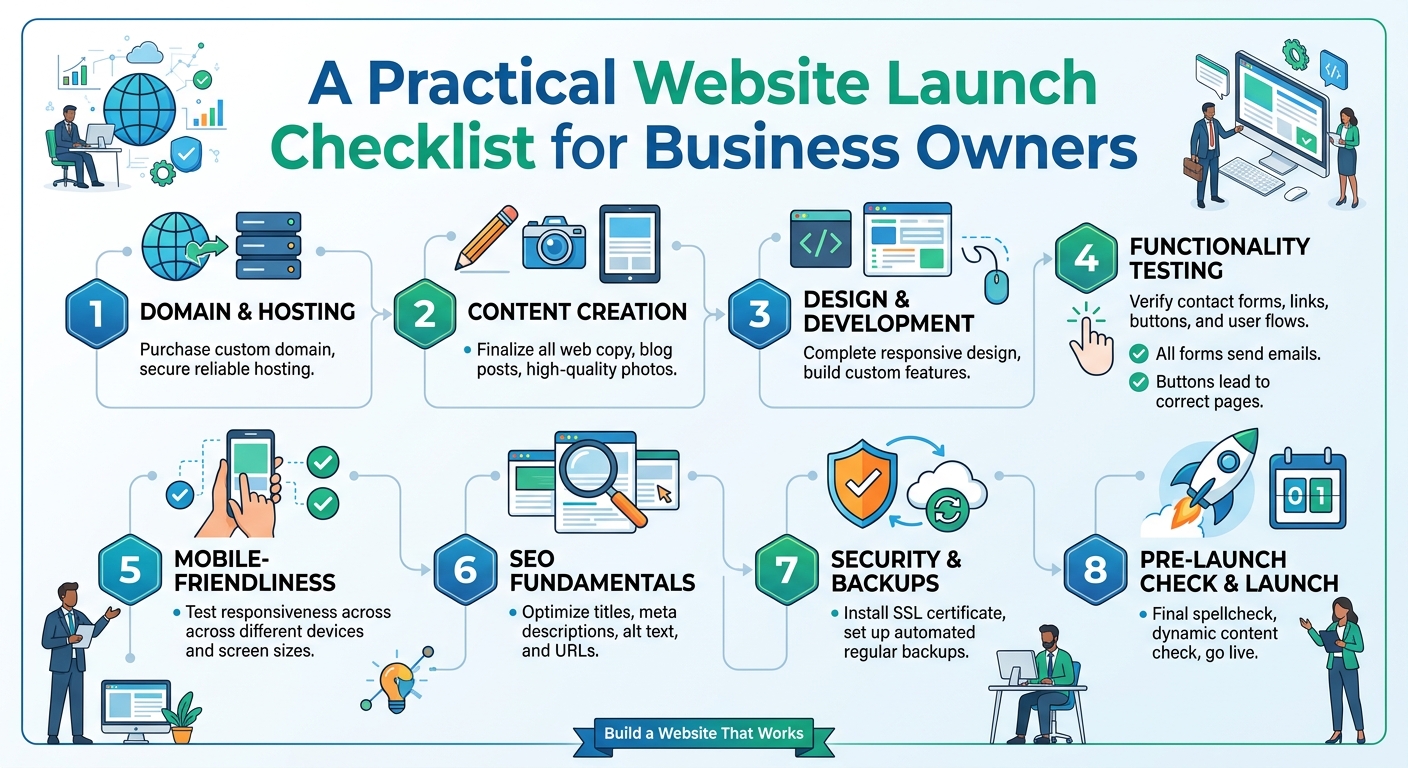
A practical launch structure

Most new businesses can begin with a focused structure:

  • Home
  • About
  • Services or Products
  • Individual service or product pages for major offerings
  • Contact
  • Privacy and legal information where applicable
  • Frequently asked questions or helpful resources, if customers need them

This structure can grow over time. Start with content that supports real customer decisions, then add guides, case studies or additional landing pages as you learn which questions and services matter most.

The useful website test

Ask someone unfamiliar with the business to visit the website on a phone and answer three questions: What does this business offer? Who is it for? What should I do next? If they cannot answer quickly, revise the wording and navigation before adding more pages.

A new business website succeeds when it makes the next decision easier. Clear services, credible business information, accessible contact details, secure and reliable foundations, and helpful answers give visitors a reason to trust the business and take action. Build that foundation first; visual additions and extra features can follow when they serve a clear customer need.

The Main Types of Web Hosting Explained

The Main Types of Web Hosting Explained

Choosing web hosting can feel confusing because providers use different names for plans that may appear similar. Shared hosting, VPS hosting, dedicated hosting, cloud hosting and managed WordPress hosting all serve different needs. The most suitable option depends on your website’s size, expected traffic, budget, email requirements and how much technical work you want to manage yourself.

For a Nigerian small business, entrepreneur or organisation, the best hosting plan is not automatically the most powerful one. It is the plan that keeps the website dependable, secure and manageable without paying for resources you do not need.

What web hosting actually does

Web hosting provides the server space and services needed to make a website available online. When someone enters your domain name, such as yourbusiness.com, hosting helps deliver the website’s files, images, databases and other content to that visitor’s browser.

A domain name and hosting are related, but they are not the same thing. The domain is the address people use to find your website. Hosting is the service that stores and delivers the website. A complete online presence may also require business email, an SSL certificate, backups, website software and ongoing maintenance.

Shared hosting: a practical starting point

Shared hosting places multiple websites on the same physical server. The websites share server resources, while each account remains separately managed within the hosting environment.

This is often a suitable choice for:

  • Small business websites
  • Personal websites and portfolios
  • Blogs and creator websites
  • New WordPress websites
  • Simple organisation or information websites

The main advantage is simplicity and affordability. You can usually manage domains, email accounts, website files and databases through a hosting control panel rather than configuring a server from the beginning.

The limitation is that your website shares resources with other accounts. A busy or poorly managed site on the same server may affect the available capacity, depending on how the hosting environment is configured. Shared hosting may also become less suitable as a website grows or requires specialised server settings.

For many small websites, however, shared hosting is a sensible first step. A company does not need a VPS simply because it wants a professional website.

VPS hosting: more control and dedicated resources

VPS stands for Virtual Private Server. A physical server is divided into separate virtual environments, giving each VPS a defined allocation of resources and a greater degree of isolation than ordinary shared hosting.

VPS hosting may suit:

  • Growing websites with higher resource requirements
  • Web applications needing specific server settings
  • Online stores with increasing activity
  • Businesses running several websites or services
  • Users who need more control than shared hosting provides

A VPS can offer improved control, scalability and predictable resource allocation. It may also support custom software or configurations that are unavailable on a basic hosting plan.

That additional control creates additional responsibility. Depending on the service, you may need to manage operating system updates, server security, backups, performance settings and software installation. A managed VPS can reduce this burden by providing technical administration and support, while an unmanaged VPS is generally better suited to someone comfortable with server management.

Before choosing a VPS, consider whether you need its capabilities or whether you are simply responding to technical terminology. If your website is a normal business site with moderate traffic, a well-supported shared or managed WordPress plan may be more practical.

Dedicated hosting: an entire server for one customer

Dedicated hosting gives one customer access to an entire physical server. There are no other hosting accounts competing for the server’s processing capacity, memory or storage.

This option can be appropriate for organisations with demanding applications, large databases, high and consistent resource requirements, or specialised compliance and configuration needs. It may also be useful when an organisation needs complete control over the server environment.

The trade-off is cost and complexity. Dedicated hosting requires more planning and technical knowledge, and the customer may be responsible for many areas of server operation. It is rarely necessary for a basic company website, portfolio or small blog.

Businesses considering dedicated hosting should first identify the specific problem it will solve. If the concern is slow website performance, the cause could instead be an unoptimised website, oversized images, a plugin problem, limited database performance or a configuration issue. Upgrading to an entire server may not fix the real problem.

Cloud hosting: flexible resources across an infrastructure

Cloud hosting uses a network of connected servers or computing resources rather than relying on one traditional server alone. The exact design varies between providers, but the general idea is that websites can use resources from a broader infrastructure.

Cloud hosting may be useful for websites with changing workloads, applications that need flexible scaling, or organisations planning for growth. It can also provide options for distributing services and handling resource demand differently from a single-server arrangement.

However, “cloud” is not automatically a guarantee of better performance, security or availability. The quality of the service depends on its architecture, configuration, support, backups and management. A small business should ask what resources are included, how scaling works, what technical support is provided and how costs are calculated.

For some websites, cloud hosting is a valuable growth option. For others, a straightforward hosting plan provides all the capacity and simplicity required.

Managed WordPress hosting: WordPress with technical support

Managed WordPress hosting is designed specifically for websites built with WordPress. The hosting environment and support processes may be tailored to WordPress, with assistance for updates, performance, security and routine maintenance depending on the provider and plan.

This can be helpful for business owners who want WordPress flexibility without becoming responsible for every technical task. Managed support may include tools or services for WordPress installation, updates, backups, security monitoring or troubleshooting. The exact features should always be confirmed before purchase.

Managed WordPress hosting is a strong option when:

  • Your website uses WordPress as its main content management system
  • You want help with routine maintenance
  • You prefer not to administer a server
  • Your website is important to daily business operations
  • You need practical support when WordPress problems occur

It may be less suitable if you need to host several different applications or require a highly customised server environment. Some managed WordPress services also limit certain plugins or configurations to protect performance and security.

How to choose the right hosting type

Use your business requirements rather than the plan name as the starting point. Ask these questions:

  • What is the website for? A brochure website, blog, online store and custom application may need different resources.
  • How much traffic is expected? Consider normal visitors as well as campaigns, launches or seasonal demand.
  • How much technical work can you manage? If you do not want server administration to become another business responsibility, managed support may be worthwhile.
  • Do you need business email? Website hosting and email arrangements can differ. Confirm how many mailboxes, storage and support options are included.
  • What security and backup arrangements exist? Look for clear information about SSL, account security, backups and restoration rather than assuming they are automatic.
  • How will the website grow? Choose a service that offers a sensible upgrade path without requiring an immediate move to an expensive setup.

A practical example

Imagine a Nigerian consulting business launching a website with five pages, a contact form, a blog and domain-based email. It receives most visitors from mobile devices and does not have a technical employee.

A suitable starting point may be reliable shared hosting or managed WordPress hosting, depending on whether the site uses WordPress and how much maintenance support is wanted. The business should also confirm that its domain is registered under accurate ownership details, that important accounts remain accessible, and that the website has HTTPS, backups and clear contact information.

If the business later adds a busy membership platform or a resource-intensive application, it can review its hosting based on measured resource needs. Moving to a VPS may then be justified. The upgrade should respond to a real requirement, not simply the belief that a more advanced hosting label is always better.

Hosting is part of business reliability

Hosting affects more than whether a website appears online. It influences how easily the site can be maintained, how securely accounts are managed, whether email works reliably and how quickly problems can be resolved.

Keep control of your domain, hosting and email accounts. Use strong, unique passwords and appropriate account protection. Monitor renewals, maintain current contact information and keep backups that can be restored. These basic responsibilities help prevent avoidable disruption, especially when a website was originally created by a developer, former employee or third party.

The right hosting choice should make technology less burdensome. For many small businesses and entrepreneurs, that means starting with a well-supported shared or managed WordPress service, then upgrading only when the website’s requirements clearly demand it. VPS, cloud and dedicated hosting are valuable options, but they are tools for specific needs—not automatic signs of a more professional website.

How Many Domains Can One Business Own?

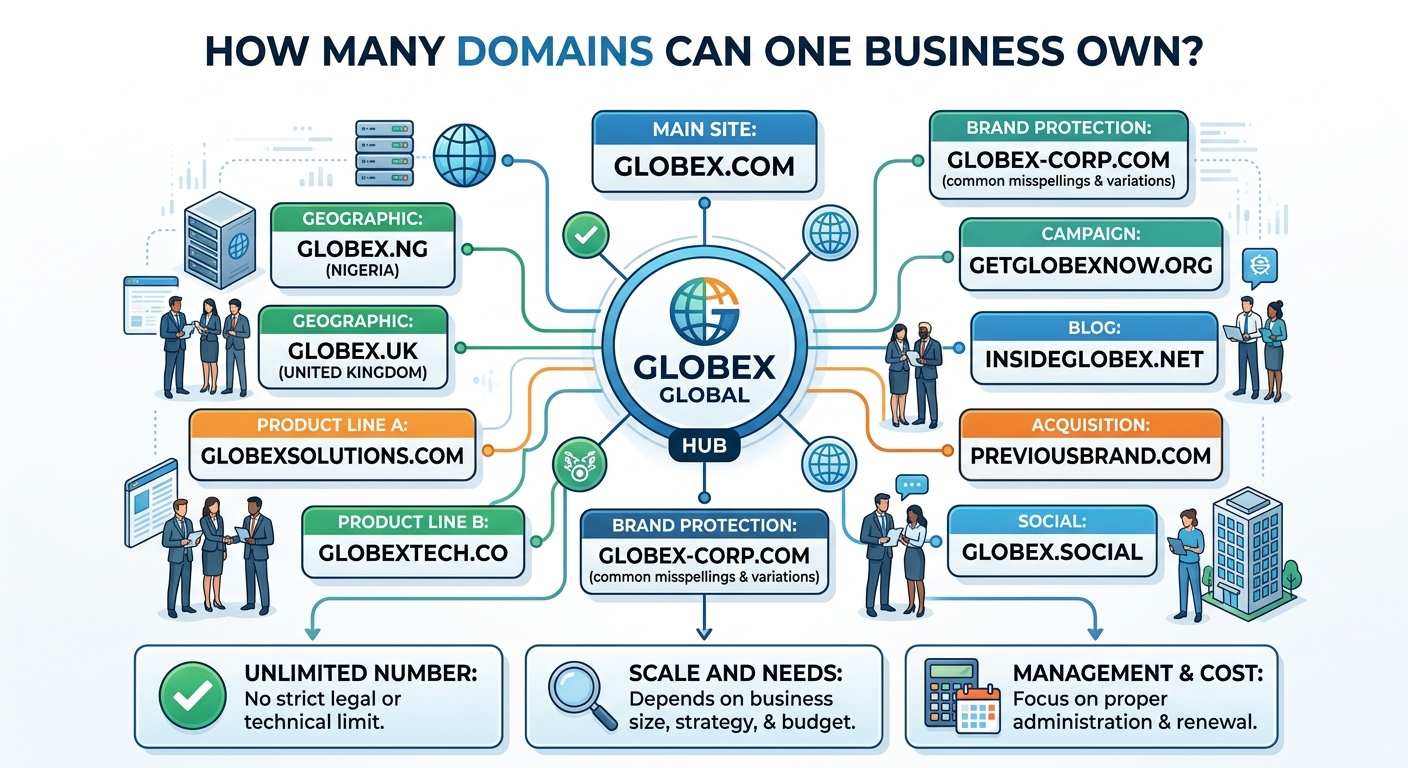
There is usually no single limit on the number of domain names one business can own. A company may register one domain for its main website or manage dozens of domains for different brands, services, locations and marketing campaigns.

However, the practical limit depends on the domain registrar, the domain extensions you choose, registration requirements, budget and your ability to manage the portfolio properly. For businesses in Nigeria, this may include a combination of international extensions such as .com and country-code domains such as .ng or other relevant options.

Before buying several domains, it is important to understand why you need them and how each one will be used. A well-planned domain strategy can protect your brand and support growth. Buying names without a clear purpose can create unnecessary renewal costs and administrative work.

Is there a legal limit on business domain ownership?

In most cases, there is no general rule that restricts a business to one domain name. Businesses can register multiple domains as long as they follow the terms set by the registrar and the relevant domain registry.

Different domain extensions may have different requirements. Some are open for general registration, while others may require proof of eligibility, local presence or specific business information. Registration policies can also vary between providers and may change over time.

A business should provide accurate information when registering domains and should avoid using names that infringe another organisation’s trademark or identity. Owning a domain does not automatically give a business the right to use a protected brand name.

Why would a business need multiple domains?

Most companies do not need a large collection of domains, but owning more than one can be useful in several situations.

Protecting your business name

A company may register its main brand under more than one extension to reduce the risk of confusion or impersonation. For example, a business might use one domain for its website while registering a related extension to prevent another party from using a similar address.

These additional domains can redirect visitors to the main website. They may also help customers recognise the official online presence of the business.

Supporting different brands or services

A company with several brands may use separate domains for each brand. A hosting company, for example, could have one main corporate domain and different domains for specialised services, provided each website has a clear business purpose.

Separate domains can make it easier for customers to find information about a particular product or service. They can also help keep different audiences and website content organised.

Serving different locations

Businesses operating in multiple cities, regions or countries may use domains that reflect their target markets. A Nigerian business may choose a country-code domain for its local audience and an international extension for customers outside Nigeria.

A location-specific domain can support a local marketing strategy, but it should not be purchased simply because it is available. The website, contact information and content should clearly serve the intended market.

Using campaign or promotional domains

Some businesses register short, memorable domains for advertising campaigns, events or specific landing pages. These domains can be easier to communicate in print, radio, social media or offline marketing.

Campaign domains should be managed carefully. When a campaign ends, the business must decide whether to renew the domain, redirect it to a permanent page or allow it to expire.

Redirecting common variations

Customers may type a business name incorrectly or use a different extension by mistake. Registering a small number of common variations can help direct those visitors to the correct website.

This approach is most useful when the variations are closely connected to the brand. Registering many random spellings can quickly become expensive without providing meaningful protection.

How many domains does a typical business need?

There is no ideal number for every business. A small business, church, law firm or growing enterprise may only need one primary domain. A second domain may be worthwhile for brand protection, a major service or a distinct location.

Larger organisations may need more domains because they operate multiple brands, regions or online services. The important question is not “How many can we buy?” but “What role does each domain serve?”

Before registering a domain, write down its purpose. A simple review can include:

  • What website, page or service will use this domain?
  • Will it redirect to another website or host separate content?
  • Does it protect a valuable brand name?
  • Who is the intended audience?
  • How will the domain be promoted and maintained?
  • Is the expected benefit greater than the ongoing renewal cost?

What does owning multiple domains involve?

Every domain normally needs to be renewed according to the registrar’s schedule. Owning several domains means tracking renewal dates, registration details, DNS settings and access permissions.

A domain portfolio can become difficult to manage when domains are registered under different accounts or email addresses. For better control, businesses should keep domains in an account owned by the organisation rather than by an individual employee, agency or contractor.

Maintain a simple domain register containing:

  • The domain name and extension
  • The registrar and account owner
  • The registration and renewal dates
  • The purpose of the domain
  • Where the domain points, such as a website, email service or redirect
  • The staff members or providers authorised to manage it

This information makes it easier to renew important domains and remove unused ones. It also reduces the risk of losing access when a staff member leaves the business.

Domains, websites and email are separate services

Buying a domain does not automatically create a website. It is the address visitors use to find your online presence. Website files require hosting, while business email may require a separate email service or hosting arrangement.

A domain can point to a website hosted on shared hosting, a VPS or cloud hosting, depending on the organisation’s technical and performance requirements. Several domains can also point to the same website through redirects or domain configuration.

Businesses should be careful when changing DNS settings. Incorrect records can make a website or email service unavailable. If you are unsure which records to change, ask your hosting provider or technical administrator before making updates.

How to manage multiple domains securely

Domain names are valuable business assets, especially when they are connected to a website, email accounts and customer communications. Basic security controls can help protect them.

  • Use a strong, unique password for the registrar account.
  • Enable two-factor authentication when the provider offers it.
  • Keep account recovery email addresses and phone details current.
  • Limit account access to people who need it.
  • Record renewal dates and enable reminders or automatic renewal where appropriate.
  • Review domain permissions when an employee or service provider no longer works with the business.
  • Be cautious with emails requesting urgent domain transfers or payment changes.

Businesses should also confirm that important domains are registered using accurate legal and contact information. Keep copies of invoices and registration records for internal administration.

Should you register every available domain extension?

No. Registering every possible extension is rarely necessary. The best choice depends on your brand, customers, location and long-term plans.

Start with the domain that will be your primary public address. Then consider a limited number of alternatives that protect the brand or support a genuine business objective. Avoid buying domains solely because they are cheap or available if there is no plan to use or monitor them.

It is also wise to check the name before registration. Search for possible trademark conflicts, confusingly similar businesses and meanings that could create problems in your target market.

When should a business let a domain expire?

A domain may no longer be useful when a campaign has ended, a service has been discontinued or a brand has been replaced. Before allowing it to expire, check whether it is connected to website redirects, email addresses, advertising materials or customer bookmarks.

Unused domains can sometimes be redirected to a current website, but keeping them indefinitely is not always the best option. Review the portfolio periodically and retain domains that provide clear protection or business value.

Conclusion

One business can usually own multiple domain names, and there is no universal number that suits every organisation. The right portfolio may contain one domain or several, depending on your brands, services, markets and marketing plans.

Choose domains with a clear purpose, keep them in a business-controlled account and track renewals carefully. If you need help connecting domains to hosting, email or a new website, a reliable hosting provider can help you manage the technical setup while you focus on running the business.

Domain Name Tips for Nigerian Law Firms

For a Nigerian law firm, a domain name is more than a website address. It is part of the firm’s professional identity and may appear on letterheads, business cards, email signatures, legal articles and online directories. A clear, credible domain can make it easier for prospective clients to find the firm and feel confident when contacting it.

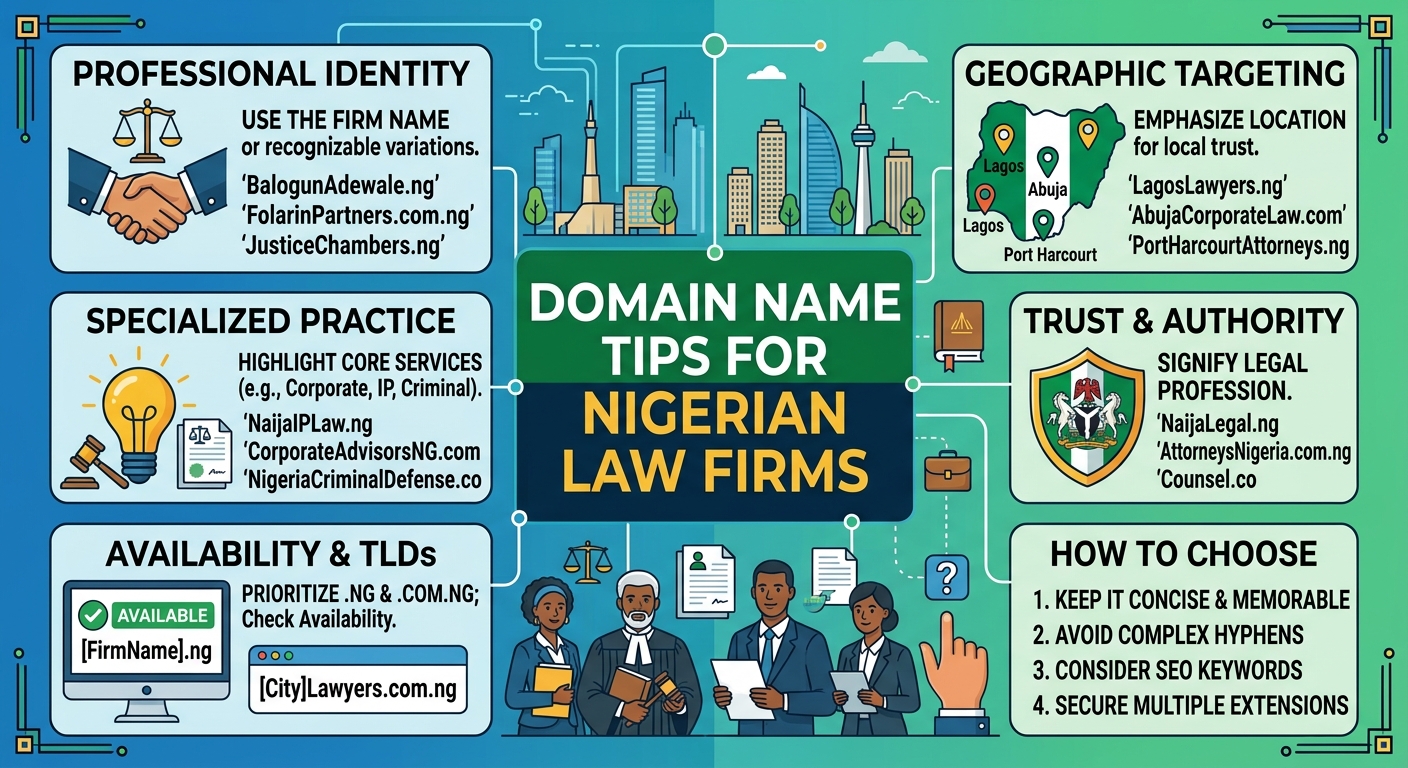
Choosing a domain name requires more thought than simply selecting an available word. The name should be easy to remember, connected to the firm’s identity and practical for use over many years. The following tips can help Nigerian law firms make a sound decision.

Choose a name that reflects the firm

The safest starting point is usually the firm’s established name or a clear abbreviation of it. A domain that closely matches the name clients already know can support brand recognition and reduce confusion.

For example, a firm might consider a domain based on:

  • The firm’s full name
  • A distinctive shortened version of the firm’s name
  • The firm’s initials, if they are already well known
  • The firm’s name combined with a relevant location or practice focus

Avoid names that are so broad or generic that visitors cannot tell which organisation operates the website. It is also wise to avoid unusual spellings, excessive hyphens and strings of numbers. These features can make a domain harder to communicate over the phone and easier to mistype.

Select an appropriate domain extension

The extension is the part after the final dot, such as .com or a Nigerian country-code extension. A Nigerian law firm may consider both a general commercial extension and an extension associated with Nigeria, depending on availability, eligibility requirements and its branding goals.

A Nigerian-focused extension can help communicate the firm’s connection to the local market. A .com domain may be familiar to a wider audience, particularly if the firm works with international clients. Neither choice automatically makes a website more trustworthy; the quality of the website, the firm’s professionalism and the accuracy of its information remain important.

Before registering a country-code domain, check the current requirements set by the relevant registry or accredited registrar. Requirements, documentation and available options can change. If the preferred name is available in more than one extension, registering suitable variations may help protect the firm’s online identity.

Keep the domain short, clear and easy to say

A good legal-services domain should be simple enough for a client to remember after hearing it once. Read the proposed name aloud and ask whether another person would know how to spell it.

Consider these practical checks:

  • Can someone type it correctly without seeing it written down?
  • Does it contain words that could be misunderstood when joined together?
  • Is it short enough to fit comfortably in an email address and printed material?
  • Will the name still make sense if the firm expands its services?

Do not select a highly specific domain if the firm may soon add new practice areas or open offices in other Nigerian cities. A flexible name can remain useful as the business develops.

Check name availability and possible conflicts

Domain availability is not the same as permission to use a name. Before registering a domain, the firm should consider whether it is confusingly similar to another law firm, business or recognised brand. A domain that appears available may still create disputes or reputational problems.

Search for similar business names and review relevant business and professional records where appropriate. If the domain will be used as part of a broader brand, the firm may also wish to obtain professional advice about name protection and intellectual property considerations. This is especially important where the proposed name is distinctive, commercially valuable or similar to an existing organisation.

Register the domain in the correct legal or business identity where possible, rather than using an individual employee’s personal details. This helps the firm maintain control if staff or service providers change.

Use a professional email address

A domain becomes more valuable when it is used consistently for professional email. Addresses such as info@yourfirmdomain or contact@yourfirmdomain can look more established than a free personal email address and make it easier for clients to identify official correspondence.

Law firms should create separate addresses for common functions, such as general enquiries, billing, recruitment or specific departments. Personal staff addresses should follow a consistent format. The firm should also establish clear procedures for managing former employees’ accounts and preserving important business correspondence.

Email authentication and strong account security are important because legal practices handle confidential client information. Use strong, unique passwords, enable multi-factor authentication where available and restrict administrative access to trusted personnel.

Register the domain through a reliable provider

When comparing domain providers, look beyond the first-year registration offer. Check the renewal terms, domain management tools, support options, transfer process and the way ownership details are recorded. A low introductory price may not represent the long-term cost or service experience.

The firm should receive direct access to its domain account and retain control of the account’s main email address. Avoid arrangements where a web designer or employee is the only person who can renew, update or transfer the domain. Service providers can assist with management, but ownership and administrative control should remain with the firm.

Sonhosting provides domain and web hosting services for organisations that want a simpler way to manage their online tools. When choosing any provider, Nigerian law firms should confirm that the selected plan supports their domain extension, email needs and expected website requirements.

Protect the domain account

A domain account can control the firm’s website and email, so it deserves the same care as other important business systems. Limit access to people who need it and keep recovery information current.

Useful safeguards include:

  • Using a dedicated business email account for domain administration
  • Enabling multi-factor authentication when the provider offers it
  • Keeping registrar login details out of shared public documents
  • Reviewing account users and permissions periodically
  • Enabling available domain-locking or transfer-protection features
  • Keeping accurate records of renewal dates and account ownership

Staff should also be trained to recognise renewal scams. Fraudulent messages may imitate a registrar and ask the recipient to pay an urgent invoice or click a suspicious link. Verify renewal notices by signing in through the provider’s official website rather than relying on an unexpected email link.

Plan for renewals and continuity

Allowing a domain to expire can interrupt the firm’s website and email. In some cases, the name may become difficult or costly to recover. Assign responsibility for renewals to a role rather than relying on one person’s memory.

Keep a simple record containing the registrar, account administrator, renewal date, payment method and recovery contact. If the registrar supports automatic renewal, consider whether it is suitable for the firm and make sure the payment details remain valid. Automatic renewal should supplement, not replace, periodic account reviews.

Review the domain portfolio at least periodically. Remove unused domains only after confirming that they are not connected to old email addresses, redirects, marketing materials or important client communications.

Make the website match the domain

A professional domain should lead to a website that is accurate, secure and easy to use. The site should clearly identify the firm, explain its services in understandable language and provide reliable contact information. Check that the domain works correctly on mobile devices and that links, email addresses and forms are maintained.

Use secure website hosting and keep the website software updated. A hosting plan should provide the resources and support the site needs without making management unnecessarily complicated. For a small or growing practice, the right choice may differ from the requirements of a firm with a large content library or several locations.

Review the domain as the firm grows

A domain decision should support the firm’s future, not only its current website. Reassess the firm’s online identity when there is a merger, name change, new office, major change in services or expansion into a different market.

Do not abandon an old domain immediately after a rebrand. Plan redirects, email continuity and communication with existing clients before changing addresses. Keep relevant records and monitor both domains during the transition so that enquiries are not lost.

Conclusion

The right domain name can give a Nigerian law firm a clear and dependable online identity. Choose a name that matches the firm, check for possible conflicts, select an appropriate extension and register it under the firm’s control. Then protect the account, maintain professional email, renew the domain on time and connect it to a secure, useful website.

With a little planning, the domain can remain a stable business asset while the firm builds its reputation and serves clients online.

Can You Buy Hosting Without Buying a Domain?

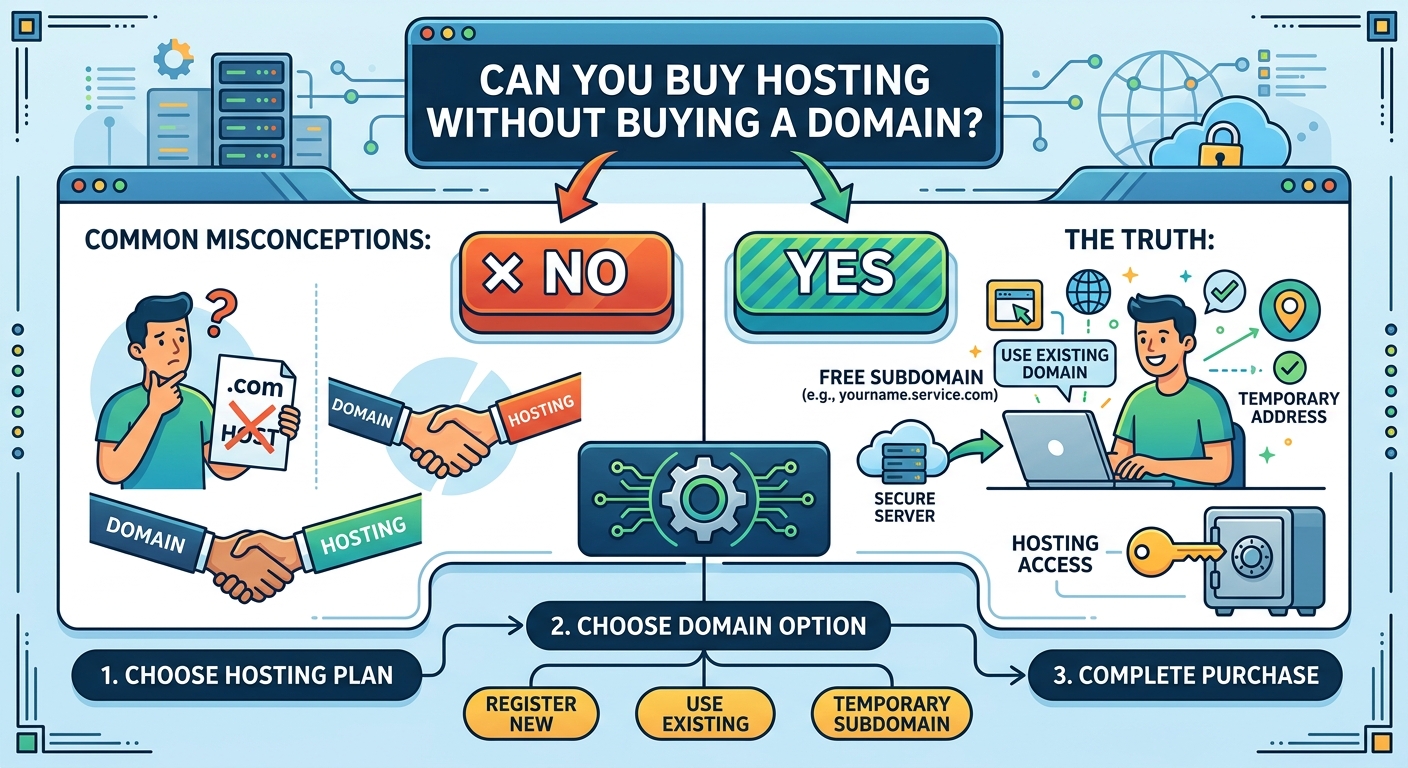
Yes, you can buy web hosting without buying a domain name. Hosting and domain registration are separate services, even though they are commonly purchased together when launching a website.

This flexibility can be useful for business owners, SMEs, churches, law firms and other organisations that want to prepare a website before choosing a permanent web address. You may also already own a domain registered with another provider and only need hosting for your website.

Understanding the difference between these services will help you avoid unnecessary costs and make setup easier.

What is web hosting?

Web hosting is the service that stores your website’s files and makes them available online. These files may include your website pages, images, databases, videos and application code.

When someone visits your website, the hosting server delivers the relevant files to their browser. Hosting can come in different forms, including shared hosting, VPS hosting and cloud hosting. The right option depends on the size of your website, expected traffic, technical requirements and available budget.

Without hosting, your website files do not have a reliable place to operate online. You may have designed a website, but visitors will not be able to access it through the internet until it is placed on a suitable server.

What is a domain name?

A domain name is the address people type into a browser to find your website. It is the readable alternative to using a numerical IP address.

For example, a business might use a domain based on its name, while a church, law firm or professional organisation may choose an address that reflects its identity. A domain can help people remember your website and can support a more professional online presence.

Registering a domain gives you the right to use that web address for the registration period, subject to the terms of the domain extension and registrar. It does not automatically provide storage for your website files. That is the role of hosting.

Can hosting work without a domain?

Yes. Many hosting providers allow you to purchase a hosting plan without registering a new domain. You may be given a temporary address, a server address or another access method for viewing and managing your website.

This allows you to:

  • Upload website files before selecting a permanent domain.
  • Build and test a website privately or on a temporary address.
  • Use a domain registered with a different provider.
  • Move an existing website to new hosting without transferring the domain.
  • Set up a website project while your preferred domain choice is still being decided.

The exact temporary access method depends on the hosting provider. It may not be suitable as a permanent public address, but it can be useful during development and migration.

When might you buy hosting first?

1. You are still choosing a domain name

A suitable domain name may require careful thought. You may want to confirm your business name, review available domain extensions or agree on a name with business partners before registering it.

Buying hosting first can allow your website work to begin while that decision is being finalised. However, if you have already found a valuable and suitable domain name, registering it promptly may reduce the risk of someone else taking it.

2. You already own a domain

Many website owners purchase their domain and hosting from different companies. For example, you may have registered your domain previously but now need more suitable hosting for a new website.

You do not need to purchase the domain again. Instead, you can connect the existing domain to your new hosting account by updating its DNS settings or nameservers.

3. You are moving an existing website

When transferring a website to a new hosting provider, the domain can remain with its current registrar. The important task is to point the domain to the new server after the website files and databases have been moved.

Keeping the domain and hosting separate can also make future changes easier because you are not required to transfer both services whenever you change hosting.

4. You are developing a website before launch

A designer or developer may need hosting to build and test a website before the organisation is ready to publish it. A temporary address can support this stage, although access controls should be considered if the website contains confidential information or unfinished content.

How do you connect a domain to hosting?

After purchasing hosting, you generally connect your domain by changing its DNS configuration. The hosting provider will normally supply the nameservers or DNS records required for the connection.

The usual process is:

  1. Purchase or choose a hosting plan.
  2. Obtain the hosting account details and required nameservers or DNS records.
  3. Log in to the account where your domain is registered.
  4. Replace or update the relevant DNS settings.
  5. Upload your website files or install your chosen website platform.
  6. Test the domain and confirm that the website loads correctly.

DNS changes may not appear everywhere immediately. The time can vary depending on the records involved, caching and the providers handling the domain and hosting. During this period, some visitors may see the old destination while others see the new one.

What happens to email if you change hosting?

Business email often depends on DNS records, so changing hosting should be planned carefully. If your organisation uses email addresses connected to its domain, do not remove or replace mail-related records without knowing how your email service is configured.

A website can be moved to new hosting while email continues to operate through a separate email provider. The key is to update only the records required for the website and preserve the records needed for mail delivery.

Before making DNS changes, record your existing settings and confirm which service handles your email. This is especially important for organisations such as law firms and businesses that rely on consistent communication with clients.

Is it better to buy hosting and a domain together?

For many beginners, purchasing both services from one provider is convenient. One account may make billing, support and initial setup easier. Some providers also offer domain registration during the hosting order process.

However, buying them together is not required. Separate providers may suit you if:

  • You already have a domain.
  • Your preferred domain registrar does not provide the hosting features you need.
  • You want to keep your domain independent from your hosting provider.
  • You are moving a website and want to avoid changing several services at once.

When comparing options, look beyond the introductory offer. Consider renewal terms, storage, backups, support, security features, control panel access and the hosting resources your website needs. The lowest initial cost is not always the lowest overall cost or the best fit for a business website.

What can you do before buying a domain?

While using temporary hosting access, you can prepare much of your website. You may create page content, upload images, configure a content management system, test forms and organise your navigation.

It is still wise to delay public promotion until you have a permanent domain and have tested the complete website. A temporary address may be difficult to remember and may not represent your brand professionally.

You should also confirm that your final domain can be connected easily to the hosting account. Check whether the host supports the technology your website requires, such as databases, programming languages, content management systems or specific server configurations.

Do you need a domain for every website?

A domain is not required for every type of online project. A website can be tested on a temporary address, hosted within an internal network or accessed through a platform-provided address.

For a public-facing organisation, however, a custom domain is usually the more practical choice. It gives visitors a clear address, supports brand recognition and can make it easier to create professional domain-based email addresses. The domain should be chosen carefully because changing it later can affect links, search visibility, printed materials and customer awareness.

Final considerations before you buy hosting

Before ordering, identify what you need now and what you may need later. A small informational website may have different requirements from a busy online shop, a client portal or a website with custom applications.

  • Decide whether you need a domain immediately or already own one.
  • Confirm how you will access the hosting account without a domain.
  • Check how the provider connects external domains.
  • Review backup, security and support options.
  • Protect existing email and DNS settings during any change.
  • Choose hosting that can support your website’s expected requirements.

Sonhosting can help simplify the process of choosing hosting and setting up the tools needed for a website. Whether you are preparing a new website or moving an existing domain, understanding how hosting and domains work separately makes it easier to plan with confidence.

In short, you can buy hosting without buying a domain. You can use temporary access while building your website, connect a domain registered elsewhere or purchase a domain later. The best approach depends on your project timeline, technical needs and how quickly you are ready to establish a permanent online identity.

A Practical Website Launch Checklist for Business Owners

Launching a business website is an important step for a small business, church, law firm or growing organisation. Your website can help people understand what you offer, find your contact details and decide whether to work with you. However, a successful launch involves more than choosing a design and publishing a few pages.

A proper launch process helps you avoid broken links, missing information, security gaps and problems that could frustrate visitors. Use this checklist to plan your website, prepare its technical foundation and confirm that everything works before you share the link publicly.

1. Define the website’s purpose

Start by deciding what the website needs to achieve. A website designed to generate enquiries may require clear service pages and contact options. A church website may focus on meeting information, announcements and online resources. A law firm may need to explain its areas of practice and provide a professional way for prospective clients to get in touch.

Write down the main goal and one or two supporting goals. Examples include:

  • Helping potential customers understand your services.
  • Generating calls, messages or enquiry form submissions.
  • Providing opening hours, location and other essential information.
  • Publishing news, announcements or educational content.
  • Building trust before a visitor contacts your organisation.

Clear goals make it easier to decide which pages, features and calls to action are necessary. They also help prevent your website from becoming crowded with tools that do not support your business.

2. Choose and register the right domain

Your domain is the address people use to find your website. It should be easy to remember, easy to spell and closely connected to your organisation or brand. If possible, use a short name without unnecessary numbers, punctuation or complicated wording.

Before purchasing a domain, check that:

  • The name matches your organisation or trading name.
  • You have checked the spelling carefully.
  • The domain is suitable for the audience and market you serve.
  • The registration details are accurate and controlled by your business.
  • You know when the domain is due for renewal.

Keep your domain account details secure. A domain is a valuable business asset, and losing access to it can make it difficult to manage your website or business email.

3. Select hosting that fits your needs

Web hosting stores your website files and makes them available to visitors. The right hosting choice depends on the type of website you are launching, the features you need and the level of traffic you expect.

For a straightforward business website, an appropriate shared hosting plan may provide a practical starting point. Businesses with more demanding applications, higher resource requirements or specialised configurations may need VPS or cloud hosting. The important point is to match the hosting environment to the website rather than choosing a plan based only on the lowest price.

When comparing hosting options, consider:

  • Whether the plan supports your website platform and software.
  • Storage and resource limits.
  • Available backup options.
  • Security features and account access controls.
  • How easily you can upgrade as the website grows.
  • The quality and availability of technical support.

Sonhosting provides web hosting options for organisations that want to save time and avoid unnecessary complexity when setting up their online tools. Review the requirements of your website first, then select a plan that can support its current and likely near-term needs.

4. Prepare the essential website pages

A new website does not need dozens of pages to be useful. It does need the right information. Most business websites should consider the following core pages:

  • Home: Explain who you are, what you offer and what visitors should do next.
  • About: Provide relevant background about the business or organisation.
  • Services: Describe each important service clearly and explain who it is for.
  • Contact: Include reliable contact methods and any relevant business information.
  • Frequently asked questions: Address common concerns before people contact you.

Depending on your organisation, you may also need pages for locations, team members, events, resources, testimonials supplied by real customers or legal and privacy information. Only publish information that is accurate and approved.

5. Check your content carefully

Visitors judge a website quickly, and small errors can reduce confidence. Review every page for spelling, grammar, outdated details and unclear wording. Ask someone who is unfamiliar with the business to read the pages. They may notice information that employees have assumed is obvious.

Check that:

  • Your services are described in plain language.
  • Prices, opening hours and availability are current if you publish them.
  • Contact details are consistent across the website.
  • Calls to action are clear, such as “Request a consultation” or “Contact us”.
  • Images are relevant, sharp and suitable for the page.
  • Text is easy to read on a mobile phone.

Avoid making promises that the business cannot consistently deliver. Professional content should be specific, honest and useful to the people you want to serve.

6. Test the website on different devices

Many visitors will access your website from a mobile phone. Test the layout on phones, tablets and desktop computers where possible. Look for text that is too small, buttons that are difficult to tap, images that overlap content and menus that do not open properly.

Complete the main visitor journey yourself. Start on the home page and try to find a service, read the relevant information and make contact. Test every important button, link and form. Do not assume that a feature works simply because it worked during development.

7. Review performance and accessibility

A website should be reasonably quick and usable for people with different devices, connection speeds and abilities. Large images, unnecessary plugins and poorly configured features can slow down a page.

Before launch:

  • Compress large images while keeping them clear.
  • Remove unused pages, plugins and design elements.
  • Use descriptive headings and readable text.
  • Add meaningful alternative text to important images.
  • Make sure links and buttons are distinguishable.
  • Check that key information is not available only through images.

These steps improve the experience for visitors and make the website easier to maintain.

8. Protect the website and its accounts

Security should be part of the launch plan, not an afterthought. Use strong, unique passwords for your hosting, domain, website administration and email accounts. Enable additional account protection where it is available, and limit administrative access to people who need it.

Confirm that your website uses HTTPS and that its software, themes and extensions are kept up to date. Arrange a backup process and understand how a backup can be restored. A backup is most useful when it can actually be recovered after a mistake or technical problem.

Also decide who is responsible for updates, renewals and security checks. Assigning ownership prevents important tasks from being forgotten when staff or service providers change.

9. Configure business email and contact notifications

A professional email address using your business domain can create a more consistent experience than relying only on a personal address. Before launch, test sending and receiving messages, including messages sent from website contact forms.

Check where form notifications are delivered and whether more than one responsible person should receive them. Send test enquiries from different devices and confirm that the messages do not disappear into an overlooked inbox. Add a simple confirmation message so visitors know whether their enquiry was submitted successfully.

10. Complete the final launch review

Use a final checklist before announcing the website:

  1. Confirm the correct domain points to the intended website.
  2. Review the home page, main service pages and contact page.
  3. Test navigation, buttons, forms and important links.
  4. Check the website on mobile and desktop screens.
  5. Verify HTTPS, backups, updates and administrator access.
  6. Remove placeholder text and unfinished sections.
  7. Confirm that contact information is accurate.
  8. Tell relevant staff how to handle enquiries received through the website.

It can be useful to ask one person to review the website as a first-time visitor rather than as someone involved in building it. A fresh perspective often reveals confusing navigation or unanswered questions.

11. Plan what happens after launch

Publishing the website is the beginning of its working life. Schedule regular reviews of your content, software, contact details and performance. Add useful updates when your services, events or operating arrangements change.

Monitor the questions people ask and the pages they use most. This information can guide future improvements, such as clearer service descriptions, additional frequently asked questions or a more direct enquiry process. If your website grows beyond the limits of its original hosting plan, review whether an upgrade or a different hosting environment is appropriate.

Conclusion

A careful website launch gives your organisation a stronger foundation online. Define your goals, choose a suitable domain and hosting plan, prepare accurate content, test the visitor experience and protect the accounts behind the website. Then keep the site current after launch.

Whether you are launching a small business website, a church website or a professional site for a law firm, a practical checklist can reduce avoidable problems and help visitors find the information they need with confidence.

Your Cart

©2018 - currentyear Sonhosting • By Digital Nigeria - RC 7487481
All Rights Reserved
Powered by ShootOut Now Services