Can You Buy Hosting Without Buying a Domain?

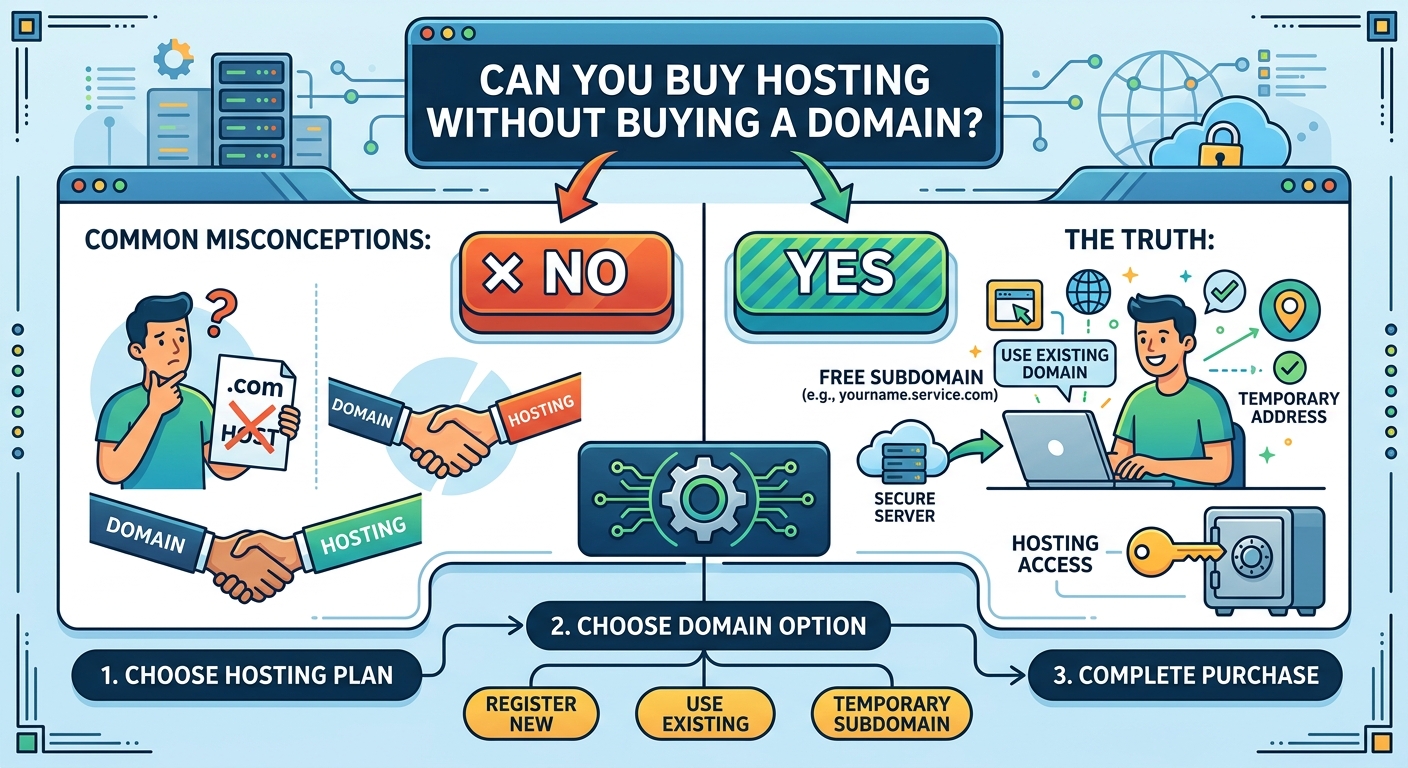
Yes, you can buy web hosting without buying a domain name. Hosting and domain registration are separate services, even though they are commonly purchased together when launching a website.

This flexibility can be useful for business owners, SMEs, churches, law firms and other organisations that want to prepare a website before choosing a permanent web address. You may also already own a domain registered with another provider and only need hosting for your website.

Understanding the difference between these services will help you avoid unnecessary costs and make setup easier.

What is web hosting?

Web hosting is the service that stores your website’s files and makes them available online. These files may include your website pages, images, databases, videos and application code.

When someone visits your website, the hosting server delivers the relevant files to their browser. Hosting can come in different forms, including shared hosting, VPS hosting and cloud hosting. The right option depends on the size of your website, expected traffic, technical requirements and available budget.

Without hosting, your website files do not have a reliable place to operate online. You may have designed a website, but visitors will not be able to access it through the internet until it is placed on a suitable server.

What is a domain name?

A domain name is the address people type into a browser to find your website. It is the readable alternative to using a numerical IP address.

For example, a business might use a domain based on its name, while a church, law firm or professional organisation may choose an address that reflects its identity. A domain can help people remember your website and can support a more professional online presence.

Registering a domain gives you the right to use that web address for the registration period, subject to the terms of the domain extension and registrar. It does not automatically provide storage for your website files. That is the role of hosting.

Can hosting work without a domain?

Yes. Many hosting providers allow you to purchase a hosting plan without registering a new domain. You may be given a temporary address, a server address or another access method for viewing and managing your website.

This allows you to:

  • Upload website files before selecting a permanent domain.
  • Build and test a website privately or on a temporary address.
  • Use a domain registered with a different provider.
  • Move an existing website to new hosting without transferring the domain.
  • Set up a website project while your preferred domain choice is still being decided.

The exact temporary access method depends on the hosting provider. It may not be suitable as a permanent public address, but it can be useful during development and migration.

When might you buy hosting first?

1. You are still choosing a domain name

A suitable domain name may require careful thought. You may want to confirm your business name, review available domain extensions or agree on a name with business partners before registering it.

Buying hosting first can allow your website work to begin while that decision is being finalised. However, if you have already found a valuable and suitable domain name, registering it promptly may reduce the risk of someone else taking it.

2. You already own a domain

Many website owners purchase their domain and hosting from different companies. For example, you may have registered your domain previously but now need more suitable hosting for a new website.

You do not need to purchase the domain again. Instead, you can connect the existing domain to your new hosting account by updating its DNS settings or nameservers.

3. You are moving an existing website

When transferring a website to a new hosting provider, the domain can remain with its current registrar. The important task is to point the domain to the new server after the website files and databases have been moved.

Keeping the domain and hosting separate can also make future changes easier because you are not required to transfer both services whenever you change hosting.

4. You are developing a website before launch

A designer or developer may need hosting to build and test a website before the organisation is ready to publish it. A temporary address can support this stage, although access controls should be considered if the website contains confidential information or unfinished content.

How do you connect a domain to hosting?

After purchasing hosting, you generally connect your domain by changing its DNS configuration. The hosting provider will normally supply the nameservers or DNS records required for the connection.

The usual process is:

  1. Purchase or choose a hosting plan.
  2. Obtain the hosting account details and required nameservers or DNS records.
  3. Log in to the account where your domain is registered.
  4. Replace or update the relevant DNS settings.
  5. Upload your website files or install your chosen website platform.
  6. Test the domain and confirm that the website loads correctly.

DNS changes may not appear everywhere immediately. The time can vary depending on the records involved, caching and the providers handling the domain and hosting. During this period, some visitors may see the old destination while others see the new one.

What happens to email if you change hosting?

Business email often depends on DNS records, so changing hosting should be planned carefully. If your organisation uses email addresses connected to its domain, do not remove or replace mail-related records without knowing how your email service is configured.

A website can be moved to new hosting while email continues to operate through a separate email provider. The key is to update only the records required for the website and preserve the records needed for mail delivery.

Before making DNS changes, record your existing settings and confirm which service handles your email. This is especially important for organisations such as law firms and businesses that rely on consistent communication with clients.

Is it better to buy hosting and a domain together?

For many beginners, purchasing both services from one provider is convenient. One account may make billing, support and initial setup easier. Some providers also offer domain registration during the hosting order process.

However, buying them together is not required. Separate providers may suit you if:

  • You already have a domain.
  • Your preferred domain registrar does not provide the hosting features you need.
  • You want to keep your domain independent from your hosting provider.
  • You are moving a website and want to avoid changing several services at once.

When comparing options, look beyond the introductory offer. Consider renewal terms, storage, backups, support, security features, control panel access and the hosting resources your website needs. The lowest initial cost is not always the lowest overall cost or the best fit for a business website.

What can you do before buying a domain?

While using temporary hosting access, you can prepare much of your website. You may create page content, upload images, configure a content management system, test forms and organise your navigation.

It is still wise to delay public promotion until you have a permanent domain and have tested the complete website. A temporary address may be difficult to remember and may not represent your brand professionally.

You should also confirm that your final domain can be connected easily to the hosting account. Check whether the host supports the technology your website requires, such as databases, programming languages, content management systems or specific server configurations.

Do you need a domain for every website?

A domain is not required for every type of online project. A website can be tested on a temporary address, hosted within an internal network or accessed through a platform-provided address.

For a public-facing organisation, however, a custom domain is usually the more practical choice. It gives visitors a clear address, supports brand recognition and can make it easier to create professional domain-based email addresses. The domain should be chosen carefully because changing it later can affect links, search visibility, printed materials and customer awareness.

Final considerations before you buy hosting

Before ordering, identify what you need now and what you may need later. A small informational website may have different requirements from a busy online shop, a client portal or a website with custom applications.

  • Decide whether you need a domain immediately or already own one.
  • Confirm how you will access the hosting account without a domain.
  • Check how the provider connects external domains.
  • Review backup, security and support options.
  • Protect existing email and DNS settings during any change.
  • Choose hosting that can support your website’s expected requirements.

Sonhosting can help simplify the process of choosing hosting and setting up the tools needed for a website. Whether you are preparing a new website or moving an existing domain, understanding how hosting and domains work separately makes it easier to plan with confidence.

In short, you can buy hosting without buying a domain. You can use temporary access while building your website, connect a domain registered elsewhere or purchase a domain later. The best approach depends on your project timeline, technical needs and how quickly you are ready to establish a permanent online identity.
Affordable Website Hosting Options for Nigerian Startups

For a Nigerian startup, a website can support credibility, customer enquiries, online sales and business growth. However, hosting costs and technical decisions can feel difficult when you are working with a limited budget. The cheapest plan is not always the best choice, while an expensive package may include features your business does not yet need.

The right approach is to choose hosting that matches your current website, expected traffic and plans for growth. This guide explains the main hosting options available to Nigerian startups and the factors to consider before making a decision.

What is website hosting?

Website hosting is the service that stores your website files and makes them available to people online. When someone enters your domain name into a browser, the hosting server delivers your website’s pages, images and other content.

Hosting is different from a domain name. A domain is your website address, such as yourbusiness.ng or yourbusiness.com. Hosting is the space and technology used to store and serve the website. Most businesses need both a domain and a hosting plan.

A suitable hosting provider can also make important tasks easier, including setting up email, installing a content management system, creating backups and managing security settings.

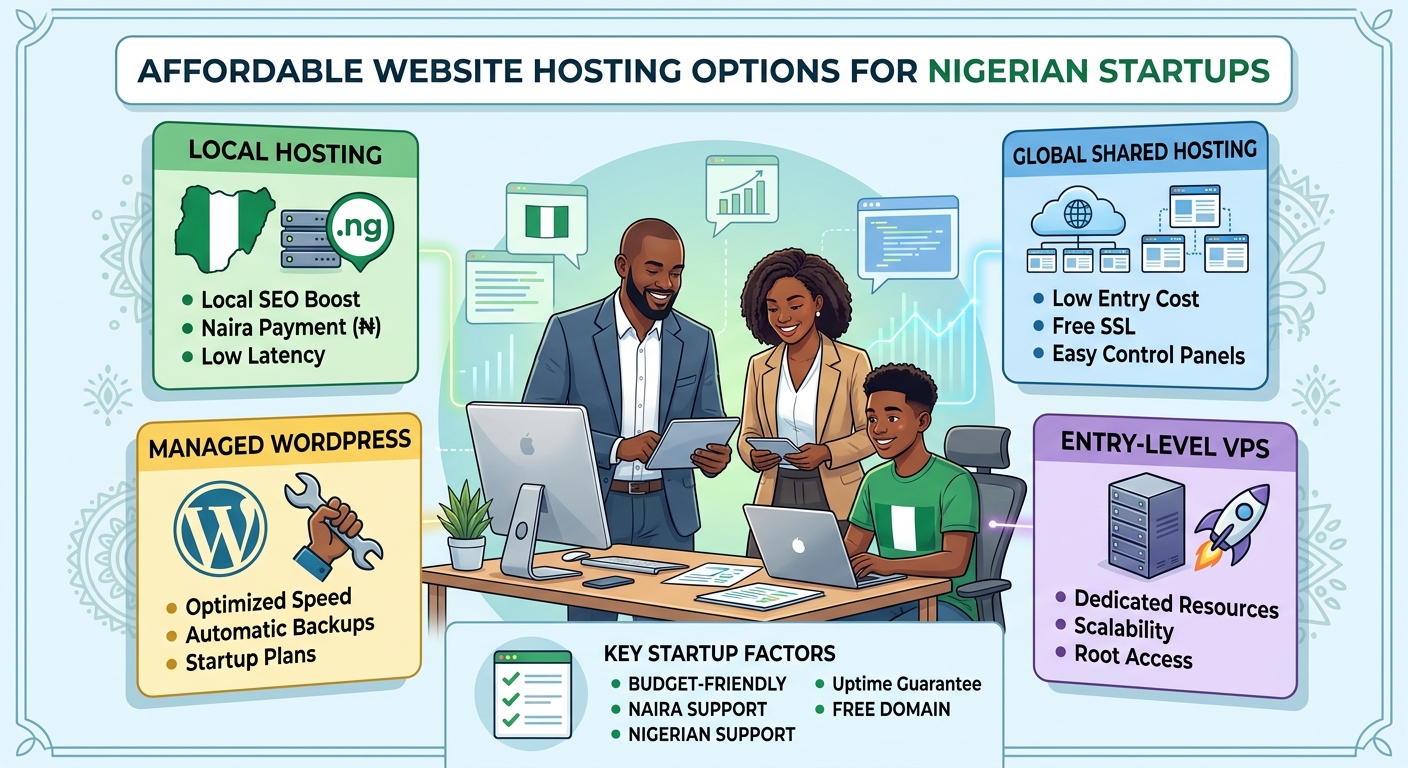
Affordable hosting options for startups

Different hosting types suit different stages of business. Understanding the differences can help you avoid overspending or choosing a plan that cannot support your website.

Shared hosting

Shared hosting is often the most accessible option for a new startup. Several websites use resources on the same server, which allows the provider to offer hosting at a lower cost.

It can be suitable for:

  • Company websites with a small number of pages
  • New blogs and content websites
  • Landing pages for services or products
  • Small church, law firm or professional-service websites
  • Websites that are still building their audience

The main advantage is affordability and simplicity. Many shared hosting plans include a control panel and tools that help users install popular website platforms without advanced technical knowledge.

The trade-off is that your website shares server resources with other customers. Performance may be affected if a site on the same server uses unusually high resources. For a new or modestly sized website, however, a well-managed shared hosting plan may provide practical value.

WordPress hosting

WordPress hosting is designed for websites built with WordPress. It may include WordPress installation, updates, security features, backups or performance settings suited to the platform.

This option can be useful for startups that want to create a website quickly without building everything from scratch. WordPress supports company websites, blogs, service pages, news sections and many types of business content.

Before choosing a WordPress plan, check whether it gives you control over your website and whether important features are included. A low-cost plan may still require you to manage updates, plugins and backups yourself, while a managed service may provide more assistance at a higher cost.

Cloud hosting

Cloud hosting uses connected servers and infrastructure rather than relying on one physical server alone. Depending on the provider and plan, this can offer flexibility, scalability and improved resilience.

Cloud hosting may be appropriate for a startup with:

  • Growing visitor numbers
  • A web application or customer portal
  • More demanding business software
  • Seasonal changes in website traffic
  • A need to increase resources as the business develops

Cloud hosting is not automatically the most affordable option for every business. Its value depends on how resources are allocated and billed. A startup should understand the plan’s limits and charges before selecting it.

VPS hosting

A virtual private server, or VPS, provides an allocated virtual environment on a physical server. It generally offers more control and dedicated resources than basic shared hosting.

A VPS can be a good next step when a website has outgrown shared hosting or needs specific server software and configurations. It may also suit developers and businesses running applications that require more control.

However, VPS hosting often requires more technical administration. You may need to manage server updates, security, monitoring and backups, or pay for additional management. It is important to consider the full cost of running a VPS rather than looking only at the advertised hosting fee.

How to choose cost-effective hosting in Nigeria

Match the plan to your website

Start by identifying what you are building. A five-page business website does not need the same resources as an online store, membership platform or software application.

Consider the number of pages, expected visitors, image and video usage, databases, email accounts and any special software requirements. Choosing based on actual needs helps prevent both overspending and performance problems.

Check what is included

Hosting plans can vary significantly in what they provide. Review the details rather than comparing only headline prices.

Useful features may include:

  • Storage suitable for your website files
  • Bandwidth or traffic allowances
  • SSL support for secure browsing
  • Website backups
  • Malware monitoring or security tools
  • Database support
  • Email services, if required
  • A clear control panel
  • Migration assistance
  • Customer support

Some providers list certain features as optional add-ons. Knowing this in advance makes it easier to compare the total cost of each option.

Consider payment and renewal terms

Hosting is usually an ongoing service rather than a one-time purchase. Review the renewal terms, billing cycle and accepted payment methods before committing. A promotional starting price may not be the same as the price at renewal.

Nigerian startups should also consider whether the provider makes account management and payments convenient for their team. Clear invoices, accessible support and straightforward renewal information can reduce administrative problems later.

Look beyond server location

Some buyers assume that a server must be physically located in Nigeria for a website to perform well for Nigerian visitors. Server location can influence latency, but it is only one factor. Network quality, server configuration, caching, image optimisation and website code also affect speed.

Ask the provider how performance is managed and whether the service can support your expected audience. Avoid choosing solely because of a location claim without considering the complete hosting environment.

Review support quality

When a website becomes unavailable, quick and useful support matters. Check how customers can contact the provider and whether the support team can assist with common issues such as domain connections, email setup, website migration and hosting errors.

Support is especially important for business owners who do not have an in-house technical team. A slightly lower-priced plan may not be good value if resolving problems takes too long or requires specialist knowledge.

Ways to reduce hosting costs

Affordability does not mean choosing the smallest plan indefinitely. It means using resources carefully and avoiding unnecessary costs.

  1. Begin with a suitable entry plan: Choose enough storage and performance for your current website, with a clear path to upgrade.
  2. Keep your website efficient: Compress images, remove unused plugins and use a lightweight design where possible.
  3. Separate essential and optional services: Decide whether you need premium email, advanced security or specialist server management immediately.
  4. Maintain regular backups: A backup can help prevent the cost and disruption of rebuilding a website after a serious error.
  5. Track website usage: Monitor storage, traffic and resource consumption so you can change plans based on evidence.
  6. Protect your domain: Keep domain renewal information current and ensure the business retains control of the domain account.

Common mistakes to avoid

Startups sometimes choose hosting based only on the lowest advertised price. This can lead to unexpected renewal costs, limited support or a plan that cannot handle the website’s needs.

Other common mistakes include ignoring backups, using outdated software, selecting a VPS without the skills to manage it, and buying more resources before they are needed. It is also risky to register a domain or hosting account under the details of someone who may not remain involved in the business.

A practical hosting path for a new startup

A simple business website will often be able to begin with reliable shared hosting or a suitable WordPress plan. As the website gains visitors or requires more complex features, the business can review its resource usage and consider cloud or VPS hosting.

This staged approach keeps early costs manageable while leaving room for growth. The best provider should make upgrading clear and help you move to a more suitable environment when your needs change.

Conclusion

Affordable website hosting for a Nigerian startup should provide more than a low starting price. It should offer the resources, security, support and flexibility your business needs at its current stage.

Compare shared hosting, WordPress hosting, cloud hosting and VPS hosting according to your website’s purpose and expected growth. Check renewal terms, included features, support quality and upgrade options. With a thoughtful choice, your startup can establish a professional online presence without paying for complexity it does not yet need.

A Website Hosting Checklist for Nigerian Businesses

Choosing website hosting is an important decision for any Nigerian business. Your hosting service affects how quickly your website loads, how reliably it stays online, how secure it is and how easy it is to manage.

The cheapest plan is not always the best choice, and the most advanced plan may provide more capacity than your organisation currently needs. A small business, church, law firm and growing online company can have very different hosting requirements.

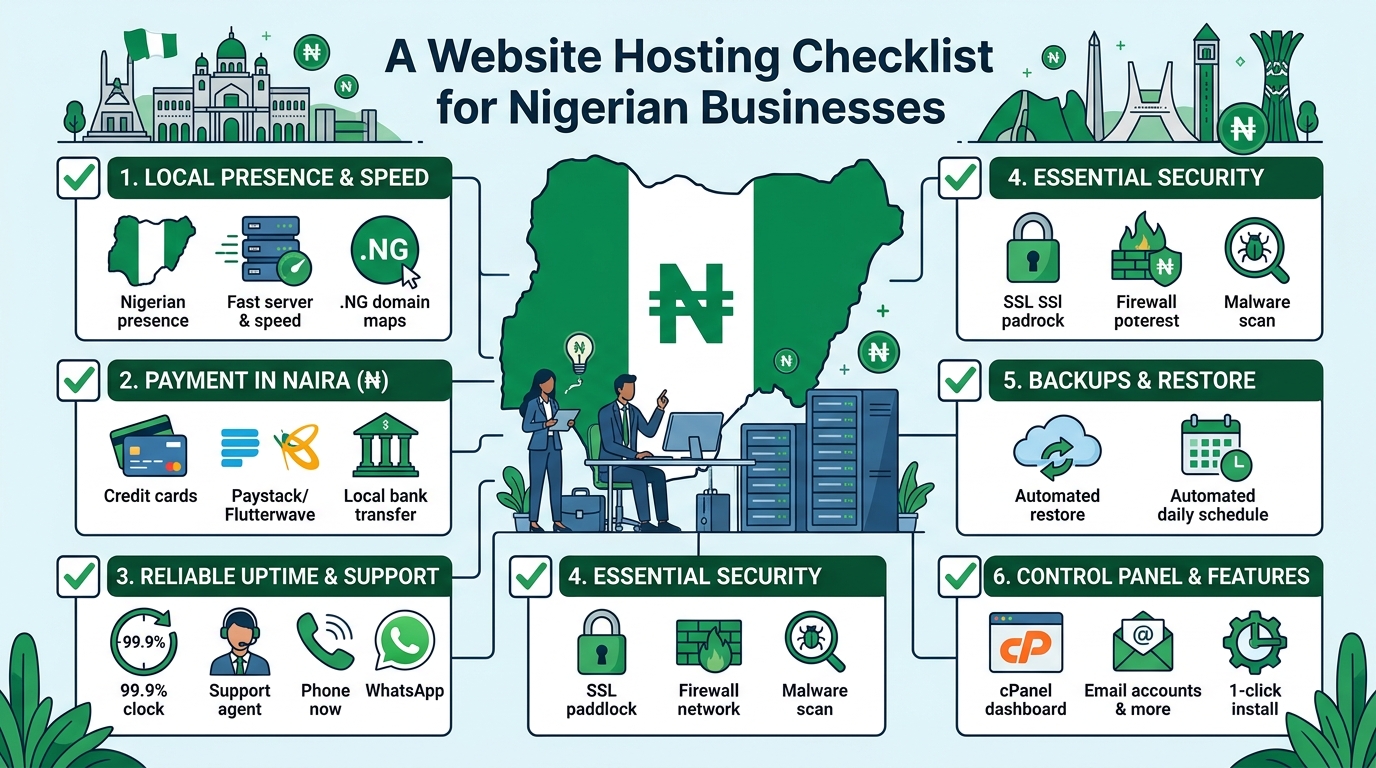
Use this checklist to compare hosting providers and select a plan that fits your website, budget and future goals.

1. Identify what your website needs

Before comparing hosting packages, define the purpose of your website. A simple business website with a few pages has different requirements from an online shop, membership platform or busy company portal.

Consider the following questions:

  • How many pages will your website have?
  • Will you publish blog posts, videos, documents or other large files?
  • Will visitors submit contact forms or make enquiries?
  • Will you sell products or accept online payments?
  • Will your church need event information, sermons or donation features?
  • Will a law firm publish downloadable legal resources or client information?
  • Do you expect traffic to increase over time?

For a basic company profile, a standard shared hosting plan may be appropriate. A website with more traffic, demanding applications or specialised technical requirements may eventually need VPS or cloud hosting.

2. Check the hosting resources

Hosting plans often differ in the amount of storage, processing capacity, memory and other resources they provide. Do not compare plans based only on the number of websites or the advertised storage.

Storage

Storage is used for website files, databases, email accounts, images, backups and other data. Estimate your current needs, then allow room for growth. Large images, videos and downloadable documents can use storage quickly.

Bandwidth and traffic

Bandwidth relates to the amount of data transferred between your website and its visitors. A page containing large images or files can use more bandwidth than a simple text page. Ask how the provider manages usage and what happens if your website grows beyond the plan’s normal capacity.

Server resources

Shared hosting places multiple websites on the same server environment. It can be a practical starting point for many small websites, but performance may be affected by the activities of other accounts. If your website needs more consistent resources, ask whether VPS or cloud hosting is available as an upgrade.

3. Ask about reliability and uptime

Your website should be available when potential customers, members, clients or visitors try to access it. A hosting provider should clearly explain how it works to maintain reliable service and respond to technical problems.

When assessing reliability, ask:

  • Is there an uptime commitment in the service terms?
  • How are server faults monitored?
  • How does the provider communicate during service interruptions?
  • Is technical support available when your website has a problem?
  • Are there planned maintenance windows?

Avoid choosing a provider based on an uptime figure alone. Read the terms carefully and look for a clear support process. It is also useful to keep your own website monitoring in place so you know when important pages become unavailable.

4. Review website speed features

Website speed affects the experience of visitors, particularly people using mobile devices or less consistent internet connections. Hosting is only one part of performance, but it provides the foundation.

Look for a hosting environment that supports modern website software and efficient server configuration. Ask whether the plan supports caching, current PHP versions where relevant, databases suited to your website platform and secure connections.

You should also optimise your own website by resizing images, reducing unnecessary plugins, choosing a lightweight design and keeping software updated. A powerful hosting plan cannot fully compensate for an overloaded or poorly maintained website.

5. Confirm security and backup arrangements

Security should be a basic requirement, not an optional extra. A compromised website can damage your reputation, interrupt business operations and expose information.

Before signing up, check whether the provider offers or supports:

  • SSL certificates for encrypted connections
  • Server-level security measures
  • Protection against common malicious activity
  • Malware detection or cleanup options
  • Account isolation or access controls
  • Regular backups

Backups are especially important, but do not assume that a backup exists simply because it is mentioned in a plan. Ask how often backups are created, how long they are retained and whether you can restore your website yourself or need to contact support.

Keep an independent copy of important website content where possible. Your organisation should also use strong passwords, enable available multi-factor authentication and limit administrative access to people who need it.

6. Choose and protect your domain name

Your domain name is the address people use to find your website. It should be easy to remember, relevant to your organisation and simple to communicate by phone or in person.

When purchasing a domain, confirm:

  • Who will be listed as the registrant or owner?
  • How will domain renewal reminders be sent?
  • Can you manage domain settings yourself?
  • What are the renewal and transfer procedures?
  • Is domain privacy available and suitable for your registration?

Keep control of the domain account and its recovery email address. A web designer or staff member may help manage the website, but the organisation should retain access to the domain and hosting accounts.

7. Understand email hosting

Professional email addresses using your domain can help your organisation present a consistent identity. However, email services have different storage, security and sending limits.

Ask whether the hosting plan includes business email and find out how many mailboxes, aliases and forwarding addresses are available. Check the mailbox size and whether webmail and mobile access are supported.

Also ask how the provider handles spam and whether the domain can be configured with email authentication records. Correct email configuration can help legitimate messages reach recipients and reduce the risk of someone impersonating your domain.

8. Evaluate customer support

When a website stops working, access to knowledgeable support can be more valuable than a small difference in monthly cost. This is particularly important for organisations without an in-house technical team.

Check the available support channels, operating hours and expected response process. Ask whether support can help with common tasks such as domain connections, SSL activation, email configuration, database issues and restoring a backup.

Good support should make technical information understandable. Before buying, you can assess the provider’s communication by asking specific questions about your intended website rather than relying only on general sales descriptions.

9. Read the pricing and renewal terms

Hosting costs can include more than the initial advertised plan. Compare the full cost over the period you expect to use the service.

Review:

  • Initial and renewal pricing
  • Domain registration and renewal charges
  • SSL or backup costs, if charged separately
  • Migration or setup fees
  • Upgrade costs
  • Taxes or payment-related charges
  • Cancellation and refund terms

Choose a payment arrangement your organisation can manage consistently. An expired domain or suspended hosting account can make a website unavailable, so assign someone to monitor renewal dates.

10. Consider future growth

Your first hosting plan does not have to support every possible future project, but your provider should offer a sensible path for growth. Ask whether you can increase resources, host additional websites, move to VPS hosting or use cloud hosting when necessary.

For example, a law firm may begin with a brochure website and later add a knowledge centre. A church may add online registration, media resources or donation tools. A growing SME may introduce an online shop or customer portal. Planning for these possibilities can reduce the disruption of changing providers later.

11. Check migration and ownership policies

If you already have a website, ask how it will be moved to the new host. Confirm whether the provider can assist with transferring files, databases, email accounts and domain settings.

Make sure you will receive access to the key components of your website. This includes the hosting control panel, domain management, website files, databases and relevant administrator accounts. Clear ownership and access arrangements reduce problems if your web developer, employee or agency changes.

A simple decision checklist

Question What to confirm
What type of website do we have? Basic website, blog, online shop, portal or application
Can the plan handle our content? Storage, traffic, databases and email capacity
How will problems be handled? Support channels, availability and response process
Is our website protected? SSL, security controls and backup arrangements
What will we pay over time? Renewals, add-ons, upgrades and cancellation terms
Can we grow? Upgrade options and migration support

Conclusion

The right hosting plan should be secure, manageable and suitable for your organisation’s current needs. Start by understanding your website, then compare resources, reliability, support, security, domain ownership and total costs.

For many Nigerian SMEs, churches and professional firms, a well-supported standard hosting plan can provide a practical starting point. As traffic and technical requirements increase, VPS or cloud hosting may offer a more suitable next step. Taking time to check these details before you buy can help your organisation avoid unnecessary costs and keep its website dependable.

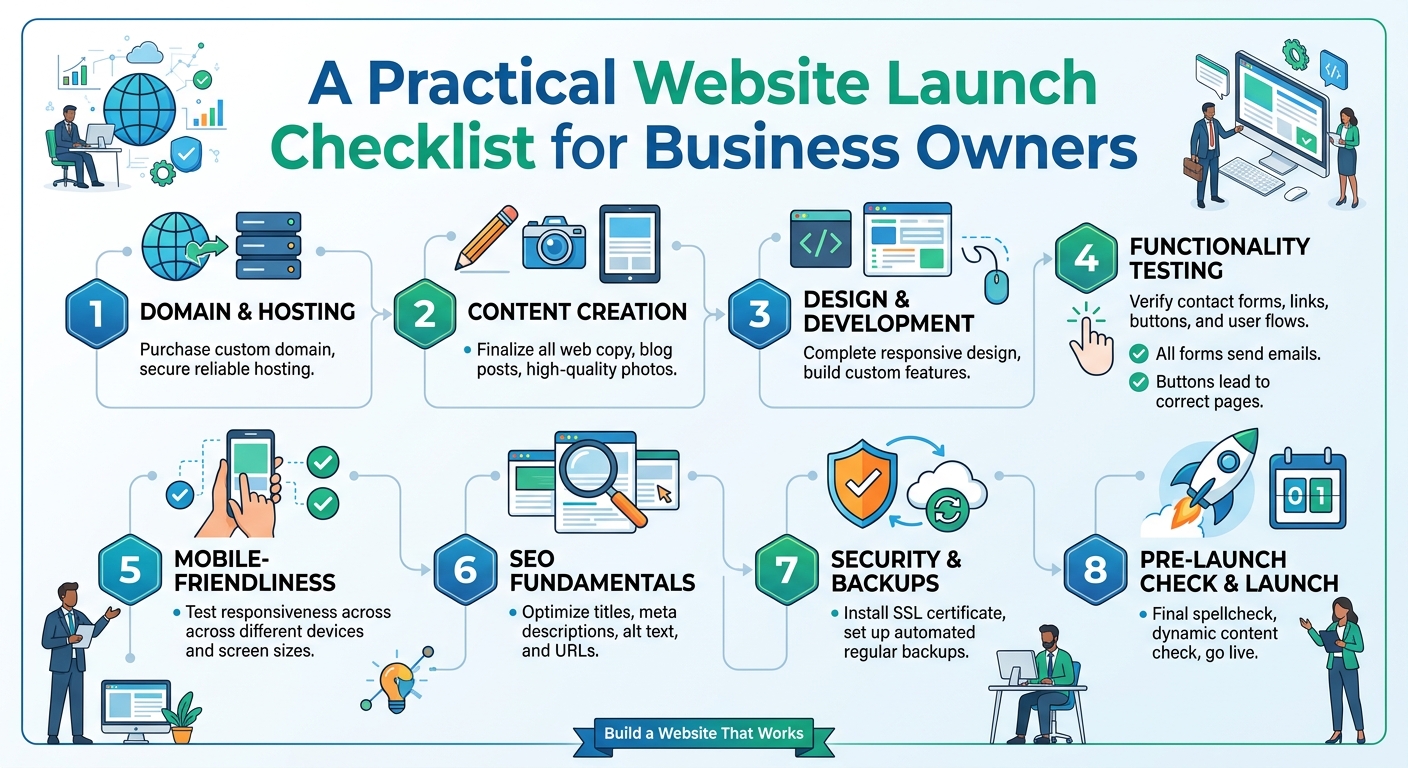
A Practical Website Launch Checklist for Business Owners

Launching a business website is an important step for a small business, church, law firm or growing organisation. Your website can help people understand what you offer, find your contact details and decide whether to work with you. However, a successful launch involves more than choosing a design and publishing a few pages.

A proper launch process helps you avoid broken links, missing information, security gaps and problems that could frustrate visitors. Use this checklist to plan your website, prepare its technical foundation and confirm that everything works before you share the link publicly.

1. Define the website’s purpose

Start by deciding what the website needs to achieve. A website designed to generate enquiries may require clear service pages and contact options. A church website may focus on meeting information, announcements and online resources. A law firm may need to explain its areas of practice and provide a professional way for prospective clients to get in touch.

Write down the main goal and one or two supporting goals. Examples include:

  • Helping potential customers understand your services.
  • Generating calls, messages or enquiry form submissions.
  • Providing opening hours, location and other essential information.
  • Publishing news, announcements or educational content.
  • Building trust before a visitor contacts your organisation.

Clear goals make it easier to decide which pages, features and calls to action are necessary. They also help prevent your website from becoming crowded with tools that do not support your business.

2. Choose and register the right domain

Your domain is the address people use to find your website. It should be easy to remember, easy to spell and closely connected to your organisation or brand. If possible, use a short name without unnecessary numbers, punctuation or complicated wording.

Before purchasing a domain, check that:

  • The name matches your organisation or trading name.
  • You have checked the spelling carefully.
  • The domain is suitable for the audience and market you serve.
  • The registration details are accurate and controlled by your business.
  • You know when the domain is due for renewal.

Keep your domain account details secure. A domain is a valuable business asset, and losing access to it can make it difficult to manage your website or business email.

3. Select hosting that fits your needs

Web hosting stores your website files and makes them available to visitors. The right hosting choice depends on the type of website you are launching, the features you need and the level of traffic you expect.

For a straightforward business website, an appropriate shared hosting plan may provide a practical starting point. Businesses with more demanding applications, higher resource requirements or specialised configurations may need VPS or cloud hosting. The important point is to match the hosting environment to the website rather than choosing a plan based only on the lowest price.

When comparing hosting options, consider:

  • Whether the plan supports your website platform and software.
  • Storage and resource limits.
  • Available backup options.
  • Security features and account access controls.
  • How easily you can upgrade as the website grows.
  • The quality and availability of technical support.

Sonhosting provides web hosting options for organisations that want to save time and avoid unnecessary complexity when setting up their online tools. Review the requirements of your website first, then select a plan that can support its current and likely near-term needs.

4. Prepare the essential website pages

A new website does not need dozens of pages to be useful. It does need the right information. Most business websites should consider the following core pages:

  • Home: Explain who you are, what you offer and what visitors should do next.
  • About: Provide relevant background about the business or organisation.
  • Services: Describe each important service clearly and explain who it is for.
  • Contact: Include reliable contact methods and any relevant business information.
  • Frequently asked questions: Address common concerns before people contact you.

Depending on your organisation, you may also need pages for locations, team members, events, resources, testimonials supplied by real customers or legal and privacy information. Only publish information that is accurate and approved.

5. Check your content carefully

Visitors judge a website quickly, and small errors can reduce confidence. Review every page for spelling, grammar, outdated details and unclear wording. Ask someone who is unfamiliar with the business to read the pages. They may notice information that employees have assumed is obvious.

Check that:

  • Your services are described in plain language.
  • Prices, opening hours and availability are current if you publish them.
  • Contact details are consistent across the website.
  • Calls to action are clear, such as “Request a consultation” or “Contact us”.
  • Images are relevant, sharp and suitable for the page.
  • Text is easy to read on a mobile phone.

Avoid making promises that the business cannot consistently deliver. Professional content should be specific, honest and useful to the people you want to serve.

6. Test the website on different devices

Many visitors will access your website from a mobile phone. Test the layout on phones, tablets and desktop computers where possible. Look for text that is too small, buttons that are difficult to tap, images that overlap content and menus that do not open properly.

Complete the main visitor journey yourself. Start on the home page and try to find a service, read the relevant information and make contact. Test every important button, link and form. Do not assume that a feature works simply because it worked during development.

7. Review performance and accessibility

A website should be reasonably quick and usable for people with different devices, connection speeds and abilities. Large images, unnecessary plugins and poorly configured features can slow down a page.

Before launch:

  • Compress large images while keeping them clear.
  • Remove unused pages, plugins and design elements.
  • Use descriptive headings and readable text.
  • Add meaningful alternative text to important images.
  • Make sure links and buttons are distinguishable.
  • Check that key information is not available only through images.

These steps improve the experience for visitors and make the website easier to maintain.

8. Protect the website and its accounts

Security should be part of the launch plan, not an afterthought. Use strong, unique passwords for your hosting, domain, website administration and email accounts. Enable additional account protection where it is available, and limit administrative access to people who need it.

Confirm that your website uses HTTPS and that its software, themes and extensions are kept up to date. Arrange a backup process and understand how a backup can be restored. A backup is most useful when it can actually be recovered after a mistake or technical problem.

Also decide who is responsible for updates, renewals and security checks. Assigning ownership prevents important tasks from being forgotten when staff or service providers change.

9. Configure business email and contact notifications

A professional email address using your business domain can create a more consistent experience than relying only on a personal address. Before launch, test sending and receiving messages, including messages sent from website contact forms.

Check where form notifications are delivered and whether more than one responsible person should receive them. Send test enquiries from different devices and confirm that the messages do not disappear into an overlooked inbox. Add a simple confirmation message so visitors know whether their enquiry was submitted successfully.

10. Complete the final launch review

Use a final checklist before announcing the website:

  1. Confirm the correct domain points to the intended website.
  2. Review the home page, main service pages and contact page.
  3. Test navigation, buttons, forms and important links.
  4. Check the website on mobile and desktop screens.
  5. Verify HTTPS, backups, updates and administrator access.
  6. Remove placeholder text and unfinished sections.
  7. Confirm that contact information is accurate.
  8. Tell relevant staff how to handle enquiries received through the website.

It can be useful to ask one person to review the website as a first-time visitor rather than as someone involved in building it. A fresh perspective often reveals confusing navigation or unanswered questions.

11. Plan what happens after launch

Publishing the website is the beginning of its working life. Schedule regular reviews of your content, software, contact details and performance. Add useful updates when your services, events or operating arrangements change.

Monitor the questions people ask and the pages they use most. This information can guide future improvements, such as clearer service descriptions, additional frequently asked questions or a more direct enquiry process. If your website grows beyond the limits of its original hosting plan, review whether an upgrade or a different hosting environment is appropriate.

Conclusion

A careful website launch gives your organisation a stronger foundation online. Define your goals, choose a suitable domain and hosting plan, prepare accurate content, test the visitor experience and protect the accounts behind the website. Then keep the site current after launch.

Whether you are launching a small business website, a church website or a professional site for a law firm, a practical checklist can reduce avoidable problems and help visitors find the information they need with confidence.

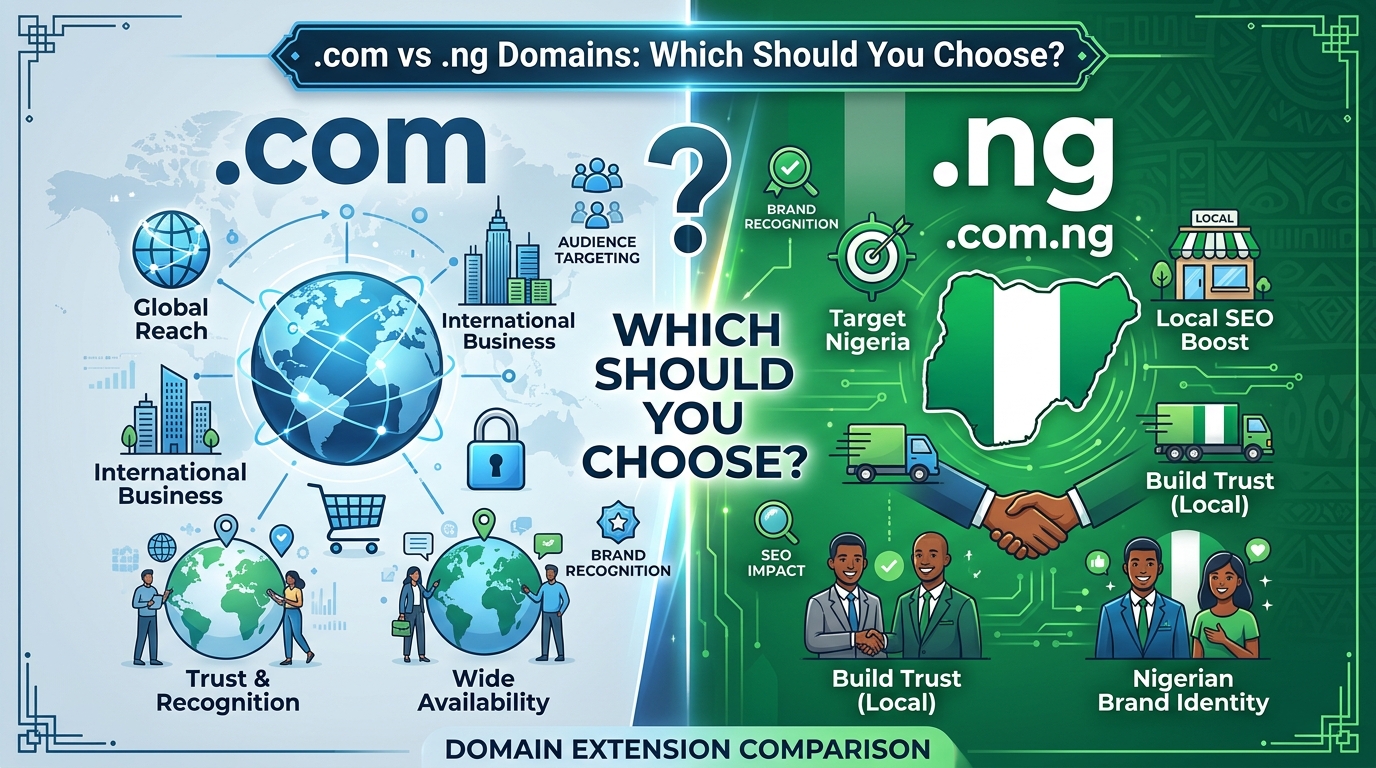
.com vs .ng Domains: Which Should You Choose?

Choosing a domain name is one of the first important decisions when creating a website. Your domain is more than a web address: it is part of your brand identity, appears in marketing materials and can influence how visitors perceive your organisation.

For businesses and organisations in Nigeria, the choice often comes down to a .com domain or a Nigerian country-code domain such as .ng or .com.ng. Both can be suitable, but the best option depends on your audience, business goals and the image you want to build.

This guide explains the main differences between .com and .ng domains so you can make a confident decision before purchasing your domain and hosting.

What is a .com domain?

A .com domain is a generic top-level domain. It was originally associated with commercial organisations, but it is now used by businesses, individuals, non-profits, churches, professionals and many other types of websites around the world.

Because .com has been used for many years, it is familiar to internet users in Nigeria and internationally. When people hear a business name, they may automatically try the .com version first. This familiarity can make a .com domain easy to remember and suitable for organisations serving customers across multiple countries.

However, popular .com names are often already registered. You may need to adjust your preferred name, add a relevant word or choose a different extension if the exact domain is unavailable.

What is a .ng domain?

A .ng domain is Nigeria’s country-code top-level domain. It identifies a website with a connection to Nigeria and can help communicate that a business, organisation or service is focused on the Nigerian market.

There are also second-level options such as .com.ng, which is commonly associated with commercial websites, and other Nigerian domain categories intended for particular types of organisations. The appropriate option may depend on the domain provider’s requirements and the organisation applying for it.

A .ng domain can be useful for a Nigerian SME, local service provider, church, law firm or community organisation that wants its Nigerian identity to be clear. It can also make a brand name available when the corresponding .com has already been taken.

Key differences between .com and .ng

1. Audience and market focus

The clearest difference is geographical positioning. A .com domain has a global feel, while .ng signals Nigeria.

If your organisation mainly serves customers in Lagos, Abuja, Port Harcourt or other parts of Nigeria, a .ng domain can reinforce your local presence. It may help visitors immediately understand that your services are intended for the Nigerian market.

A .com domain may be more appropriate if you plan to serve customers in several countries, sell internationally or build a brand that is not tied to one location. It is also a sensible choice when your target audience is already familiar with your business name under a .com address.

2. Brand perception

Neither extension automatically makes a website more professional. A trustworthy brand depends more on the quality of its website, communication, security, customer service and consistency.

That said, the extensions communicate different things. A .com domain can make a company appear broadly international. A .ng domain can present a business as proudly Nigerian, locally relevant and focused on serving people in the country.

For a Nigerian church, a .ng domain may clearly identify the organisation’s location. For a law firm serving Nigerian clients, it can support a local professional identity. A company with international expansion plans may prefer .com as its primary domain, even if it starts in Nigeria.

3. Availability of names

Domain availability is a practical consideration. Short, obvious .com names are often unavailable because many businesses and individuals already use them.

You may have more naming flexibility with a .ng or .com.ng domain. This can allow you to use your preferred business name without adding unnecessary numbers, hyphens or extra words.

Before deciding, check the exact name across the extensions you are considering. A good domain should be easy to spell, easy to say aloud and closely related to your organisation’s name or services.

4. Memorability

People are generally familiar with .com, which can make it easy to remember. However, familiarity does not mean that every .com domain is memorable. A long or complicated name can still be difficult to recall.

A concise .ng domain may be more memorable than a crowded .com alternative. For example, a clear business name with a relevant Nigerian extension may be easier to communicate than a .com address containing several extra words.

When comparing options, say each domain aloud and consider how it will look on a sign, invoice, social media profile, business card or radio advertisement.

5. Search engine considerations

Changing the domain extension alone does not guarantee better search engine visibility. Search engines consider many aspects of a website, including useful content, technical performance, relevance, links and the quality of the user experience.

A Nigerian country-code domain can provide a useful geographic signal for searches connected to Nigeria. A .com domain can support a broader international positioning. The extension should therefore match your intended audience, while your website content and technical setup support your search goals.

Most importantly, choose a domain that you can build consistently. A relevant, trusted website is more valuable than selecting an extension based only on assumptions about rankings.

When should you choose a .com domain?

A .com domain may be the better choice if:

  • Your business plans to serve customers outside Nigeria.
  • You want a broadly international brand identity.
  • Your audience is already familiar with your .com name.
  • You expect to expand into different countries or markets.
  • The .com version of your brand name is available and easy to use.

For example, a technology company developing services for customers across Africa may choose .com to avoid limiting its brand to one country. A Nigerian business can still use .com while clearly showing its location through its website content, contact information and business messaging.

When should you choose a .ng domain?

A .ng or .com.ng domain may be a strong choice if:

  • Your main customers are in Nigeria.
  • Your organisation wants to emphasise its Nigerian identity.
  • You provide location-based services to Nigerian clients.
  • The matching .com domain is unavailable or too expensive for your budget.
  • You want a short, clear alternative to a long .com name.

This can work well for local retailers, schools, churches, professional practices, community organisations and SMEs whose services are primarily delivered within Nigeria.

Can you buy both .com and .ng?

Yes, many organisations choose to register both versions when they are available. One domain can be used as the main website, while the other redirects visitors to it.

Owning both can help protect your brand and reduce the risk of another party registering a similar domain. It can also prevent confusion when customers type the wrong extension. However, registering multiple domains adds renewal responsibilities, so keep your domain records organised and renew every important domain on time.

If you use more than one domain, decide which one is your primary address. Use that version consistently on your website, email addresses, social media profiles, invoices and promotional materials.

What to check before registering your domain

  1. Check the spelling: Avoid names that are difficult to pronounce or easy to mistype.
  2. Keep it practical: Shorter domains are usually easier to share and remember.
  3. Consider the future: Choose a name that still fits if your products or services expand.
  4. Review registration requirements: Requirements and policies can vary by domain extension and provider.
  5. Plan for renewal: Keep your registration email and payment details current.
  6. Protect your brand: Consider related extensions if the name is important to your organisation.

Does the domain extension affect hosting?

Your choice of .com or .ng does not prevent you from using standard web hosting, VPS hosting or cloud hosting. The domain points visitors to your website, while hosting provides the server space and resources needed to run it.

When purchasing hosting, check that the provider can help you connect your chosen domain, manage DNS records and set up professional email addresses. A reliable setup should also support website security, backups and the software your organisation needs.

Final recommendation

Choose .com if you want a global identity, plan to expand internationally or already have a strong .com brand. Choose .ng or .com.ng if your organisation mainly serves Nigeria and you want your local identity to be immediately clear.

There is no universally superior extension. The best domain is available, easy to remember, aligned with your audience and suitable for your long-term plans. Once you choose it, focus on building a fast, secure and useful website that gives visitors a reason to return.

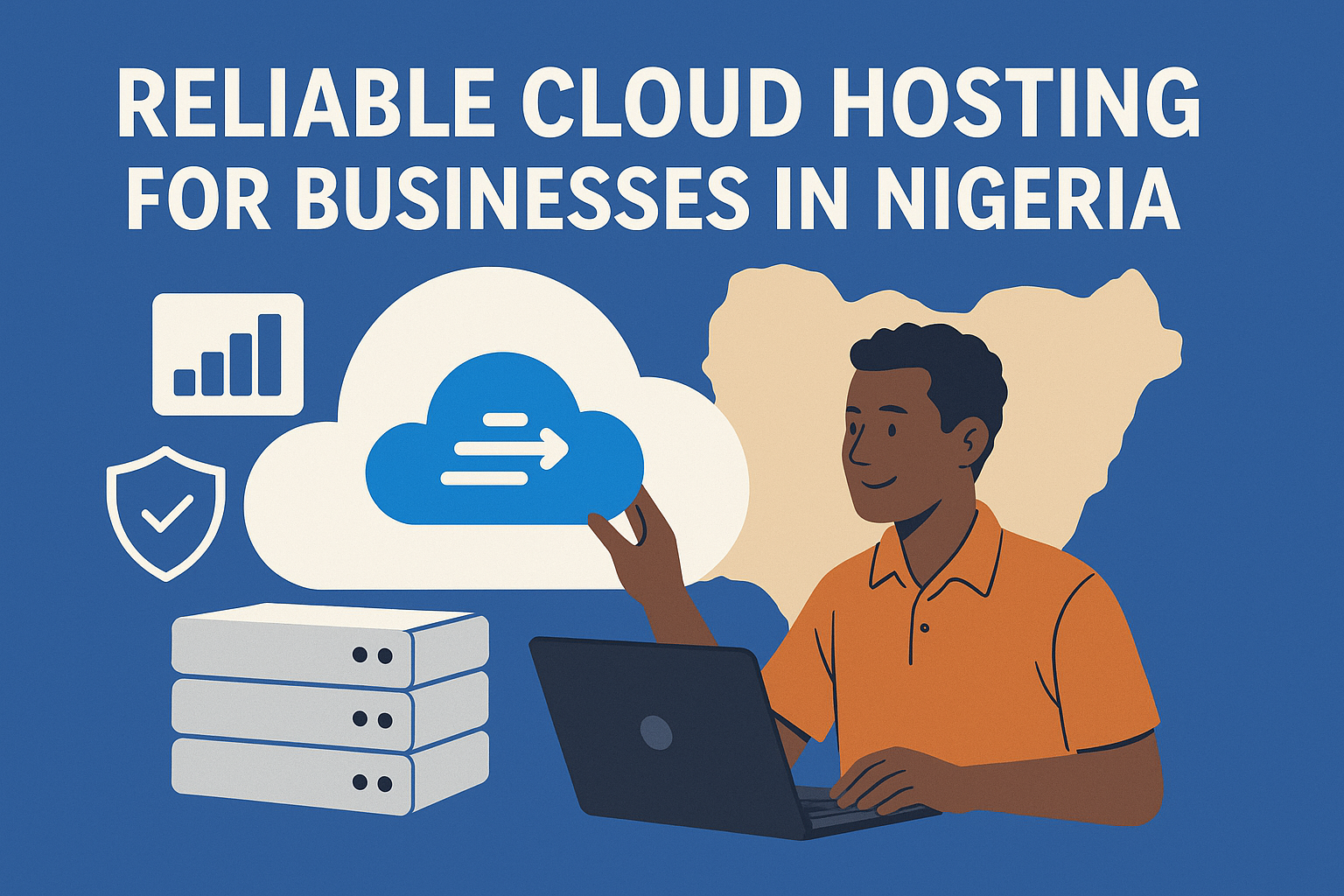
A man seated on a table in front of a laptop, with three servers stacked vertically beside him representing Reliable Cloud Hosting In Nigeria

Reliable Cloud Hosting for Businesses in Nigeria

Today, many businesses in Nigeria are using the internet to run their daily work. They sell goods online, keep customer records, store files, and run websites. To do all these things, they need a place to keep their data safe and easy to reach. That place is called the “cloud.”

Cloud hosting is a way for businesses to store their data and run their websites on the internet instead of on their own computers. This helps companies save money, work faster, and keep their information safe. But the cloud must be reliable. If it is slow or goes down, it can hurt the business. That is why choosing a reliable cloud hosting service is very important.

What Is Cloud Hosting?

Cloud hosting that is eco-friendly

Cloud hosting means using a group of connected computers (called servers) to store data, run websites, and support apps. These servers are not in your office. They are in special buildings called data centers, and you can access them online from anywhere.

When you use cloud hosting, you do not need to buy expensive hardware. You just pay for what you use. This makes it a good choice for small and large businesses alike.

Why Businesses in Nigeria Need Cloud Hosting

Nigerian flag featuring a cloud hosting server

Businesses in Nigeria are growing fast. Many are going digital to reach more customers. Here are some reasons why cloud hosting is useful for them:

1. Cost Saving

Buying servers and setting up your own IT team is expensive. With cloud hosting, you don’t need to do that. You just pay a monthly or yearly fee and the hosting company takes care of everything.

2. Easy Access

Cloud hosting lets you reach your data anytime, from anywhere. This is very helpful for businesses that have teams working in different places or from home.

3. Better Security

Good cloud hosting companies protect your data with strong security tools. They back up your files and keep them safe from hackers, viruses, or power problems.

4. Scalability

This means you can grow your hosting space as your business grows. If you need more power or space, you can get it easily. You don’t have to buy new hardware every time your business expands.

5. Support and Maintenance

Cloud hosting companies provide 24/7 support. If anything goes wrong, you can get help fast. They also handle updates and maintenance, so you don’t have to worry about technical problems.

Challenges in Nigeria

While cloud hosting has many benefits, there are still some challenges in Nigeria:

1. Internet Speed

Many areas in Nigeria still have slow or unstable internet. Cloud hosting needs good internet to work well. Without it, businesses may face delays and trouble accessing their data.

2. Power Supply

Unstable electricity can affect business operations. If the internet or office devices go off during work, it can stop access to the cloud. Some companies use backup power (like generators or solar) to avoid this issue.

3. Cost of Data

Mobile data and broadband can be expensive in Nigeria. This makes it harder for some businesses to use cloud services fully.

4. Lack of Knowledge

Some business owners don’t fully understand what cloud hosting is or how to use it. They may fear losing control over their data or think it’s too technical. More education and awareness are needed.

What to Look for in a Reliable Cloud Hosting Provider

A huge cloud and hosting servers on the ground

If you want to choose a reliable cloud hosting service in Nigeria, here are some things to check:

1. Uptime Guarantee

Uptime means how often your website or app is online and working. A good hosting provider should promise 99.9% uptime. This means your service will hardly ever go down.

2. Speed and Performance

Your website should load fast. Slow websites can make customers leave. Check that the hosting provider uses high-speed servers and has data centers near Africa.

3. Security Features

Look for services with firewalls, encryption, backup options, and protection from cyber attacks. Your data must stay safe.

4. Customer Support

You should be able to reach support any time—day or night. Choose providers with good reviews for support service.

5. Flexible Plans

Your needs may change. Look for plans that let you upgrade or reduce your services easily without losing money.

6. Local Presence

Some hosting companies have offices or data centers in Nigeria. This can improve speed and support and help you follow local laws.

Top Cloud Hosting Providers for Nigerian Businesses

Here are some reliable cloud hosting options for businesses in Nigeria:

1. Sonhosting

Sonhosting is a local hosting company. It is easy to use, affordable, and offers good support. They provide both shared and cloud hosting.

2. Whogohost

Whogohost is one of the biggest web hosting companies in Nigeria. They offer cloud hosting, email hosting, and domain registration. Their support is local, and they accept payments in Naira.

3. Smartweb

Smartweb is another Nigerian company. It offers VPS, cloud hosting, and server options. Their prices are fair and they provide good security.

4. Hostinger

Hostinger is an international company with low prices and fast service. Their servers are not in Nigeria, but their global reach gives good speed.

5. Google Cloud / Microsoft Azure / Amazon Web Services (AWS)

These are global cloud giants. They offer powerful tools, high speed, and strong security. But they are more expensive and may require more technical knowledge.

You May Also Like: The 11 Shocking Benefits of Cloud Hosting: Explained In Layman Terms

Tips for Using Cloud Hosting Well

To get the most out of cloud hosting, follow these tips:

  • Choose the right plan: Don’t buy too much or too little. Start with what you need and grow from there.
  • Back up your data: Even though cloud services do backups, you should also keep your own copy.
  • Train your team: Make sure your staff knows how to use cloud tools properly.
  • Monitor your usage: Keep an eye on your monthly use so you don’t get surprised by the bill.

Cloud hosting is a smart choice for Nigerian businesses that want to grow, save money, and work better. It helps you keep your data safe, reach more customers, and work from anywhere. But you need a reliable provider to enjoy the full benefits.

Before choosing, compare hosting companies, read reviews, and make sure they offer the features your business needs. With the right setup, cloud hosting can help Nigerian businesses succeed in a digital world.

A modern and visually appealing digital illustration of a reseller hosting business in Nigeria. The image features a young entrepreneur working on a

How to Make Money with Reseller Hosting in Nigeria: A Step-by-Step Guide

With Nigeria’s growing digital economy, the demand for web hosting services has surged. Businesses, entrepreneurs, and bloggers all need hosting solutions, making reseller hosting a profitable business opportunity. Reseller hosting allows you to buy hosting resources from a larger provider and sell them to your customers at a profit. If you want to start a reseller hosting business in Nigeria, this step-by-step guide will help you navigate the process.

Step 1: Understand Reseller Hosting

A professional digital illustration of a person working on a laptop with a futuristic web hosting interface displayed on the screen. The background

Reseller hosting is a business model where you purchase hosting resources (disk space, bandwidth, etc.) from a web hosting provider and resell them to customers. This allows you to brand your own hosting company without managing physical servers.

Benefits of Reseller Hosting:

  • Low startup cost – No need to buy expensive server hardware.
  • Scalability – Upgrade as your customer base grows.
  • Recurring revenue – Earn money from hosting renewals and domain sales.
  • Custom branding – Create your own hosting brand with personalized plans and pricing.

Step 2: Choose a Reliable Reseller Hosting Provider

Selecting the right hosting provider is crucial to your business’s success. Look for providers that offer:

  • Affordable reseller plans with enough resources.
  • 99.9% uptime guarantee to ensure customer websites stay online.
  • White-label options to allow custom branding.
  • 24/7 customer support for troubleshooting.
  • cPanel/WHM access for easy management of hosting accounts.

Some popular reseller hosting providers include:

Step 3: Purchase a Reseller Hosting Plan

Once you’ve chosen a provider, select a reseller hosting package that aligns with your budget and business goals. Consider:

  • Storage space – Determine how much disk space you need.
  • Bandwidth allocation – Ensure it can handle customer traffic.
  • Number of accounts – Choose a plan that supports enough customers.
  • Additional features – Free SSL, automated backups, and security tools.

Step 4: Set Up Your Hosting Business

A picture of datacenter that is shot from high above the ground.

a. Choose a Business Name and Register It

Pick a catchy, professional name for your hosting company and register it with the Corporate Affairs Commission (CAC) in Nigeria. This establishes credibility.

b. Design a Professional Website

Your website serves as the storefront for your business. Ensure it includes:

  • A clear homepage explaining your services.
  • Hosting plans and pricing that customers can compare.
  • A domain registration feature (integrate with domain providers like Namecheap or ResellerClub).
  • A payment gateway such as Paystack, Flutterwave, or Interswitch.
  • Customer support options (live chat, email, WhatsApp, or ticketing system).

Step 5: Set Competitive Pricing

Your pricing strategy should balance affordability and profitability. Consider:

  • Analyzing competitors’ prices in Nigeria.
  • Offering tiered plans (basic, premium, and enterprise hosting packages).
  • Providing discounts for long-term subscriptions.
  • Including free features like SSL certificates or website migration to attract customers.

Step 6: Promote Your Hosting Business

Marketing is crucial for attracting clients. Here are effective strategies:

a. Social Media Marketing

Use Facebook, Twitter, Instagram, and LinkedIn to promote your hosting services. Share testimonials, promotions, and educational content about web hosting.

b. Content Marketing

Start a blog about web hosting, website building, and online business tips to attract organic traffic.

c. SEO Optimization

Optimize your website with keywords like “cheap web hosting in Nigeria” or “best reseller hosting services.” This improves search engine rankings.

d. Paid Advertising

Invest in Facebook Ads, Google Ads, and influencer marketing to reach potential customers quickly.

e. Referral Program

Encourage customers to refer others by offering discounts or commission-based incentives.

Step 7: Provide Excellent Customer Support

Reliable customer support builds trust and encourages referrals. Ensure you:

  • Offer 24/7 support via live chat, email, or phone.
  • Create a knowledge base with FAQs and troubleshooting guides.
  • Respond quickly to inquiries and complaints.

Step 8: Scale Your Business

Once you’ve gained customers, expand by:

  • Offering VPS and dedicated hosting for higher-tier clients.
  • Selling additional services like website design, SEO, and digital marketing.
  • Partnering with developers, bloggers, and agencies to increase sales.
  • Upgrading to a larger reseller plan as your customer base grows.

You May Also Like: How to Start Reseller Hosting in Nigeria and Earn Instantly

Reseller hosting is a lucrative business opportunity in Nigeria, especially with the rising demand for online services. By selecting a reliable hosting provider, setting competitive pricing, marketing effectively, and providing excellent customer support, you can build a profitable reseller hosting business. Start today and tap into Nigeria’s growing digital economy!

Two robot like servers in a boxing ring, prepared to box. HarmonWeb vs Sonhosting

HarmonWeb Vs Sonhosting: Which Hosting Is Better For Small Business

Finding the right web hosting provider is crucial for anyone looking to establish an online presence. For users in Africa, it’s important to consider factors like speed, reliability, security, customer support, and cost. Two popular options are Sonhosting and HarmonWeb. This guide will help you compare these two services to choose the one that fits your needs best.

Speed and Performance

A fast car representing Sonhosting running past all other cars

Sonhosting
Sonhosting offers very fast website speeds, thanks to its advanced caching technology and servers located in Africa and Europe. This ensures quick page loading times, even for websites with lots of images and videos.

HarmonWeb
HarmonWeb provides managed cloud hosting powered by advanced SSD technology, which is up to six times faster than many competitors. They also allow users to choose server locations near their customers for better performance.

Uptime Reliability

Sonhosting
Sonhosting guarantees 99.9% uptime. This means your website will be online almost all the time, with minimal disruptions.

HarmonWeb
HarmonWeb offers a 99% uptime guarantee, supported by backup systems like cooling, emergency power, and round-the-clock monitoring to keep your site running.

Security Features

A highly secured windows vps datacenter

Sonhosting
Security is a priority for Sonhosting. They include free SSL certificates, regular backups, and malware protection in all their plans, helping to protect your website from online threats.

HarmonWeb
HarmonWeb also provides strong security measures, including free SSL certificates and weekly backups, to keep your data safe.

Customer Support

Sonhosting
Sonhosting provides 24/7 support in both English and French. This multilingual service is especially helpful for users across different African countries.

HarmonWeb
HarmonWeb has a team of support experts available 24/7. They’re known for being friendly and helpful, ensuring you get the assistance you need anytime.

Pricing and Plans

Sonhosting
Sonhosting offers flexible and budget-friendly plans starting at ₦999. They include free domains, unlimited SSD storage, and free SSL certificates, making it easy for users to start small and upgrade as their needs grow.

HarmonWeb
HarmonWeb’s hosting options start at ₦1,590/month for shared hosting, ₦2,200/month for WordPress hosting, and ₦14,000/month for Cloud VPS hosting. All plans include features like free domains and fast SSD storage.

Special Features

A man in total disbelief, after discovering the secrets of creating a website

Sonhosting
Sonhosting is designed with the African market in mind. They support payment methods like mobile money and local bank transfers, making it easy for users to pay. They also integrate with platforms like WooCommerce and Shopify, which is great for setting up online stores.

HarmonWeb
HarmonWeb allows users to choose from multiple server locations to optimize performance. They also offer weekly backups and specialized hosting for Ezoic-monetized websites, catering to specific needs.

Customer Feedback

Sonhosting
Customers appreciate Sonhosting for its affordability, fast website speeds, and reliable customer service. Many users report better website performance after switching to Sonhosting.

HarmonWeb
HarmonWeb users highlight their excellent uptime, responsive customer support, and reasonable pricing. Many customers have seen their websites grow successfully while using HarmonWeb’s hosting plans.

Both Sonhosting and HarmonWeb are strong options for web hosting in Africa.

You May Also Like: Top 5: The Best Web Hosting Companies in Nigeria

  • Choose Sonhosting if you value speed, security, multilingual support, and payment options tailored to African users. They are especially ideal for businesses setting up e-commerce websites.
  • Choose HarmonWeb if you’re looking for a variety of hosting solutions, competitive pricing, and reliable performance.

Ultimately, your choice will depend on your specific needs, budget, and the features you prioritize most. Both providers have a lot to offer, ensuring you can find a plan that suits your goals.

A sophisticated map of Africa showing datacenters and web servers all over Africa

Your Search Ends Here – Africa’s Best Web Host Revealed!

When it comes to launching a website in Africa, one of the most important decisions you’ll make is choosing the right web host. Whether you’re running a small business, starting a blog, or building an e-commerce empire, the quality of your hosting service can make or break your online presence. Africa’s digital landscape is growing rapidly, and the demand for reliable, fast, and secure web hosting has never been higher. But with so many options on the market, how do you find the best one?

We’ve done the hard work for you and uncovered Africa’s best web host—one that stands out for its unbeatable features, customer support, affordability, and tailored solutions for businesses in Africa.

Let’s dive into why this web host deserves the top spot and how it can elevate your online ventures.

The Rise of Digital Opportunities in Africa

A map of Africa stylishly hanging in the ocean

Africa is experiencing a tech revolution, with more individuals and businesses embracing the digital economy. Internet penetration has grown exponentially, and as of 2024, Africa boasts over 600 million internet users. This boom has fueled the need for robust web hosting services capable of meeting the diverse needs of startups, SMEs, and established enterprises.

However, challenges like inconsistent connectivity, high costs, and lack of localized support often hinder businesses from achieving their online potential. The right web hosting provider can solve these issues, offering seamless uptime, cost-effective solutions, and localized customer support.

What Makes a Great Web Host?

A view inside a datacenter of a hosting company that resells hosting

Before revealing the best web host in Africa, it’s essential to understand the key factors that set a hosting provider apart:

  1. Speed and Uptime
    A reliable web host ensures your website is always accessible with minimal downtime. Slow-loading websites risk losing visitors, damaging user experience and conversions.
  2. Customer Support
    Given the technical challenges that can arise, especially in regions with varying infrastructure, excellent customer support is non-negotiable. A top-tier host offers 24/7 assistance via multiple channels, including live chat, email, and phone.
  3. Security Features
    Cybersecurity threats are on the rise, making robust security protocols a must. Look for features like SSL certificates, DDoS protection, and automated backups.
  4. Scalability and Affordability
    As businesses grow, so do their hosting needs. The ideal host provides flexible plans that allow you to scale resources without breaking the bank.
  5. Localized Solutions
    Hosting tailored to the African market addresses specific challenges like local payment options, multilingual support, and data centers optimized for regional connectivity.

And the Winner Is…

After extensive research and testing, Sonhosting emerges as Africa’s leading web hosting provider.

Why Sonhosting Stands Out:

  1. Lightning-Fast Speeds
    With strategically placed servers and advanced caching technology, Sonhosting ensures rapid load times, even for resource-heavy websites. Their data centers across Africa and Europe are optimized for speed and reliability, giving businesses a competitive edge.
  2. Unmatched Uptime Guarantee
    Say goodbye to downtime! Sonhosting guarantees 99.9% uptime, ensuring your website remains accessible around the clock.
  3. Affordable and Flexible Plans
    Whether you’re a solopreneur or running a large enterprise, Sonhosting offers plans to fit every budget. Their tiered pricing makes it easy to start small and upgrade as your needs grow.
  4. Top-Notch Security
    Security is a cornerstone of Sonhosting’s services. From free SSL certificates and malware protection to regular backups, your website is safeguarded against threats.
  5. Exceptional Customer Support
    Their dedicated customer support team is available 24/7, providing assistance in English, French, and several other languages spoken across Africa.
  6. Tailored for Africa
    What truly sets Sonhosting apart is their commitment to the African market. They offer localized payment methods, making it easy to pay using mobile money, local bank transfers, and other region-specific options.
  7. E-Commerce Ready
    For entrepreneurs looking to launch online stores, Sonhosting integrates seamlessly with platforms like WooCommerce and Shopify, offering features like one-click installs and advanced e-commerce tools.

Testimonials from Satisfied Customers

Here’s what some of Sonhosting’s users have to say:

  • “You will always have a good experience with them as their customer service is top notch. They are also patient and enthusiastic about giving you what you want while guiding you to make the best decisions about your brand. They deliver excellent jobs.” – Chidinma Wogu, Nigeria
  • “I have been hosting my website with sonhosting for sometime now and I can tell you they are the best and for their customer services they are great. keep on with the good work sonhost.” – Godwin Akoto., Ghana
  • “It’s not easy to make an eCommerce store fast, but with the technologies they have, it’s possible, and we are proof of that.” – Sonshopa., Nigeria

How to Get Started with Sonhosting

Signing up with Sonhosting is straightforward:

  1. Visit Their Website
    Go to sonhosting.com to explore their hosting plans.
  2. Choose Your Plan
    Select a plan based on your website’s needs. Their beginner-friendly shared hosting is perfect for small businesses, while their VPS and dedicated server options cater to larger enterprises.
  3. Set Up Your Domain
    Register a new domain or transfer an existing one during the signup process.
  4. Launch Your Website
    Use their intuitive control panel to manage your site or take advantage of one-click CMS installations like WordPress, Joomla, and Drupal.

Why Now Is the Time to Invest in a Reliable Web Host

With Africa’s digital economy on the rise, establishing a strong online presence is crucial. The right web host can:

  • Improve website performance, attracting more visitors.
  • Enhance customer trust with reliable uptime and security.
  • Simplify scaling as your business grows.

You May Also Like: 7 Astonishing Guidelines to Web Hosting for Small Businesses

Don’t settle for less. With Sonhosting, you’re partnering with a host that understands the unique challenges and opportunities of the African market.

Your website is your digital storefront, and choosing the right web host is the foundation of your success. Sonhosting ticks all the boxes for speed, reliability, security, and affordability.

Stop searching and start building with Africa’s best web hosting provider.

An entrance door, with a wall displaying a windows vps

Revealed: 7 Secrets You Must Know About Windows VPS

Virtual Private Servers (VPS) have become a cornerstone in the world of web hosting and online applications. Among the available options, Windows VPS stands out due to its robust features, compatibility with Microsoft applications, and user-friendly interface. However, there are some crucial secrets about Windows VPS that can significantly impact your hosting experience. Here, we unveil the 7 secrets you must know about Windows VPS to make the most of this powerful tool.

1. A Windows VPS is Not Just for Hosting Websites

A highly sophisticated computer chip for windows vps

While hosting websites is a common use case for Windows VPS, its capabilities go far beyond that. A Windows VPS is a versatile platform that can handle:

  • Remote Desktop Hosting: Use your VPS as a virtual desktop, enabling you to access a Windows environment from any device.
  • Application Hosting: Run custom software or legacy applications that require a Windows environment.
  • Game Server Hosting: Popular games like Minecraft or multiplayer strategy games can be hosted on a Windows VPS.
  • File Sharing and Backup: Use the VPS as a secure storage solution for backups and file-sharing needs.

This versatility makes Windows VPS a preferred choice for developers, gamers, and businesses alike.

2. Choosing the Right Licensing Plan is Key

A curious child holding a small jar that have light inside of it

A critical aspect of setting up a Windows VPS is selecting the correct licensing plan. Windows VPS operates on licensed Microsoft software, which comes with specific terms and costs. Here’s what you need to know:

  • Windows Server Versions: Different versions (e.g., Windows Server 2016, 2019, or 2022) offer varying features. Newer versions provide better security and performance optimizations.
  • Remote Desktop User Licenses (RDS): If multiple users need simultaneous access to the VPS, additional RDS licenses may be required.
  • Bring Your Own License (BYOL): Some hosting providers allow you to use an existing Windows license, reducing costs.

Understanding these options ensures compliance with licensing terms while optimizing your budget.

3. Performance Depends on Proper Resource Allocation

Windows VPS performance is highly dependent on the allocation of server resources like CPU, RAM, and storage. Here are some tips to optimize performance:

  • Right-sizing the VPS: Over-provisioning can lead to unnecessary costs, while under-provisioning can cause performance bottlenecks. Assess your application’s requirements carefully.
  • Solid-State Drives (SSDs): Opt for a VPS with SSD storage for faster read/write speeds and improved application performance.
  • Scalability: Choose a hosting provider that offers the ability to scale resources easily as your needs grow.

Monitoring tools like Task Manager and Resource Monitor on the VPS can help track resource usage and identify areas for optimization.

4. Security is Non-Negotiable

A highly secured windows vps datacenter

Security is a top concern when it comes to any server hosting solution, and Windows VPS is no exception. Implementing robust security measures ensures your data and applications remain safe:

  • Regular Updates: Enable automatic updates for Windows Server to keep the system patched against vulnerabilities.
  • Firewall Configuration: Configure Windows Defender Firewall to restrict unauthorized access.
  • Strong Password Policies: Use complex passwords and change them regularly to reduce the risk of brute force attacks.
  • Antivirus and Anti-malware: Install reputable security software to protect against malware.
  • Secure Remote Desktop Protocol (RDP): Limit RDP access to specific IP addresses or use a VPN to secure connections.

Additionally, many hosting providers offer managed security services, which can save time and provide peace of mind.

5. Managed vs. Unmanaged Windows VPS

When selecting a Windows VPS, you’ll encounter two primary options: managed and unmanaged. Here’s the difference:

  • Managed VPS: The hosting provider takes care of server management tasks such as updates, backups, and security configurations. It’s ideal for users with limited technical expertise.
  • Unmanaged VPS: You’re responsible for all server management tasks, which provides more control but requires technical know-how. This option is better suited for experienced users or IT teams.

Understanding your technical capabilities and requirements will help you decide which option aligns best with your goals.

6. It’s All About Compatibility

Futuristic servers

One of the biggest advantages of a Windows VPS is its compatibility with a wide range of applications and services. This includes:

  • Microsoft Ecosystem: Seamless integration with Microsoft tools like SQL Server, Active Directory, and SharePoint.
  • Cross-Platform Support: Run .NET-based applications, Visual Studio projects, or other Windows-dependent software with ease.
  • Ease of Migration: Moving applications from a local Windows environment to a Windows VPS often requires minimal adjustments.

This compatibility makes Windows VPS an excellent choice for businesses heavily invested in Microsoft technologies.

7. Costs Can Be Optimized with the Right Provider

The cost of a Windows VPS varies based on factors like server specifications, licensing, and additional services. To ensure you’re getting value for money:

  • Compare Providers: Look for hosting providers that offer competitive pricing and feature-rich packages.
  • Understand Inclusions: Verify what’s included in the base price, such as support, backups, and licensing.
  • Discounts and Offers: Many providers offer discounts for long-term commitments or first-time customers.

Moreover, regularly reviewing your VPS usage and scaling resources up or down as needed can help keep costs in check.

Tips for Getting Started with Windows VPS

To wrap things up, here are some practical tips for setting up and maintaining your Windows VPS:

  • Choose a Reputable Provider: Opt for hosting providers with a track record of reliability, strong customer support, and high uptime guarantees.
  • Plan for Growth: Select a VPS plan that offers scalability to accommodate future needs.
  • Back Up Regularly: Regular backups ensure you can recover data quickly in case of accidental deletion or hardware failure.
  • Leverage Support: If you’re new to VPS hosting, don’t hesitate to rely on your provider’s support team for setup assistance.

You May Also Like: Top 5: The Best Web Hosting Companies in Nigeria

Windows VPS offers a world of possibilities for businesses, developers, and individuals alike. By understanding its capabilities, licensing options, performance factors, security measures, and cost optimization strategies, you can maximize the benefits of this robust hosting solution. Whether you’re hosting a website, running a custom application, or setting up a remote desktop environment, these 7 secrets empower you to make informed decisions and unlock the full potential of your Windows VPS.

Now that you know the secrets, it’s time to put them into action and elevate your hosting experience to the next level!

Your Cart

©2018 - currentyear Sonhosting • By Digital Nigeria - RC 7487481
All Rights Reserved
Powered by ShootOut Now Services